20 Best AI Analytics Agents Compared: 2026 Benchmark
Full benchmark of 20 AI analytics agents on accuracy, cost, context depth, and data team UX. Warehouse-native tools, AI-native BI, and open-source agents compared.

3 February 2026
By ClaireCo-founder & CEOOver the past months, we ran a structured benchmark of 20 analytics agent solutions — from warehouse-native tools to general-purpose LLMs, from BI platforms to open-source agents.
The goal was simple: find what actually works when you want anyone at a company to ask questions on data — reliably, fast, and at a reasonable cost.
Here's the full breakdown.
The evaluation framework
We defined 5 criteria and the KPIs we wanted to measure for each.
| Criterion | KPIs | Features I looked for |
|---|---|---|
| End user UX | % of questions answered | Transparent agent flow, interactive charts, clean UI |
| Reliability | % of right answers | Customizable context, unit test evaluation, feedback mechanism, usage logs |
| Speed | Time to answer | Response latency, streaming |
| Cost | Total cost of ownership | Solution cost, LLM cost, compute cost |
| Data team UX | Time to deploy, lock-in | Setup time, vendor lock-in, context extensibility |
The main objective: anyone at nao can ask a question on company data without relying on the data team. The constraints: it needs to be reliable, fast, and reasonably priced.
Reliability is the hardest part. It won't come out of the box — you need to be able to customize context, run the agent against a set of unit tests, and monitor usage in production.
The 20 solutions we evaluated
There are a lot of options — more than most data teams realize. We mapped them across two dimensions: how AI-native they are, and whether they're generalist tools or purpose-built for data.
| Category | Solutions |
|---|---|
| Foundational models / Agent builders | Claude + MCP, Claude + plugins, Dust, Dagster Compass, Cursor, Codex |
| Text-to-SQL | TextQL, Julius, Fabi.ai |
| Semantic layer | Cube, Thoughtspot |
| Warehouse-native AI | Snowflake Cortex, Databricks Genie, Clickhouse + Librechat |
| BI tools | Looker, Metabase, Omni, Lightdash, Hex, Count |
| AI data IDE | nao IDE |
Each sits at a different point on the spectrum between "AI native" and "new to AI", and between "generalist tool" and "purpose-built for data."
Benchmark results
We summarized the evaluations across two dimensions: end-user UX and data team UX (reliability, extensibility, ease of setup, cost control).
The honest finding: there's always a trade-off.
BI tools with AI features (Omni, Lightdash, Metabase, Hex, Count, Looker)
Best end-user experience. Familiar interfaces, interactive charts, built-in visualizations. But context is locked inside the platform — your definitions, rules, and semantic layer are trapped in a vendor-specific format. Extending the agent is hard.
Warehouse-native agents (Snowflake Cortex, Databricks Genie, Clickhouse + Librechat)
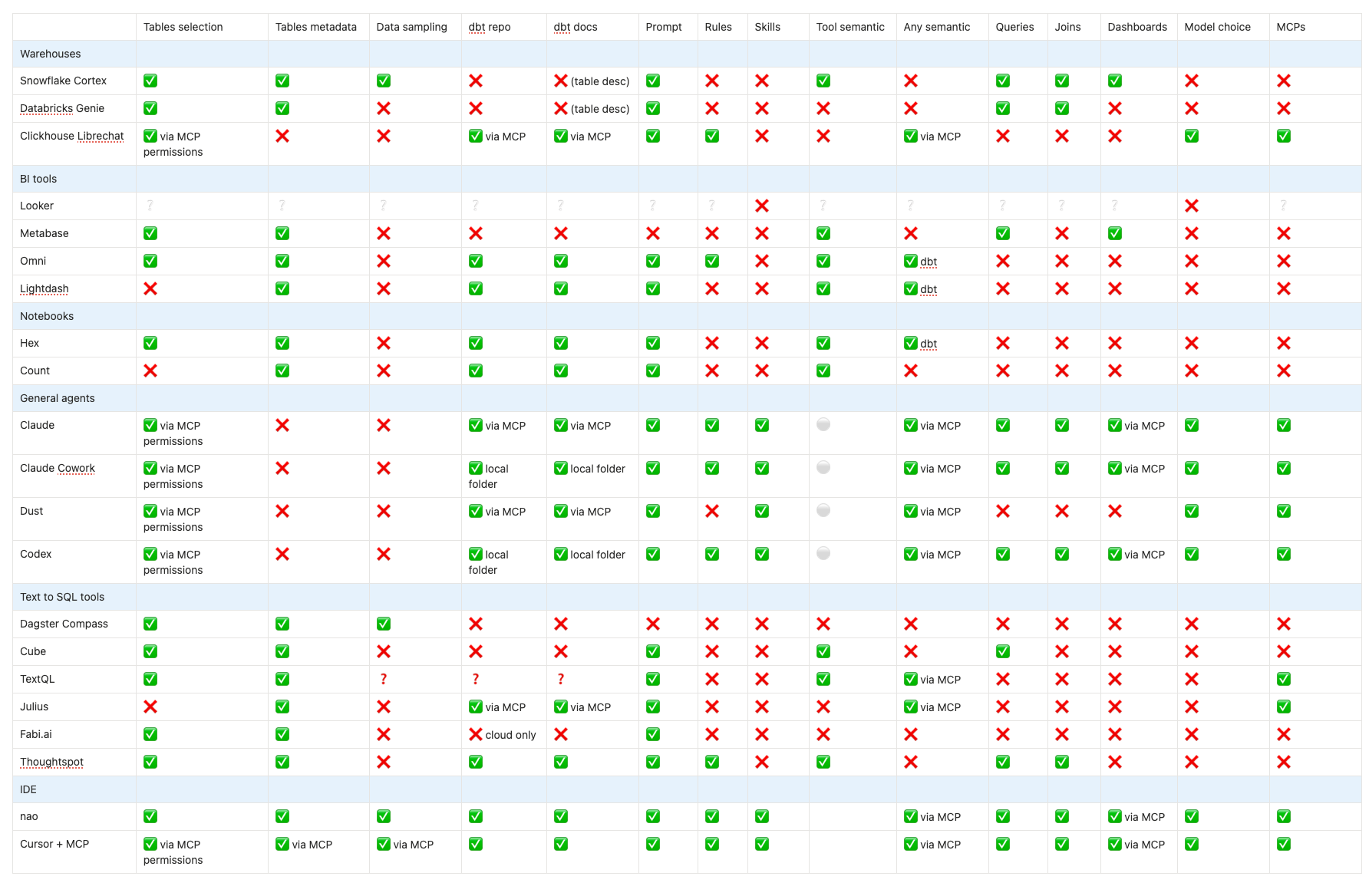
Close to the data. No extra LLM costs. But context options are limited — no dbt integration in Snowflake Cortex, no semantic layer in Databricks Genie — and the end-user UX is minimal. These tools are built for data engineers, not business users.
General agents and foundational models (Claude + MCP, Dust, Cursor, Codex, Dagster Compass)
Flexible and model-agnostic. You can plug in any context you want. But there's no governance layer, no central context management, and no way to measure reliability across your team. Great for technical users, not scalable to business users.
Text-to-SQL tools (TextQL, Julius, Fabi.ai)
Focused on one problem. Fast to get started. But they stop at SQL — no visualization, no feedback loop, no iteration. You have to build everything else yourself.
Semantic layer tools (Cube, Thoughtspot)
Strong on governance and data modeling. But they require significant upfront work to define your semantic layer, and they struggle with questions that go outside what you've pre-defined.
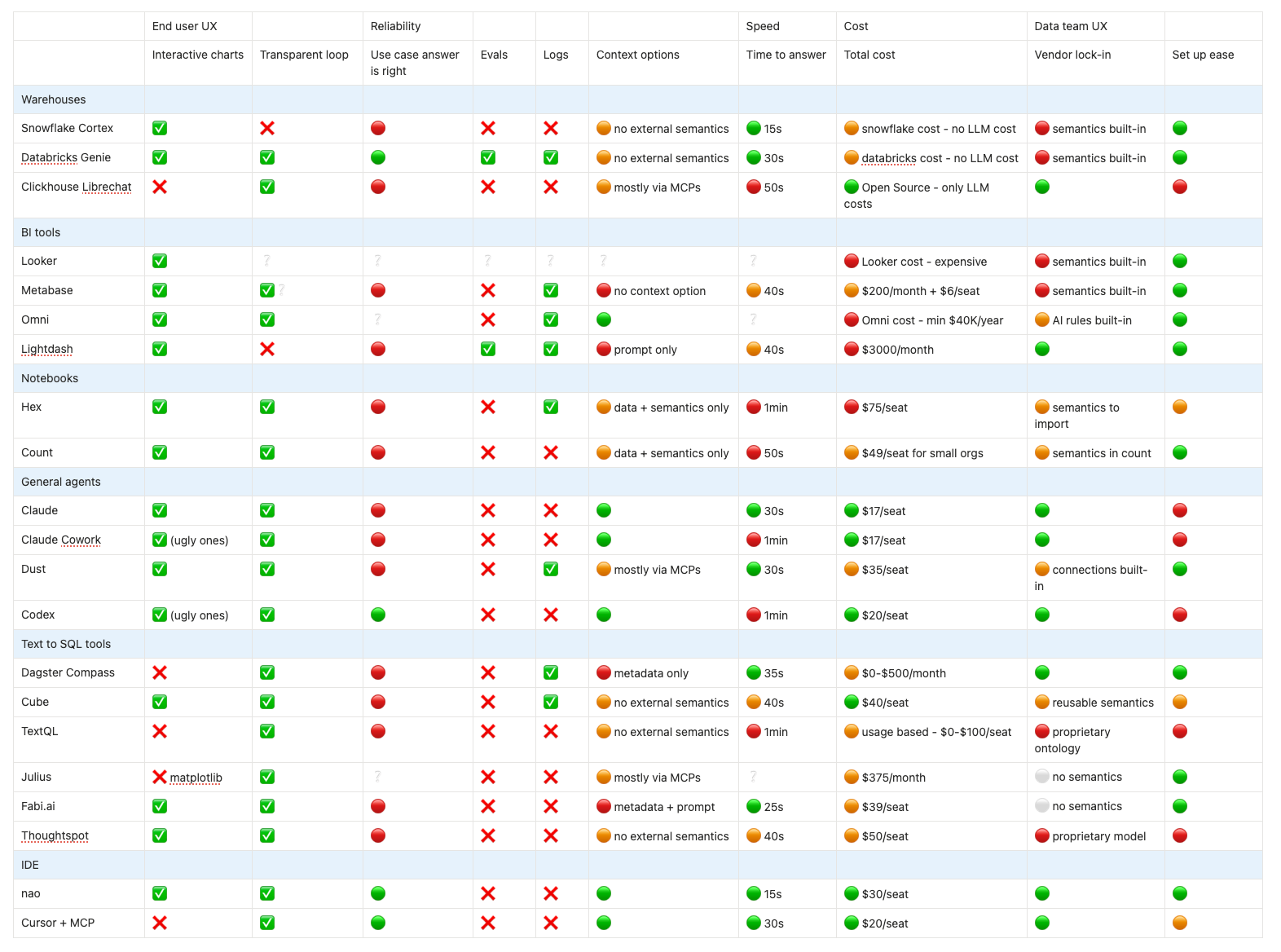
Context options compared
One of the clearest differentiators across all 20 tools is how much control you have over the context the agent uses. This matters more than model quality or UI — the agent that can see the right context wins.
The core trade-off
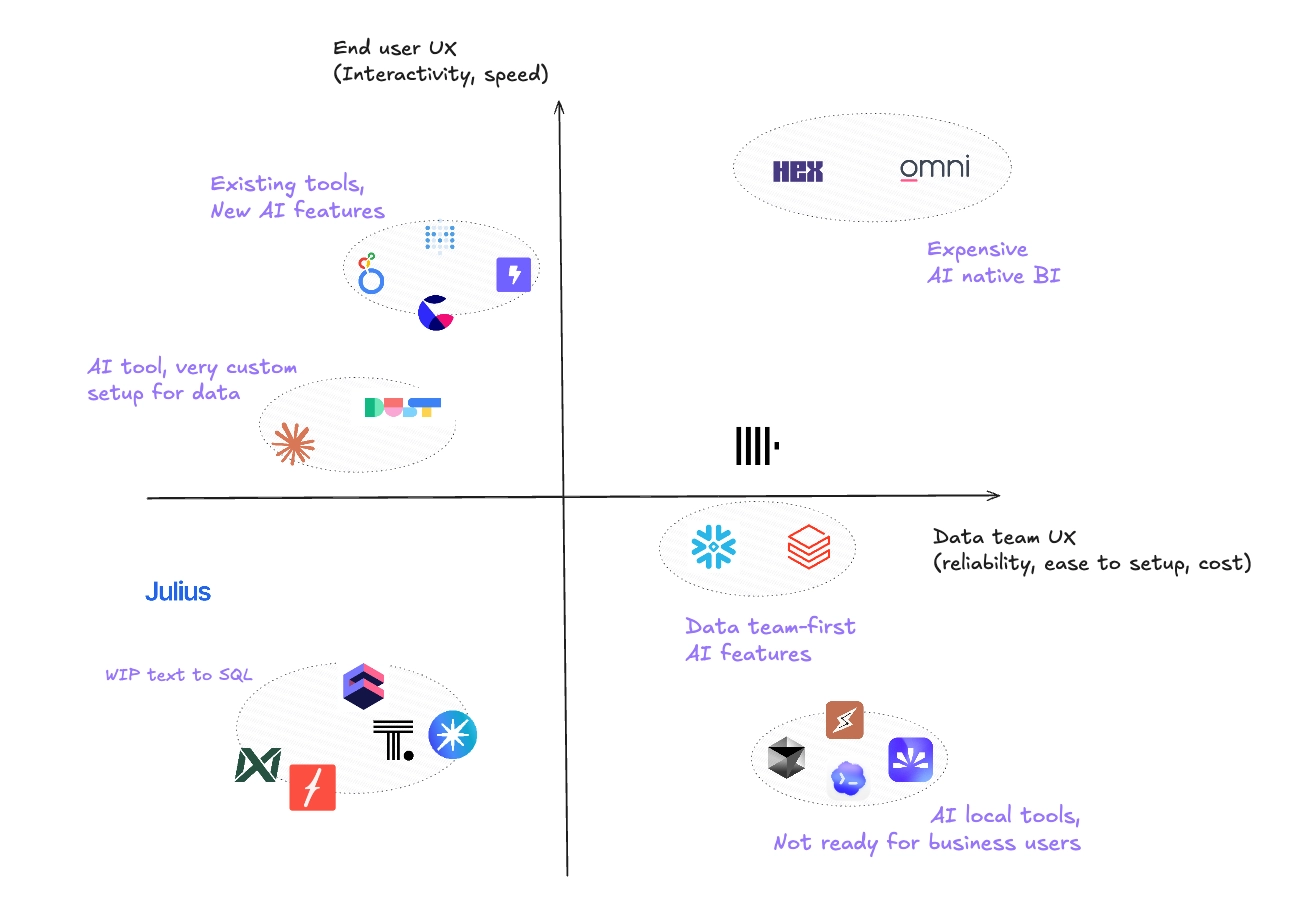
If you want to maximize both end-user UX and data team control, the answer from the benchmark is: AI-native BI tools.
But that comes with two hard requirements:
- You need to migrate your existing BI stack
- You need to pay significantly more
For most data teams, that's not realistic right now. Which means the practical choice is a trade-off between:
- Better end-user experience (BI tools) vs. better extensibility and control (agents/IDE tools)
- Faster setup (SaaS BI) vs. no vendor lock-in (open-source agents)
- Reliable answers out of the box (semantic layer tools) vs. flexibility to add any context (LLM-based agents)
What this means for how we built nao
After running this benchmark, our conclusion was: the root cause of every failure is the same — context is treated as an afterthought, not as the primary thing data teams should engineer.
The tools that got questions right weren't the ones with the fanciest UI. They were the ones where we could directly control what context the agent sees.
That's why nao is built around context engineering — a file-system approach where your agent's knowledge lives in versionable, testable, inspectable files. Not locked in a vendor's database.
👉 Read more: Why we built nao as an open-source framework
How to choose the right data agent for you
The benchmark surfaces a clear pattern: tools that win on end-user UX tend to lock your context in proprietary formats. Tools that give you control tend to sacrifice the business-user experience. Most teams end up compromising on one or the other.
Here is how to match the trade-off to your situation:
If you are already invested in Tableau, Looker, or Power BI and don't want to migrate — their built-in AI features are the lowest-friction starting point. But for the ad-hoc questions that fall outside pre-built dashboards, consider running an open source agent like nao alongside your existing BI stack rather than replacing it. You keep your dashboards for monitoring KPIs and use the agent for exploratory analysis.
If you are ready to move BI tools — Hex and Omni scored highest on end-user UX in our benchmark. Both are AI-native, sit on top of dbt, and offer a much better analytics experience than legacy BI. The trade-off is cost and migration effort, but if you are starting fresh or actively re-evaluating your stack, they are the strongest options in the AI-native BI category.
If your team is data-engineering-first — warehouse-native tools like Snowflake Cortex or Databricks Genie are worth testing. No extra LLM costs, close to the data, and easy to govern. The end-user UX is minimal, so best suited for internal data team use rather than self-serve analytics.
If open source, dbt integration, and a built-in evaluation framework matter — nao is the strongest option here. Context lives as versioned files you own, dbt lineage is imported automatically, and you can measure accuracy before deploying to business users. Best fit for data teams that want production reliability without building the infrastructure themselves.
The right choice depends on where your team's constraints are — time, budget, existing stack, or tolerance for vendor lock-in. Run the benchmark on your own questions before committing.
Explore the nao documentation or join our Slack to discuss what fits your setup.
Related articles
product updates
We're launching the first Open Source Analytics Agent Builder
We're open sourcing nao — an analytics agent framework built on context engineering. Here's our vision for what comes after black-box BI.
product updates
Launching nao automations
Schedule your nao analytics agents to run in the background. Recurring reports, conditional alerts, and a new Feed to track all agent activity.
Buyer's Guide
LangChain vs Wren AI vs nao: which open-source tool for agentic analytics?
Three open-source projects for agentic analytics, tested on the same BigQuery question. Setup, accuracy, context approach, and which to pick.

Claire
For nao team