Basics of Git data analysts should learn
Learn Git essentials for data professionals, including practical workflows and how AI can help automate version control for SQL, Python, and data projects

9 October 2025
By ClaireCo-founder & CEOTable of contents
- Introduction
- What is Git & why it matters for Data People
- Git basics you should know
- Core Git workflow (Hands-on example)
- How AI can help: Automating Git with nao
- Conclusion
- Frequently Asked Questions
Introduction
If you work in data and have ever struggled with messy SQL queries, Jupyter notebooks, or Python scripts, Git will bring order to your workflow. This guide covers Git essentials for data professionals, a practical workflow, and how AI can help automate much of it.
What is Git & why it matters for Data People
Git is a version control system - it tracks changes to your code and lets you collaborate safely with teammates.
For data teams, Git means:
- Version control for SQL queries, Python scripts, R scripts, and notebooks.
- Collaborating without overwriting each other's work.
- Tracking changes and rolling back mistakes easily.
- Reviewing and approving changes before they affect production dashboards.
If you've ever saved a file as query_final_v3_clean_reallyFINAL.sql, Git fixes that.
Git basics you should know
Where code lives
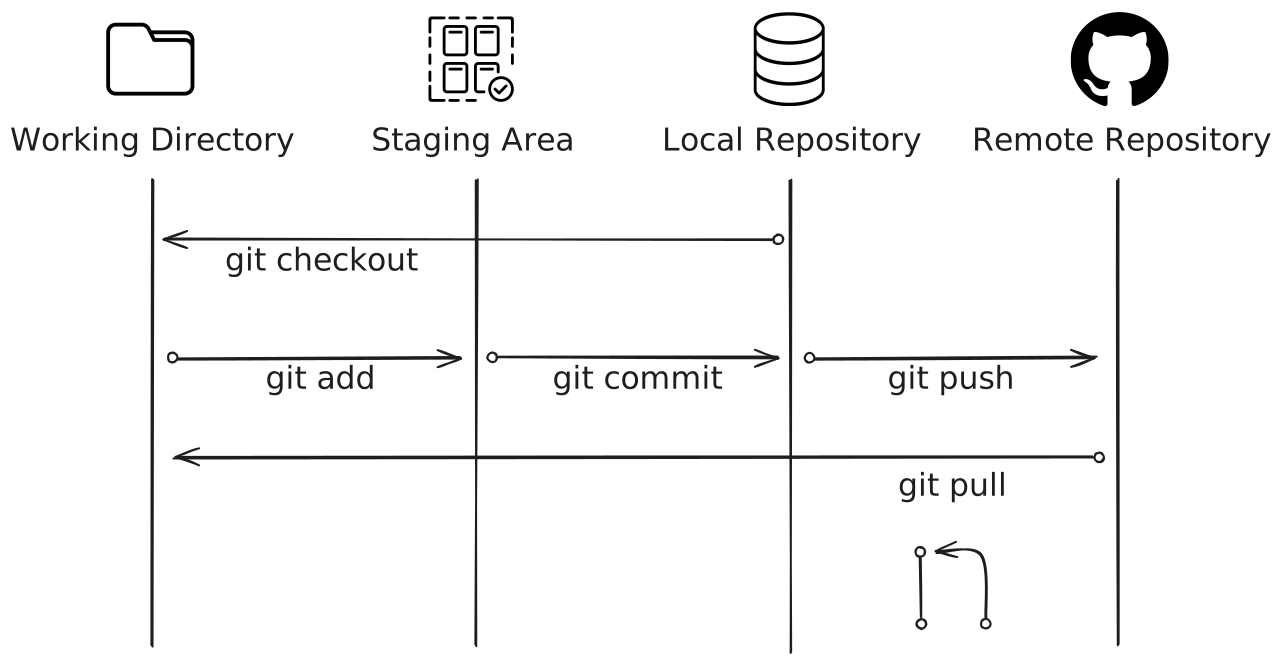
Git organizes your project across four areas:
- Working directory → your local files.
- Staging area → files you've marked for the next snapshot.
- Local repository → history of commits on your computer.
- Remote repository → shared repo on GitHub, GitLab, or Bitbucket.
These Git states interact with each other through Git commands:
Core Git workflow (Hands-on example)
Sometimes, you want to make changes to your repo but don't want to mess everything up. Here's how to do it safely using Git.
1. Create a branch - isolate your work
Use a branch for each report, analysis, or dataset update so main stays stable.
Creates and switches to a new branch called report/monthly-sales.
2. Make changes - edit files
Edit SQL, Python, or Jupyter notebooks in your working directory.
These edits are local until you stage/commit them.
3. Check status - see what changed
Quick check before staging:
Shows modified/untracked files so you know what to add.
4. Stage changes - prepare the snapshot
Select files for the next commit.
Moves changes into the staging area; lets you control exactly what will be committed.
5. Commit - save a snapshot
Create a recorded snapshot with a message explaining why you changed things.
Creates a local commit (a versioned checkpoint). Good commit messages help teammates understand intent.
6. Push - share your branch
Send your commits to the remote repo so others can see your work.
Uploads your branch and commits to the remote (GitHub/GitLab).
7. Open a Pull Request (PR) - propose and review changes
In GitHub/GitLab, open a PR from your branch into main (or the target branch).
Describe the purpose, list screenshots or sample queries, and link related issues. This is where reviewers ask questions and request edits.
8. Review & merge - finalize into main
After approval, merge the PR through the web UI (or via CLI).
If merging locally:
Combine changes into main and push the updated main branch.
How AI can help: Automating Git with nao
nao packages your Git workflow with an AI copilot that understands your project. For example, instead of running commands manually, you can prompt nao to do it for you.
Example prompt:
nao handles branching, committing, pushing, and even drafting PR descriptions automatically. It saves data people from remembering every command and lets you focus on your analysis.
See it in action 👇
Conclusion
Git helps data people collaborate safely, track changes, and maintain reproducible workflows. To make the most of it:
- Commit often with clear messages (e.g., "Add monthly_sales.sql").
- Use branches for experiments or feature work.
- Never commit raw datasets - rely on queries, connections, or
.gitignore. - Write clear PRs to explain your changes.
- Sync frequently (
git pull) to avoid conflicts.
Following these practices, and leveraging tools like nao to automate routine tasks, lets you focus on the actual analysis instead of version control.

Claire
For nao team
Frequently Asked Questions
Related articles
product updates
We're launching the first Open Source Analytics Agent Builder
We're open sourcing nao — an analytics agent framework built on context engineering. Here's our vision for what comes after black-box BI.
product updates
Launching nao Context Engineering skills
Five open-source skills that set up your nao project, write its rules, build its test suite, audit it, and add a semantic layer. Install with `nao skills add getnao/nao`.
Community
Agentic Analytics Meetup Paris 🇫🇷
Recap of the first meetup dedicated to agentic analytics: 4 data teams from Gorgias, Malt, GetAround, and The Working Company share what they've actually built, what worked, and what didn't.