What's the Best Analytics Agent for Your Data Team?
A practical guide to choose the best option for you to deploy an analytics agent.
16 March 2026
By Claire GouzeFounder @ naoThere are now dozens of ways to deploy an analytics agent.
You can buy the AI features built into your warehouse or BI tool. You can configure a general-purpose agent like Claude, Codex, or Cursor to answer data questions. You can build your own agent stack in-house. Or you can use an open-source framework built for analytics.
Each path can work. Each path also comes with a different trade-off on cost, control, reliability, and setup effort.
The real risk is not picking the wrong tool. It is doing nothing while the market gets noisier. Many teams default to the most reassuring vendor, or wait for one category to clearly win. By the time that happens, they have learned nothing, built no internal context, and lost months they could have spent testing what works for their data team.
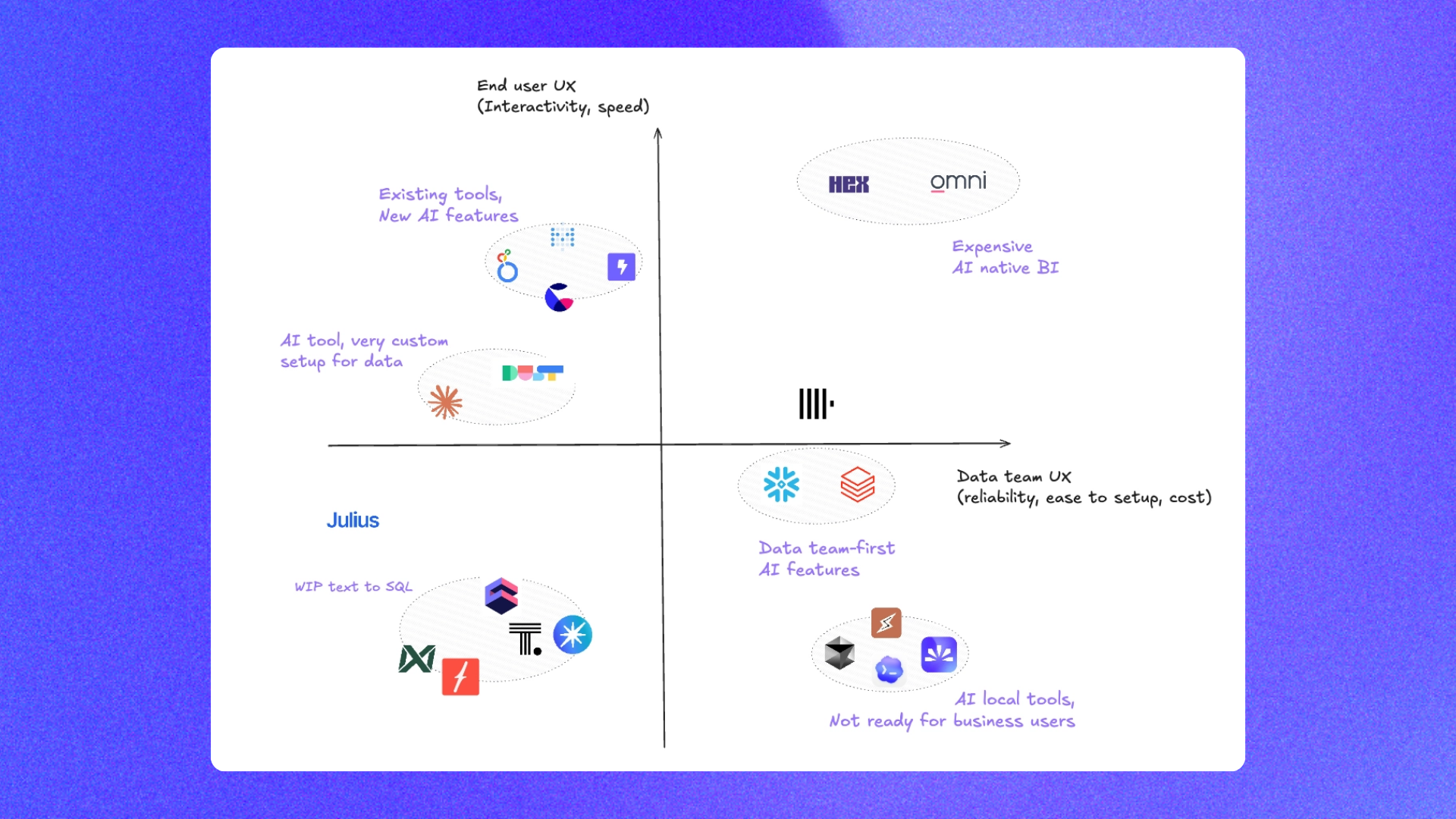
We already ran a detailed benchmark of 20 analytics agents and a separate comparison of the best open source analytics agent frameworks. This guide is the practical summary: the four real options, who they fit, and where nao stands out.
The 4 options to setup an analytics agent



Buy AI agent of BI / warehouse
Solutions: Hex, Omni, Snowflake Cortex, Databricks Genie
💲 Price: Around $70/user/month minimum
✅ Pros: Out-of-the-box agent, no extra tool to introduce, fast path to v0
❌ Cons: Mostly black-box agent, limited context options, very little room for personalization, and prices increase as users and usage scale
Setup: Hex works almost immediately. Omni requires AI topics. Snowflake Cortex and Databricks Genie usually require more semantic-layer work



Setup in general AI agent
Solutions: Claude, Codex, Cursor
💲 Price: Around $100/user/month minimum on team plans
✅ Pros: Reuse an already adopted tool and flexible context options
❌ Cons: Governance on context is impossible unless you are on the team plan. Even on a team plan, data permissions remain hard to implement at fine grain. Finally, there is no observability of data reliability in user interactions, nor a framework to evaluate your agent reliability
Setup: Easy but unreliable. Anyone at the company can install the warehouse MCP. The harder step is governing MCPs, rules, skills, and permissions at team level


Build in-house
Solutions: LangChain, LibreChat, MCPs, custom evaluation stack
💲 Price: Your LLM tokens plus internal engineering maintenance
✅ Pros: Fully flexible, fully customizable, and fully owned by your team
❌ Cons: Significant maintenance burden, no default evaluation layer, and too much focus goes into agent plumbing instead of context
Setup: You need to build the full loop yourself: agent, UI, context ingestion, governance, and evaluation

Build with open-source analytics agent
Solution: nao
💲 Price: Your LLM tokens only
✅ Pros: Full transparency, full customization, open-source flexibility, and an end-to-end framework for context, chat, and evaluation
❌ Cons: Extra interface, except if you use the Slack bot as the entry point or give up on static BI for always-on AI BI
Setup: Imports context automatically from warehouse, dbt, and business tools. UI is ready to deploy. A v0 can be ready in 15 minutes. Then you can start the context engineering work to test and improve agent reliability
Compare all AI agents
Compare each tool more in detail with our detailed comparison pages:















1. Buy AI agent of BI / warehouse
This is the option most data teams are tempted to choose because the tools are already there.
The reality on the ground is:
- there is a wow effect on easy, straightforward questions
- then there is a deceptive effect and a loss of trust on more complex questions
- finally, there is frustration from data teams because context options are limited, context work is locked in the vendor tool, and improving it requires a lot of manual work
Bottom line: these tools claim they have the best agent. But what makes the best agent is what you put into it. And they restrict and obscure what you can put into it.
2. Setup in general AI agent
This is also tempting if general agents are well adopted in your company.
But are they adopted at the user level or at the team level?
If the adoption is at user level, the issues you will run into are:
- everyone has to set up the MCP on their own machine
- the main way to provide more context is to ask each person to add a skill or a custom repo of context to their own setup
- none of this is easy to control or monitor, which means you can quickly end up with inconsistent setups and bad answers
If the adoption is at team level, key issues still remain:
- data visualization is still not easy
- fine-grained data rights are still hard to implement, and if you define an MCP at team level, everyone using the agent may end up with the same access to the same data view
3. Build in-house
That is where teams are often the happiest with their data agent.
Many teams have successfully built their own internal data agent. Good examples include Astronomer and Kepler, Gorgias building a context layer from the ground up, Vercel simplifying its internal agent architecture, and OpenAI explaining the architecture of its in-house data agent.
The common trait, though, is that these are teams with serious engineering and data resources. OpenAI, for example, describes an agent grounded in multiple layers of context, including table usage, human annotations, institutional knowledge, memory, runtime context, and more. That is a real investment. You should ask yourself whether your team actually wants to build and maintain that.
The usual path looks like this:
- 2 to 3 weeks to the first MVP, covering infra, UI, and initial context
- a strong wow effect because the agent is perfectly fit to your usage
- then production issues show up: context optimization, cost optimization, and building an evaluation framework for the agent
That last part is the catch. All of that requires real maintenance, and most of that maintenance creates very little value for the data team itself. It pulls attention away from the higher-leverage work, which is context engineering.
4. Build with open-source analytics agent
That is where nao's vision is.
We do not claim we have the best agent. You do. We give you the framework to make your data agent the best one by creating the best context for it. The goal is to provide an all-in-one analytics agent builder, from context layer to user UI to agent evaluation. All open source.
✅ It is not a black box. You can inspect the context, the files, the SQL, and the evaluation results.
✅ It does not force one context paradigm. You do not need to commit to a semantic layer, a proprietary ontology, or a rigid metadata format. Add what works best for your team.
✅ It is fully open source and fully customizable. You own the context and can adapt the framework to your stack.
✅ It removes agent maintenance from your roadmap. You do not need to spend months building chat infrastructure, orchestration, and evaluation just to reach a usable baseline.
✅ It includes an evaluation framework. That matters more than most teams realize. If you cannot measure reliability, you cannot improve it with confidence.
✅ It only costs your LLM tokens. No seat-based pricing tax just to get started.
✅ It helps create an open standard for context engineering. You can build in the open, share learnings, and benefit from what other data teams discover.
✅ Your context repo stays UI-agnostic. Use the nao chat UI, use Slack, or connect the context to another agent surface later. The context layer is the strategic asset, not the interface.
So which option should you choose?
If you want to do a first test of how an agent performs on your current data context, use nao.
You can get a working agent in 15 minutes. Then, with about one hour of building unit tests, you can know where you stand in terms of agent performance.
From there, you have two options.
If you are ready to invest in a specific UI for analytics agents, you can stick with the nao agent.
If you want to stick with your existing UI, you can still use the context engineering work you have already done in nao:
- use nao plus MCPs so nao can create charts in your BI tool when needed
- use nao only in Slack or a team bot version
- use the nao context repo as the context layer for your general AI agent
- reuse the context engineering work you have done in nao inside your BI or warehouse AI agent

Claire
For nao team
Frequently Asked Questions
Related articles
product updates
We're launching the first Open Source Analytics Agent Builder
We're open sourcing nao — an analytics agent framework built on context engineering. Here's our vision for what comes after black-box BI.
product updates
Launching nao automations
Schedule your nao analytics agents to run in the background. Recurring reports, conditional alerts, and a new Feed to track all agent activity.
Buyer's Guide
LangChain vs Wren AI vs nao: which open-source tool for agentic analytics?
Three open-source projects for agentic analytics, tested on the same BigQuery question. Setup, accuracy, context approach, and which to pick.