How to Choose Your First BI Tool: Top 3 Free Options
The 3 free BI tools companies adopt when they start their analytics journey, compared on features, pricing, setup and how far they scale.
27 November 2026
By Claire GouzeFounder @ naoThere are a lot of BI tools. Most of them are built for companies with a data team: weeks of setup, a semantic layer to model, someone full time to maintain dashboards.
To start, you don't need that. You need a tool that is simple, easy to set up, that you can maintain without a full data team, and most importantly free.
This article presents the top 3 options adopted by companies starting their analytics journey: nao, Metabase and Data Studio. For each one: features, pricing, setup and how far it scales.
What to look for in your first BI tool
- Data sources: does it connect to a database or a warehouse (Postgres, BigQuery, Snowflake...), to Excel and CSV files, or both?
- AI native: can people ask questions in plain English and get the answer, or do they build every chart by hand? An AI-native tool is built around the agent; others add an AI assistant on top of a classic BI tool.
- Setup: can you start in minutes, or do you need to install and run a server?
- Maintenance: who keeps the definitions right (what an active user is, what counts as revenue) when there is no data team?
- Pricing: what is free, and what you pay when the team grows.
- Scaling: what happens when you add people, data sources and permissions.
Top 3 free BI tools at a glance
| nao | Metabase | Data Studio | |
|---|---|---|---|
| What it is | Open source analytics agent: ask a question, get the SQL, the chart and the dashboard | Open source BI: query builder, SQL editor, dashboards | Google's report and dashboard builder |
| Data sources | Databases and warehouses, plus CSV, Excel and Parquet files | Databases and warehouses, plus CSV uploads (stored in one of your databases) | 1,400+ connectors: Google Sheets, Google Analytics, Google Ads, BigQuery, MySQL, Postgres, CSV uploads |
| AI native | Yes: the agent is the product, with an MCP server | No: Metabot added on top, with your own AI key on the free edition | No: Gemini features on Pro (preview), no MCP server |
| Free plan | Cloud free up to 3 users, or self-hosted with unlimited users | Self-hosted with unlimited users | Free for creators and viewers |
| Paid plan | $50 per user per month, capped at $2K per month | Cloud from $100 per month (5 users) | Pro at $9 per user per project per month |
| Setup | Minutes on nao Cloud, or one Docker command | One Docker command, then a production database to set up | Nothing to install, a Google account |
| Self-host | Yes | Yes | No |
| Scales with | Context as code in git, tests on the agent's answers, Enterprise SSO and permissions | Pro plan: SSO, row and column permissions | Hard to scale: everything is a click, no code, no lineage, small data |
Prices as listed on each vendor's pricing page on 27 November 2026.
1. nao: the AI-native option
getnao.io · github.com/getnao/nao
Features
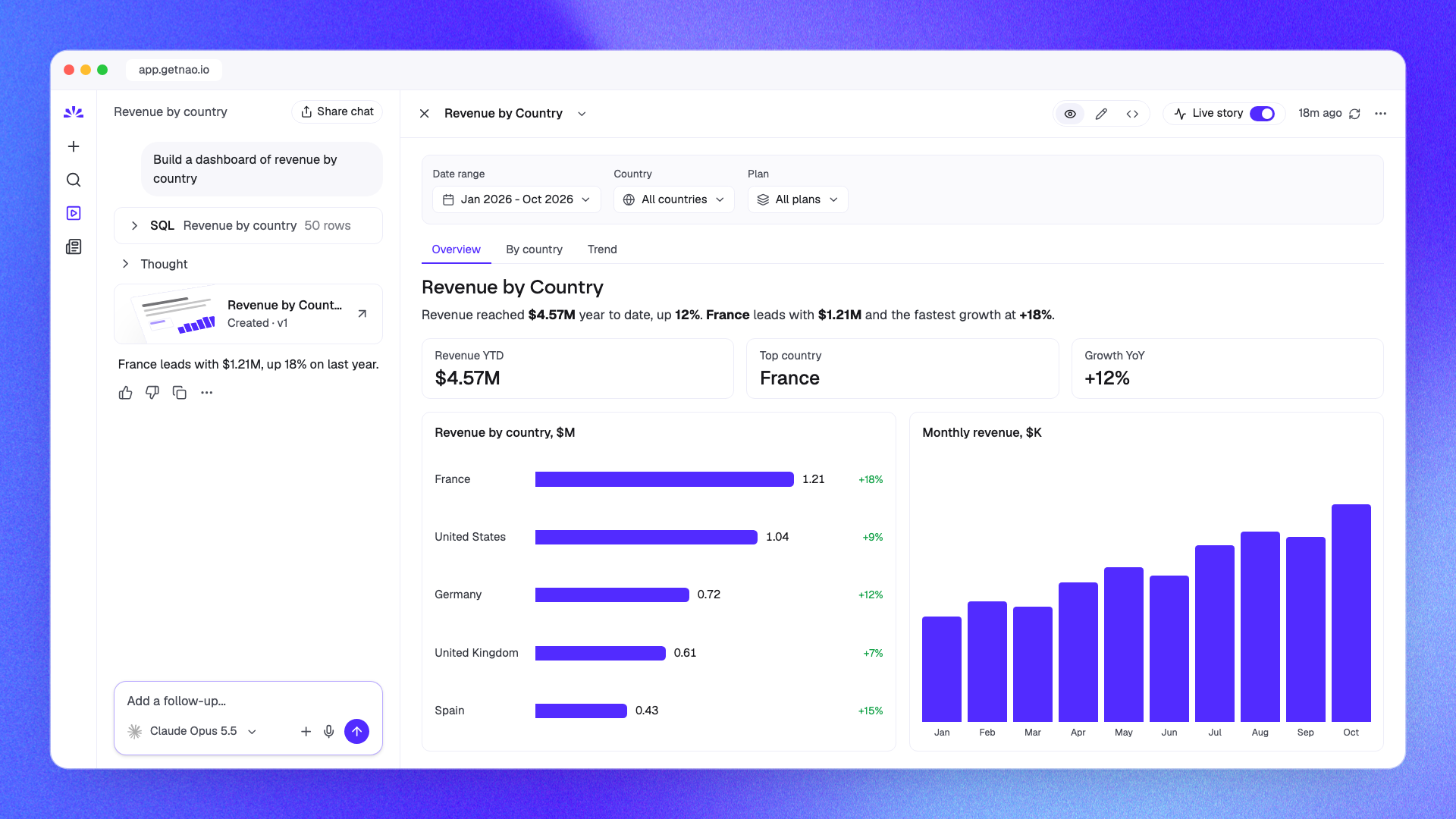
nao is an open source analytics agent (Apache 2.0). You ask "what were our weekly signups by plan since June?", and nao writes the SQL, runs it on your data, and shows the chart and the answer, with the SQL visible.
- Dashboards from a question: any answer becomes a story, a live dashboard with KPIs, charts and filters that refreshes on a schedule.
- Automations: scheduled reports and alerts, such as "every Monday, email me the weekly business review".
- Answers where people work: the nao app, Slack, Teams, or Claude and ChatGPT through the nao MCP.
- Data sources: Postgres, MySQL, BigQuery, Snowflake, Databricks, Redshift, ClickHouse, DuckDB and more. You can also attach CSV, Excel or Parquet files to a chat and join them with your database.
Pricing
- nao Cloud: free up to 3 users, then $50 per user per month, capped at $2K per month. New organizations get free nao credits, so you can start without an LLM API key.
- Self-hosted open source: free, with unlimited users. You bring your own LLM key.
- Enterprise: SSO, per-user permissions and more, on the same deployment. Details on the pricing page.
Setup
On nao Cloud, the onboarding agent asks for your database credentials, syncs your tables' metadata and writes a first RULES.md with your business definitions. You ask your first question a few minutes later.
To self-host, run the Docker image from the quickstart. There is nothing to model up front: no semantic layer, no dashboards to build first.
Scaling
The definitions the agent reads (your tables, docs and RULES.md) are files in git, so they stay reviewable as the team grows. nao test runs your key questions against the SQL you expect and gives the agent a score before more people rely on it: that is how we took our own agent from 45% to 86% reliability.
When you add a warehouse and dbt, nao reads your dbt project as context. Enterprise adds SSO and per-user permissions, and self-hosting runs on Docker or Kubernetes.
Limits: the answers are only as good as the context: plan an hour to write your first rules. And nao is the youngest of the three tools.
Best for: teams that want to ask questions in plain English and get the dashboard from the answer.
2. Metabase: the point-and-click option
metabase.com · github.com/metabase/metabase
Source: Metabase docs.
Features
Metabase is the open source BI tool most teams try first (AGPL).
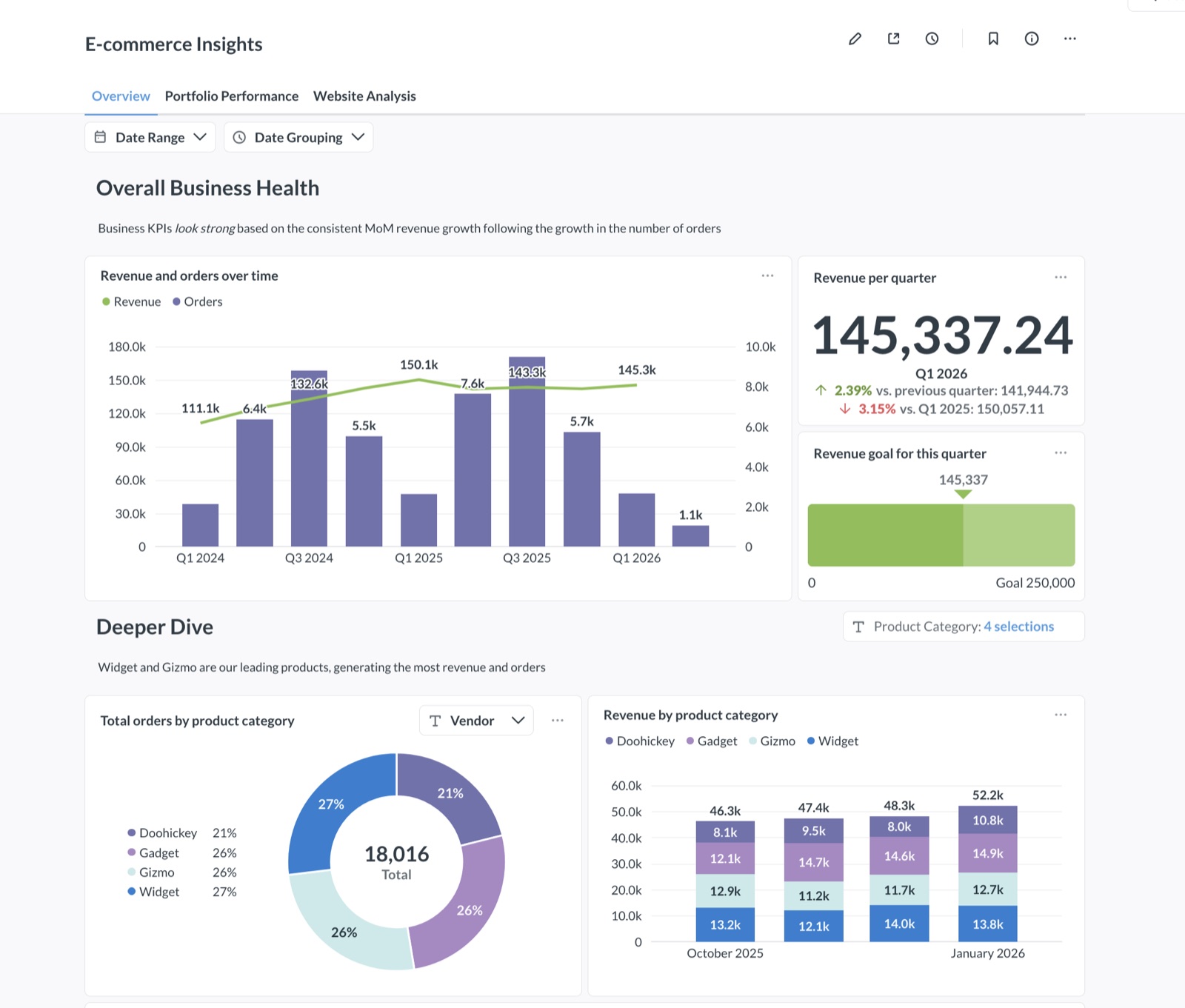
- Query builder and SQL editor: business users build charts by clicking; people who know SQL write it.
- Dashboards: filters, tabs, alerts and subscriptions.
- Data sources: 20+ databases and warehouses. CSV uploads work too, but Metabase stores them as tables in one of your databases (Postgres, MySQL, Snowflake, Redshift or ClickHouse), so it needs write access.
- AI: according to the Metabot docs, Metabot creates charts from natural language and writes SQL, on every plan. On the free open source edition, you bring your own key (Anthropic, OpenAI, AWS Bedrock or Azure).
Pricing
According to the pricing page:
- Open source: free, with unlimited users. You host it.
- Cloud Starter: $100 per month with 5 users, then $6 per extra user. There is no free Cloud plan, only a 14-day trial.
- Cloud Pro: $575 per month with 10 users, then $12 per extra user.
Setup
The Docker docs give a one-line docker run, then you open Metabase on port 3000 and connect your database. For anything you keep, move Metabase's own data from the embedded H2 file to a Postgres database, or you lose your dashboards when the container is removed.
Then someone builds the first questions and dashboards, and keeps the definitions in Metabase (segments, metrics, glossary) up to date.
Scaling
Metabase has a large community and years of production use. The features a growing team asks for are on Pro: SSO, row and column permissions, usage analytics and white-labeling.
Limits: on the free edition, someone runs the server. In our own test, Metabot didn't read our dbt docs, missed a churn column and answered wrong: its context is what lives inside Metabase.
Best for: teams where business users like to click around, with someone to run the server.
3. Data Studio: the Google option
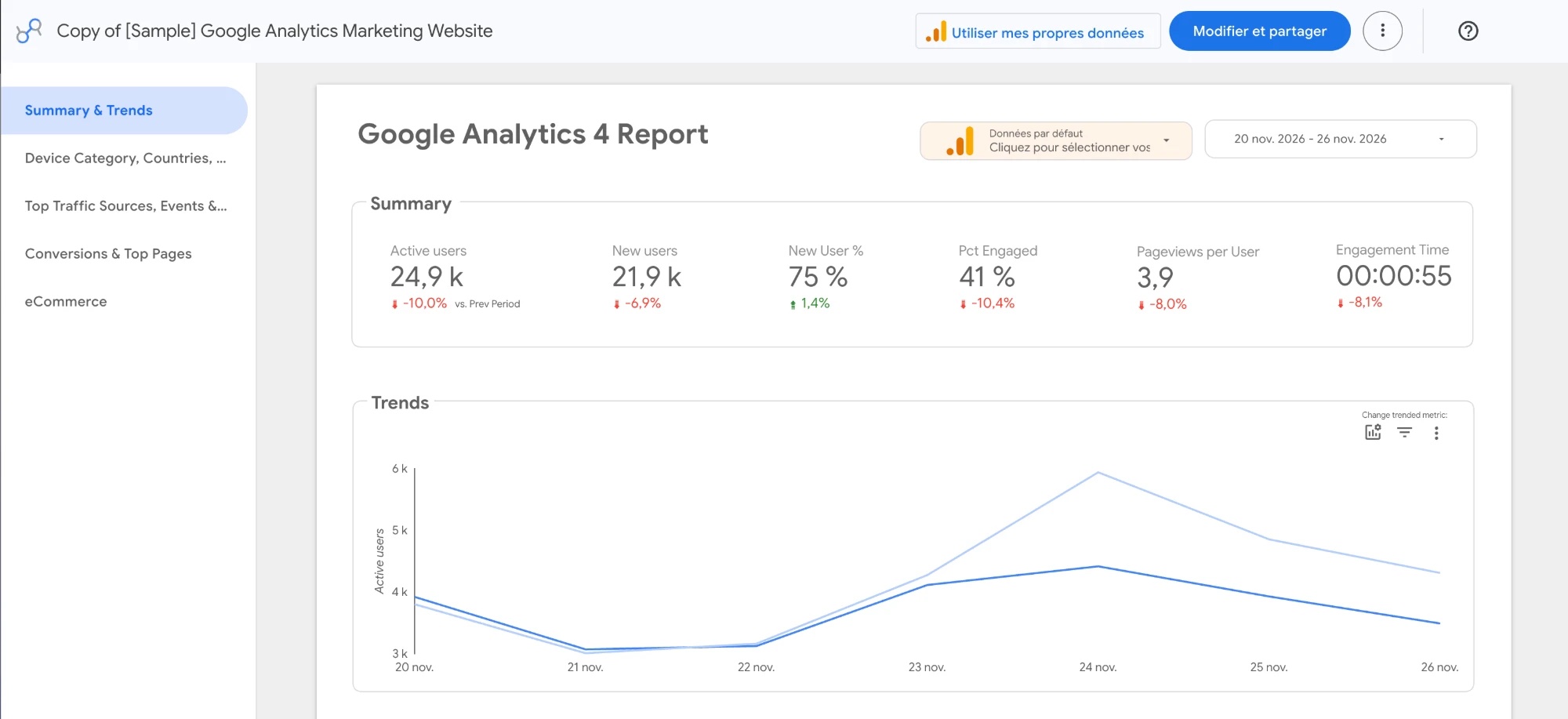
A copy of Google's Google Analytics 4 sample report in Data Studio, November 2026.
Features
Data Studio is Google's report and dashboard builder. It was called Google Data Studio, then Looker Studio, and Google renamed it back to Data Studio in April 2026.
- Drag-and-drop report editor: charts, filters, text, images, several pages per report.
- Data sources: 1,400+ connectors, with Google Sheets, Google Analytics, Google Ads and BigQuery built in, databases like MySQL and Postgres, and CSV uploads.
- Sharing: share with people or groups, by link, or embed a report in a web page.
- AI: Gemini in Data Studio (natural-language calculated fields, export to Slides) is a Pro feature, still in preview. Conversational analytics uses agents that technical users build in BigQuery and share in Data Studio.
Pricing
According to Google Cloud:
- Data Studio: no charge for creators and report viewers.
- Data Studio Pro: $9 per user per project per month, with Google Cloud support and team content management.
Setup
Nothing to install: sign in with a Google account, pick a connector, and build a report. If your data is in Google Sheets or Google Analytics, you can have a first report in minutes.
Scaling
This is where Data Studio stops. It is a great tool for a first report, not for a data stack that grows:
- Everything is a click: reports, charts and calculated fields are built in the editor. Nothing is code, so nothing lives in git: no review, no history you can diff, no way to rebuild a report from a file.
- It doesn't hold big data well: it works best on small sources like Google Sheets. The Postgres connector, for example, caps a query at 150K rows and only lists tables from the
publicschema unless you write a custom query. - Things break easily, and there is no lineage: definitions live in calculated fields, one data source at a time. Rename a column upstream and charts break, and nothing tells you which reports used it. Reports get copied, and the copies drift.
- It isn't connected to AI agents: Google has an MCP server for Looker, but none for Data Studio, so Claude, ChatGPT or Cursor can't read or build your reports. Gemini features are on Pro and still in preview.
Pro moves reports from personal to organization ownership and adds team workspaces, but it doesn't change any of the above. And it is Google-hosted only: no self-hosting, not open source.
Best for: teams whose data lives in Google Sheets and Google Analytics, who need a first shareable report today and expect to move on when the data grows.
Which one should you pick?
| Your situation | Pick |
|---|---|
| You want to ask questions in plain English, in the app or in Slack | nao |
| Your data is in a database and nobody wants to run a server | nao Cloud |
| Your business users like to build charts by clicking, and someone can run a server | Metabase |
| Your data lives in Google Sheets, Google Analytics or Google Ads | Data Studio |
| Your data must stay on your own infrastructure | nao or Metabase, self-hosted |
You can also combine them: nao connects to your database, not to a BI tool, so it runs next to Metabase or Data Studio. Many teams keep their dashboards where they are and add the agent for the questions the dashboards don't answer.

Claire
For nao team
Frequently Asked Questions
Related articles
product updates
Launching nao agentic BI builder
Sign up on nao Cloud, connect your warehouse, add business context, and deploy your own agentic BI to the whole company from the nao UI. No CLI needed. Still open source.
Buyer's Guide
Looker Conversational Analytics, Data Agents and Data Apps
Looker Conversational Analytics, data agents and Data Apps reviewed: how Gemini in Looker works, its limits, and nao as the open source alternative.
Buyer's Guide
Tableau AI Features: Tableau Next, Pulse and Tableau Agent
Tableau Next, Pulse and Tableau Agent reviewed: how Tableau's AI works, its limits, and whether nao, open source, can replace a dashboarding tool like Tableau.