How to Make the Semantic Layer Work for Analytics Agents
How to go from the semantic layer answering no questions to 82% reliability on a wide business range - 4 steps with real benchmark data.
07 April 2026
By Claire GouzeFounder @ naoThe semantic layer is presented as the holy grail to make your analytics agent reliable. But in practice, when I tested it in my first context engineering study, the semantic layer was a fail: it was so restrictive that the agent ended up answering no questions.
This time, my goal is to make my agent purely work with the semantic layer.
I want to understand the steps to make it fully reliable, and cover a decent scope of analytics questions. Spoiler alert: thanks to my iterations, I went from only 4% questions answered right to 82%.
For these tests on the semantic layer, I chose to use dbt MetricFlow semantic layer, because it integrates well with my existing stack with dbt. I believe the findings are pretty agnostic to any semantic layer though.
As a reminder, this is how I test my agent: I use nao context framework to build different context layers, and nao evaluation framework to test agent reliability and cost with each setup. I have 40 unit tests of questions to SQL and I evaluate agent performance on it. You can see in detail my process in my first context engineering study.
4 steps to implement my semantic layer agent
0 - Re-establish the baseline
My previous baseline of my Analytics agent with dbt semantic layer had:
- Schema + sample of data in context + a rules.md
- A semantic layer generated by Claude Code
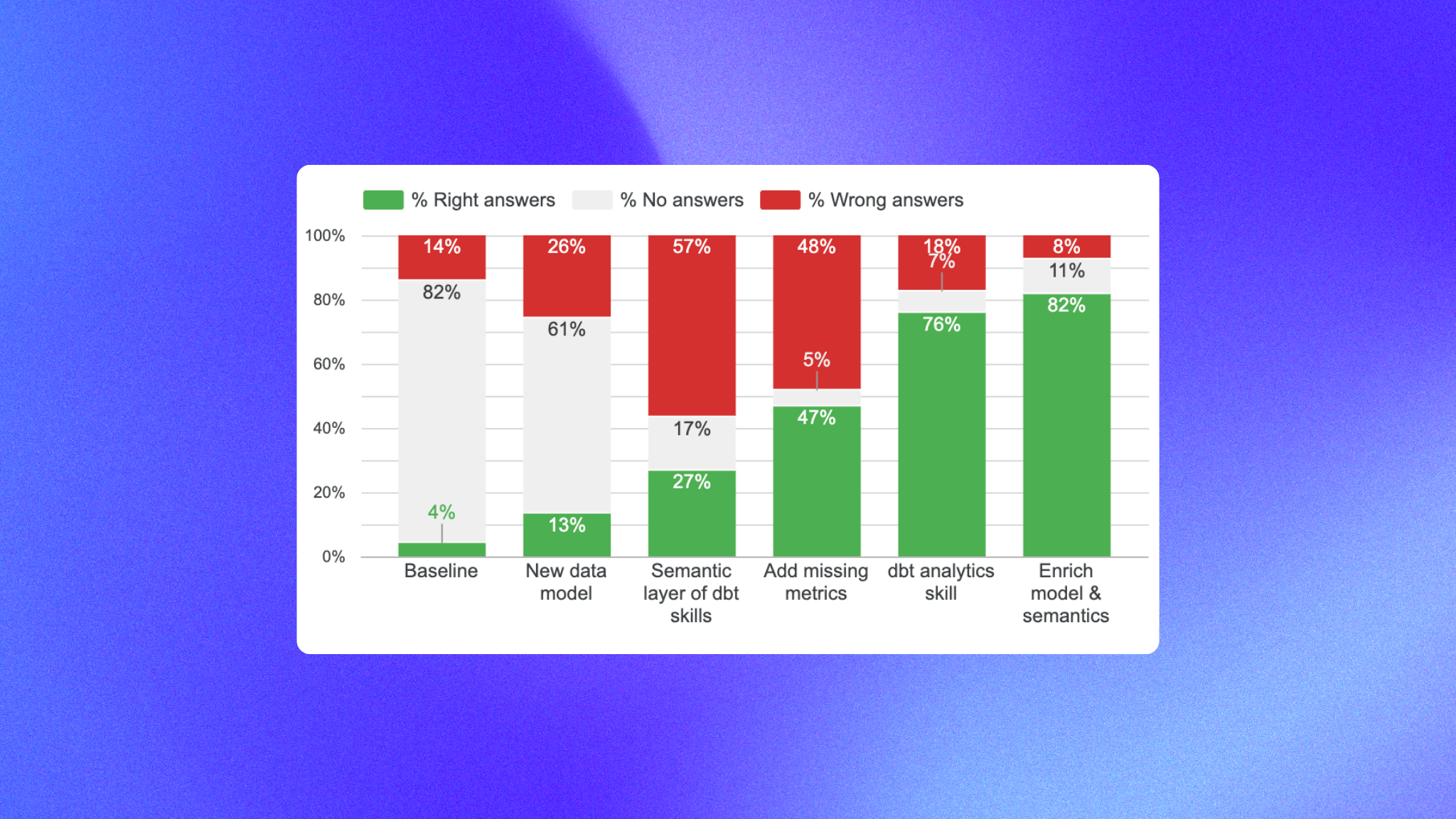
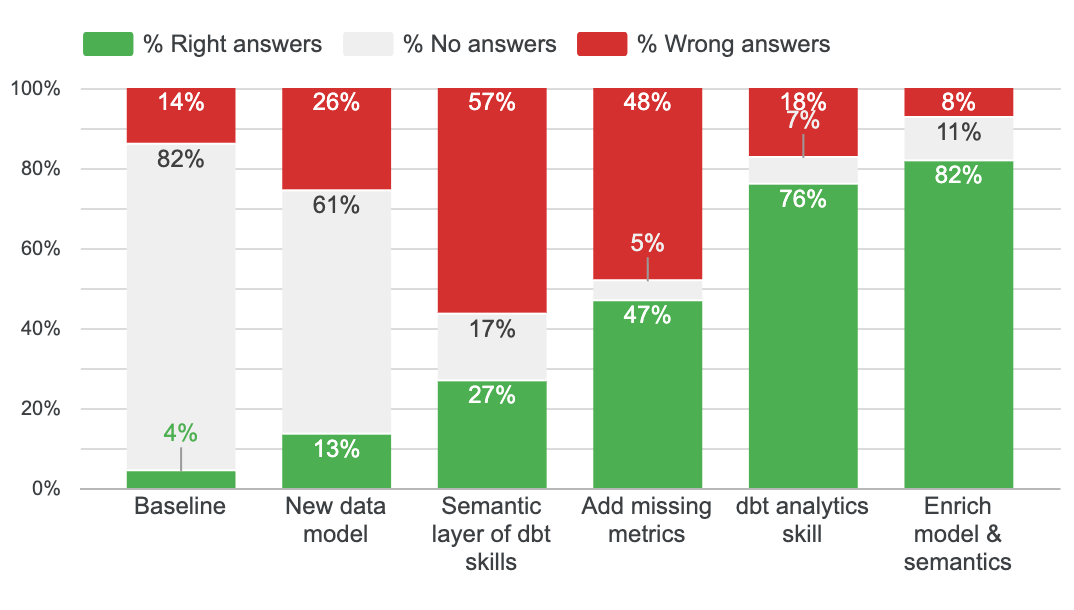
The results were: 4% right answers, 82% un-answered, 14% false
Since then, in my second context engineering study, I improved my data model a lot, so I want to re-establish the baseline performance with this new data model - but same semantic layer.
Results: 13% correct, 61% unanswered, 26% wrong. Still a lot of questions un-answered. This is our new baseline.
1 - Improve semantic layer with dbt skills
First, I installed dbt skills to create a better semantic layer on my dbt tables. I pointed it at my unit tests folder and asked it to build a semantic layer that could answer all 40 test questions.
Results: 27% correct, 17% unanswered, 57% wrong. Progress - so the dbt skill does add value and intelligence on how to build a good semantic layer.
Here, I decided to deep dive in each failure to understand them and improve the semantic layer. There were 2 kinds of failures:
- Metrics and dimensions that existed in the data model but were missing in semantic layer
- Metrics too complex to be in the semantic layer as-is, requiring data model changes first
2 - Add the missing dimensions and metrics
In this step I didn't change the data model and just added the missing dimensions and metrics in the semantics.
Results: 47% correct, 5% unanswered, 48% wrong.
After investigating again on failures, I had:
- Date filtering issues: last X weeks can still be ambiguous in the semantic layer. Are we talking Monday to Sunday? Are we talking last full weeks or including current week?
- Data quality issues: semantic layer was not filtering out null values for columns with null values - when needed.
- Missing business context: for example, if a client can only have a property "pricing" when its status is "paying", the semantic layer did not filter only on status = "paying" when asking about paying users.
- Bad joins: I had several tables with the same entity as primary key - which caused bad joins
- Out of scope queries: some queries were just impossible for the agent to do: queries with sub-CTEs, pre-aggregation joins
3 - Improve agent rules
Here I improved semantic layer and my rules.md to fix issues above:
- Date filtering: Adapted the rules.md to explain how to filter dates with semantic layer, and rules on how to address nullable dimensions
- Data quality: indicated that some dimensions were nullable, and added rules to handle these.
- Business context: I added more business context in the descriptions of the semantic layer (ex: only paying users have a pricing)
- Bad joins: Reviewed all my entities and their keys
- Out of scope queries: I used the natural language querying dbt skill to allow the agent to execute_sql when the semantic layer was not working.
Results: 76% right, 7% unanswered, 18% false
The final step was to enrich the data model to make more questions go through the semantic layer.
4 - Enrich data model
In some cases, I had to change the data model to make a metric fit into the semantic layer.
Example: Churned MRR = at subscription granularity we want to compute mrr this month - last month. We need to have a column to pre-compute it at the row level, before aggregating.
Results: 82% correct, 11% unanswered, 8% wrong.
Key learnings: how to make semantic layer work
If we recap all the steps, this is how each step improved the agent:
Here's a recap of the 7 elements that improved my semantic layer reliability:
- Use the dbt semantic layer skill to build your semantic layer
- Use the dbt natural language querying dbt skill for your analytics agent - this will help the agent decide between semantic layer tools and sql tools
- Make your data model and semantic layer as exhaustive as possible - the more metrics, dimensions you pre-computed, the more questions will fall in the semantic layer
- Review manually your semantic layer entities - this is the key scaffolding for your semantic layer: entities and their keys. Review them manually to avoid bad joins and logic.
- Add documentation on business context in your semantic layer: enrich your semantic layer with as much description as possible. They help the agent select metrics, filter dimensions, etc.
- Add agent rules: the agent still needs rules to choose the right metrics / dimensions. Add agent rules on how to: filter date scopes, handle null values, clarify ambiguous user questions depending on context
- Add a context layer to your agent so that it doesn't rely only on dbt MCP for discovery. With nao context layer, agent already has access to tables, metrics, and can do less calls to query metrics and dimensions.
My honest verdict: is the semantic layer worth it?
The big thing I realise in this exercise is: the semantic layer only solves half of the agentic analytics path. Let me explain:
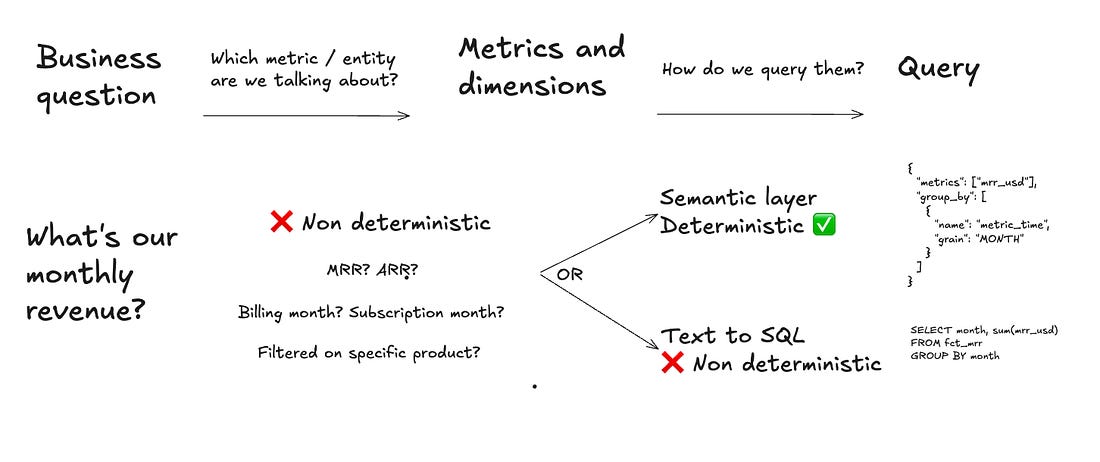
The first step in an agentic analytics process is to understand which metric / entity the user talks about. In your semantic layer, you could have these metrics: mrr, arr, adhoc_revenues, etc. So in this case, the agent still has to do the choice of which metric to pick. Then, once you have picked the right metric, you will always get the same SQL output with a semantic layer - which is not true if you just do text to SQL.
That's why I think the semantic layer reduces hallucinations, but doesn't remove them entirely.
That's also why I think you need to add context on top of your semantic layer: business context, definitions, rules on how to query the semantic layer.
Finally, if I take a step back. My best agent without the semantic layer already reaches 86% reliability. My data model is still pretty small - 12 tables only - and extremely pre-cleaned: only OBT tables, almost no joins to be done.
So I think there might be a threshold of complexity to make the semantic layer really worth it. I'm curious to hear what results companies with larger data models are seeing.
2 final elements to take into account: semantic layers agents are more expensive and slower. The way I configured the agent, I use dbt MCP which runs a lot of tool calls and consumes a lot of tokens.
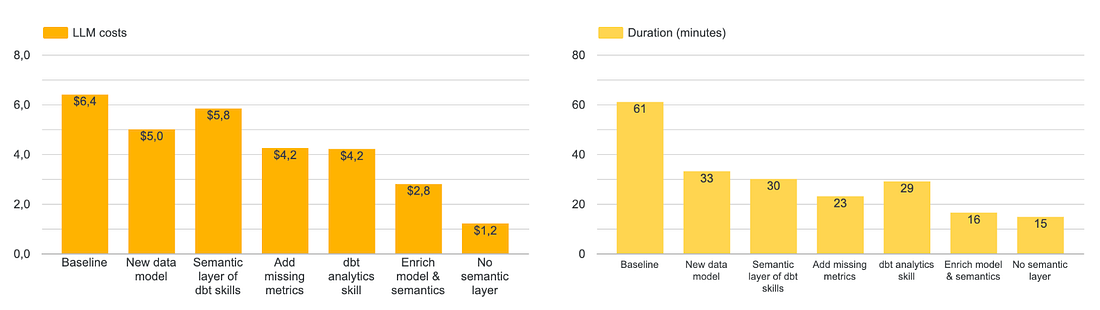
I tried to use the semantic layer with a smaller model (Claude Haiku) but then the reliability fell to 57%. Another thing to try would be to use CLI instead - you can do this in nao with the Python sandbox.
So in the end, I think the final compromise you want to optimise for is: % of questions answered vs % right answers vs speed vs costs.
Next steps for you
If you want to start investing in the semantic layer, you can follow these steps:
- Use the dbt semantic layer skills to create your semantic layer
- Create your nao project with a few unit tests
- Test your agent with your current semantic layer
- Categorize the failures: data issue, doc issue, test issue, or model issue?
- Fix one category at a time. Re-run between steps.
You can start context engineering with nao in 5 minutes - GitHub repo | evaluation docs.
What's your take? Are you using the semantic layer in production? Is it worth it for you? Let me know in comments!
Related articles
product updates
We're launching the first Open Source Analytics Agent Builder
We're open sourcing nao — an analytics agent framework built on context engineering. Here's our vision for what comes after black-box BI.
product updates
Launching nao automations
Schedule your nao analytics agents to run in the background. Recurring reports, conditional alerts, and a new Feed to track all agent activity.
Buyer's Guide
LangChain vs Wren AI vs nao: which open-source tool for agentic analytics?
Three open-source projects for agentic analytics, tested on the same BigQuery question. Setup, accuracy, context approach, and which to pick.

Claire
For nao team