What Context Has the Most Impact on Analytics Agent Performance?
We tested schema, data sampling, profiling, dbt repos, and rules.md to find which context pieces actually improve analytics agent reliability. Here's what the data says.
21 February 2026
By ClaireCo-founder & CEOWhen you build an analytics agent, you face a constant question: what context should I give it?
Schema metadata. Data sampling. Data profiling. dbt documentation. Business rules. Every piece costs tokens. Not every piece improves reliability. Some actually make things worse.
We wanted data on this. So we ran a structured benchmark: 40 text-to-SQL unit tests, 12 silver layer tables, 8 context configurations, 3 runs each. The goal was simple — find what actually moves the needle.
The Setup
We built a test suite of 40 natural language → SQL pairs covering 12 tables in our silver layer. Questions span KPI lookups, usage analytics, cohort analysis, distribution analysis, and multi-step aggregations — the full range of what real business users actually ask.
For each context configuration, nao's evaluation framework:
- Feeds the agent the natural language question
- Captures the generated SQL
- Runs an exact data diff against the expected output
- Scores coverage, reliability, cost, speed, and data scanned
Four KPIs measured across every run:
- Reliability — % of questions where the agent returns the correct answer
- Coverage — % of questions where the agent returns any answer at all
- Cost — total token cost across all questions
- Speed — total time to answer the full test set
One constraint throughout: we only tested what you would realistically have in the first days of setting up an analytics agent. No hand-tuned prompts. No weeks of curation. Just what you can produce quickly.
Baseline: MCP vs. File System Context
Before testing individual context pieces, we established a baseline by comparing two common architectures:
- Agent + MCP only: Connect directly to BigQuery. No pre-loaded context. The agent discovers schema by querying.
- File system: Context lives in files on disk. The agent searches within that file system and uses an
execute_sqltool. This is how Cursor, Claude Code, and nao work.
Result: File system wins on reliability. The agent with file-system context returns more correct answers, consistently across all three runs.
The trade-off: 2x higher token cost, because the agent ingests more context upfront. But it queries significantly less data — it already knows which tables to use.
Takeaway: Even a simple file-system context with basic schema documentation outperforms a raw MCP connection. The agent that knows where to look beats the agent that has to search. All subsequent experiments used the file-system approach.
Experiment: Which Context Piece Matters Most?
We tested five context ingredients separately and in combinations:
- Table metadata (schema + column descriptions)
- Data sampling (10 representative rows per table)
- Data profiling (value distributions, cardinality, null rates)
- dbt repository (full manifest and SQL)
- A hand-written
rules.md
The winner: schema + data sampling + rules.md
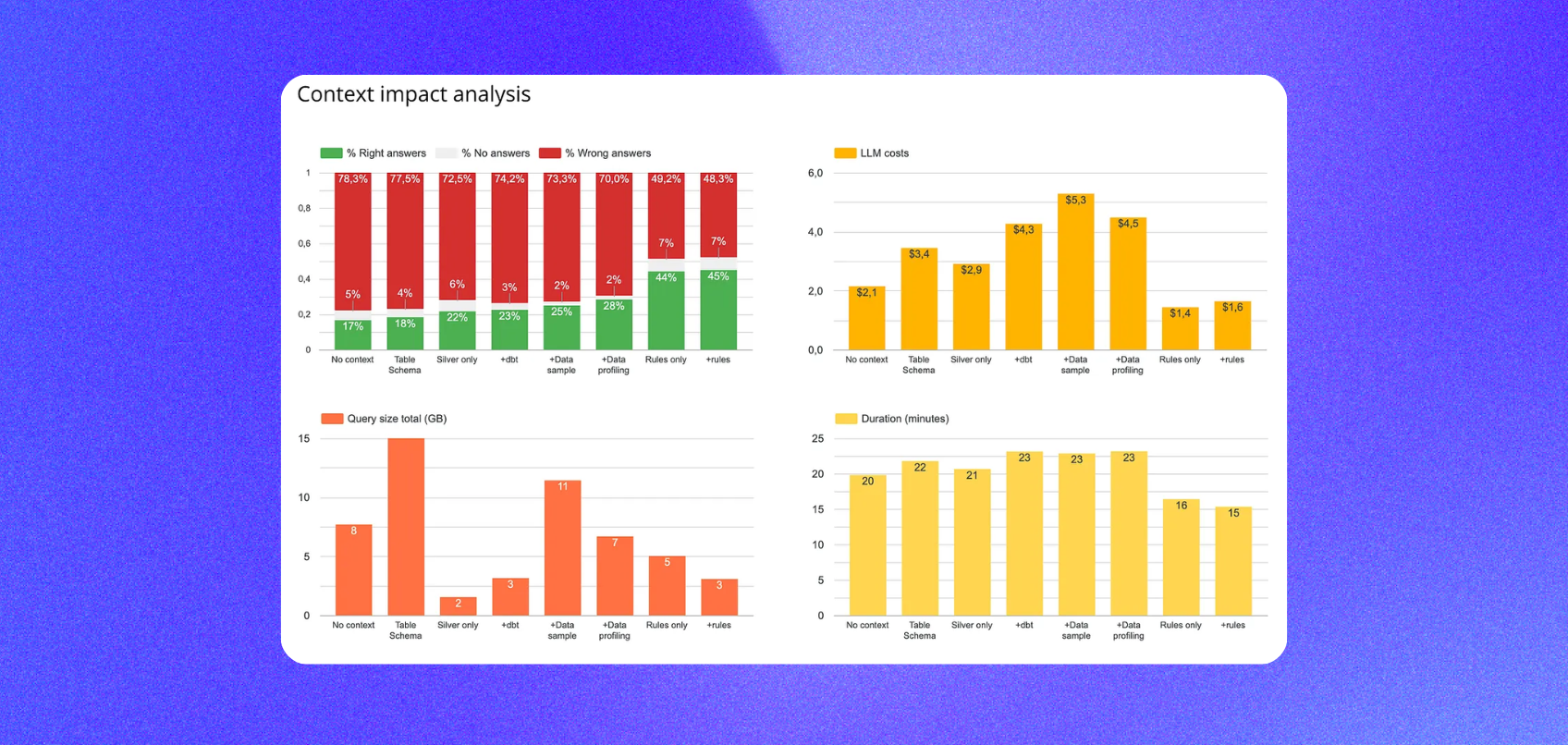
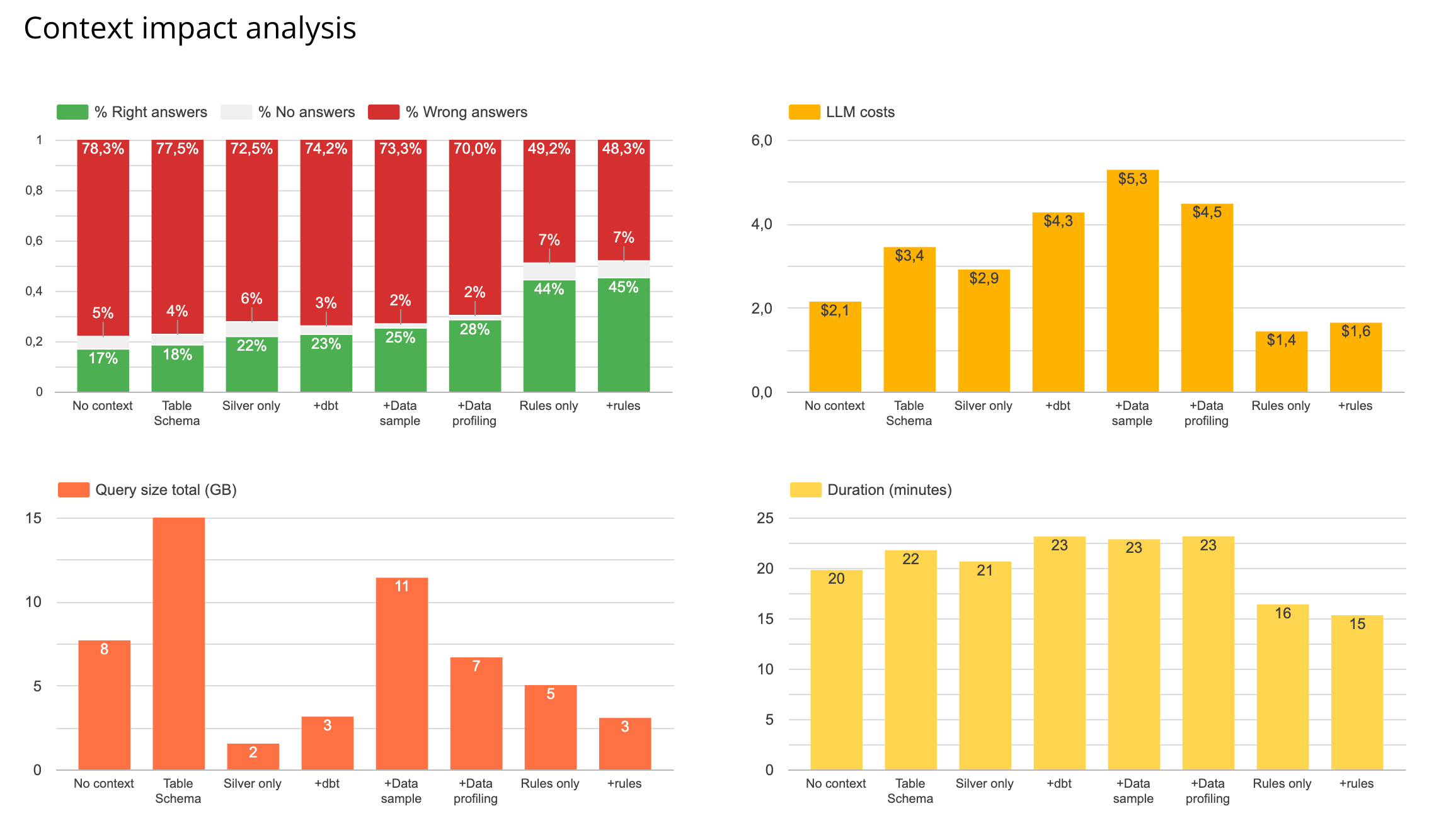
This combination outperformed every other configuration — higher reliability, lower token cost, faster response time, and smaller data scanned.
Finding 1: rules.md had the single biggest impact
A single markdown file containing a structured summary of table relationships, key metric definitions, and business logic outperformed schema alone, dbt repo alone, and profiling alone.
Adding rules.md to any configuration improved reliability and reduced both LLM and querying costs. It is the highest-leverage context piece per hour of effort.
What to include in a rules.md:
- Table-to-table join keys and grain definitions
- Metric definitions (what "active user" means, how revenue is calculated)
- Common exclusions and caveats (test accounts, refunded orders)
- Known gotchas (columns stored as TEXT that look numeric)
Surprising edge case: We tested the agent with only rules.md + BigQuery MCP — no file-system schema at all. It performed almost as well as the full file-system setup. For small, well-documented datasets, a rules file can substitute for exhaustive schema documentation. Our intuition is that this does not scale to hundreds of tables, but it is worth knowing at small scale.
Finding 2: profiling vs. sampling
Data profiling (value distributions, cardinality) outperformed raw sampling in isolation. But combined with rules.md, sampling + rules outperformed profiling + rules on both reliability and cost.
The explanation: when the agent already has a rules.md with clear metric definitions, it does not need to understand data distributions — it needs representative examples to understand the shape of the data. Sampling provides that more cheaply.
Default recommendation: Start with sampling. Add profiling only if you see the agent making distribution-related errors.
Finding 3: the dbt repository made things worse
Adding the full dbt repository on top of sampling and rules decreased reliability.
Why: the dbt repo is large and not fully relevant to any given question. SQL transformation logic, YAML configs, tests, and documentation all get surfaced together. The agent struggled to find the right signal in the noise.
What works better: extract the key documentation and metric definitions from your dbt project and put them in a curated rules.md. The agent gets the knowledge without the noise.
Finding 4: silver layer only outperforms full schema
Restricting the agent to the silver layer (cleaned, business-ready tables) improved both reliability and cost compared to exposing all layers.
Fewer tables, cleaner signal. The agent does not get confused by staging tables, raw sources, or intermediate models that are not meant for business queries.
Recommendation: Define a clear "query boundary" for your agent — the cleanest, most relevant layer — and only expose that. More tables is not better.
The Ceiling
The best-performing configuration — schema + sampling + rules.md, silver layer only — reached 45% reliability on our 40-question test suite.
That is still low. It is the starting point, not the destination. It tells you where to focus next: understand which question types fail and whether the failure is a context gap, a data modeling issue, or a documentation gap.
We followed up by testing whether semantic layers could push that number higher. The results were surprising — see What Is the Impact of a Semantic Layer on Analytics Agent Performance?.
Priority Order for Building Your Context
Based on these results:
Start here (highest impact, lowest effort):
- Restrict the agent to your cleanest data layer (silver or gold)
- Add schema with column descriptions
- Add data sampling (10 representative rows per table)
- Write a
rules.md— table relationships, key metric definitions, business logic, caveats
Add later: 5. Evaluate whether profiling adds value for your specific failure modes 6. Consider a semantic layer if your question patterns are primarily predefined metrics
Avoid early:
- Full dbt repository without curation
- Exposing all data layers simultaneously
Targeted, well-structured documentation outperforms exhaustive context every time.
How nao Makes This Measurable
These experiments were run using nao's built-in evaluation framework. Here is how to replicate it on your own data.
Define your test suite. Write 20 to 40 questions paired with the correct SQL.
Configure different context combinations. Swap schema on and off. Add sampling. Add rules.md. Remove dbt. The evaluation scores each configuration on the same test set — you see exactly what each piece adds or removes.
Iterate from your own data. Our results came from 12 tables in nao's internal model. Your schema and your question mix will produce different results. Running your own experiments is the only way to know what actually works for you.
You can set up your test environment in under two hours. The GitHub repo is at github.com/getnao/nao.
Related Reading
- What Is the Impact of a Semantic Layer on Analytics Agent Performance? — Experiment 3: does adding MetricFlow actually improve reliability?
- Why data teams need an open framework for context engineering — the architectural case for treating context as infrastructure
- How to Evaluate an Analytics Agent: 7 Steps — a repeatable rubric for scoring tools and context configurations
- dbt setup guide — if your dbt project is not yet set up, start here before building your context pack

Claire
For nao team
Frequently Asked Questions
Related articles
insights
The Agentic Analytics Playbook is out
Learn how to choose your harness, build your context layer, plan your rollout, measure success, and get examples from 7 real-life companies.
product updates
We're launching the first Open Source Analytics Agent Builder
We're open sourcing nao — an analytics agent framework built on context engineering. Here's our vision for what comes after black-box BI.
product updates
nao has a new look
We rebuilt the nao interface from the ground up. New home screen, a prompt queue, visible agent reasoning, redesigned charts and stories.