What Is the Impact of a Semantic Layer on Analytics Agent Performance?
We tested MetricFlow semantic layers against a plain rules.md file to measure the real impact on analytics agent reliability, cost, and speed. Here's what the data says.
24 February 2026
By ClaireCo-founder & CEOSemantic layers are often positioned as the answer to analytics agent reliability. Add MetricFlow, LookML, or dbt semantic models — and your agent will finally return consistent, trustworthy answers.
We wanted to test that claim with data, not opinions.
We ran a structured benchmark on nao's own internal data model: 40 text-to-SQL unit tests, 12 silver layer tables, 3 runs per configuration to account for model randomness. We specifically tested two semantic layer setups against our best-performing baseline context.
Here is what we found.
The Setup
We built a test suite of 40 natural language → SQL pairs covering 12 tables in our silver layer. Questions span KPI lookups, usage analytics, cohort analysis, distribution analysis, and multi-step aggregations — the full range of what real business users actually ask.
For each configuration, nao's evaluation framework:
- Feeds the agent the natural language question
- Captures the generated SQL
- Runs an exact data diff against the expected output
- Scores coverage, reliability, cost, speed, and data scanned
Four KPIs measured across every run:
- Reliability — % of questions where the agent returns the correct answer
- Coverage — % of questions where the agent returns any answer at all
- Cost — total token cost across all questions
- Speed — total time to answer the full test set
The baseline we tested against: schema + data sampling + rules.md — the best-performing context configuration from our context impact study. Starting from there, we asked: does adding a semantic layer make it better?
The Test: Does a Semantic Layer Actually Help?
We tested two approaches:
- Semantic YAML: Add a MetricFlow semantic layer definition as a file in the context. The agent reads it alongside schema and rules.
- Metrics store (MCP): Route all queries through the MetricFlow MCP. The agent only queries via the semantic layer, not raw SQL.
We built the MetricFlow semantic layer using AI with manual review to verify the key metrics were correct. This is realistic — it reflects what you would produce in the first days of setting up a semantic layer.
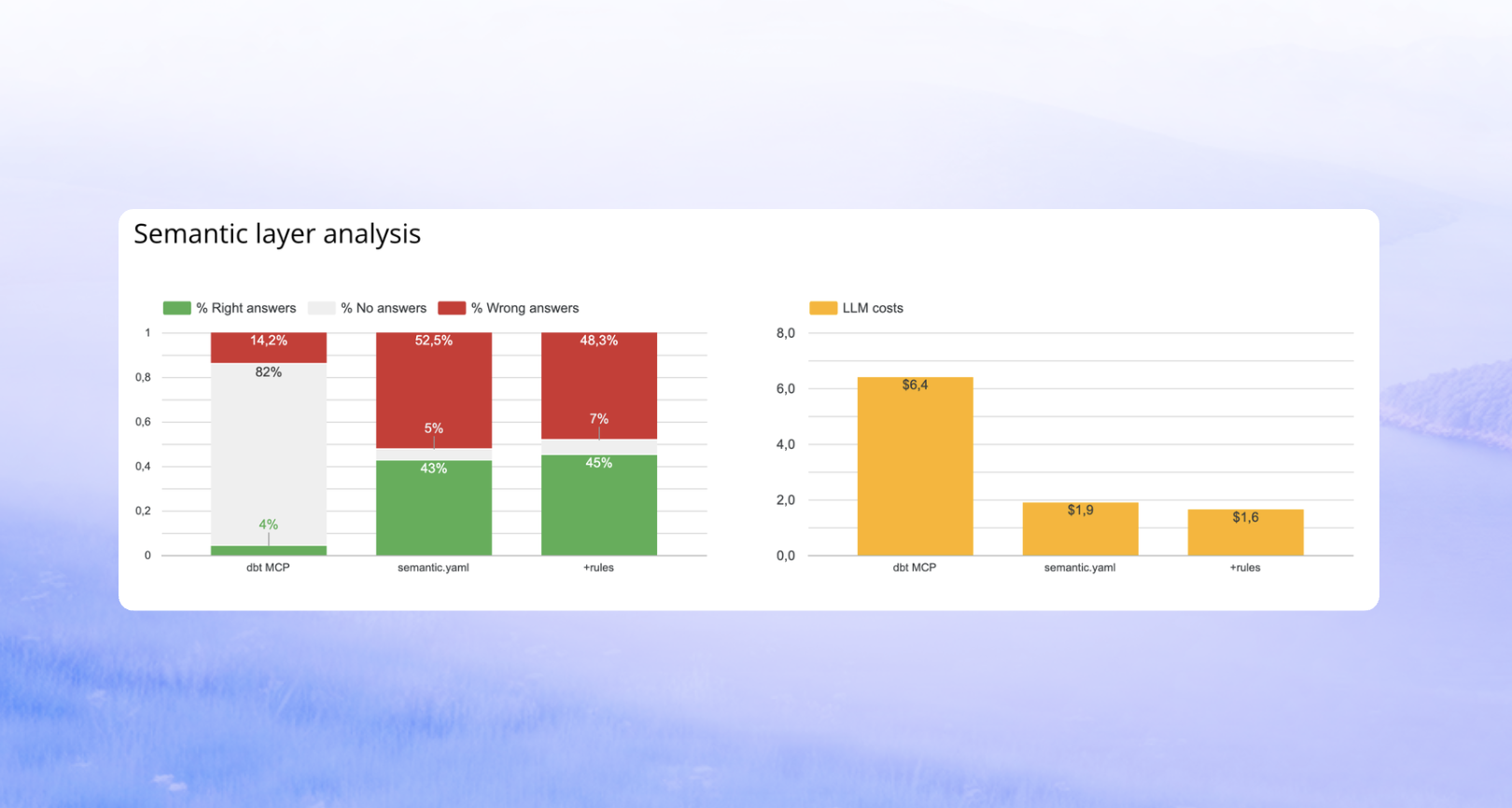
Results for the metrics store (MCP):
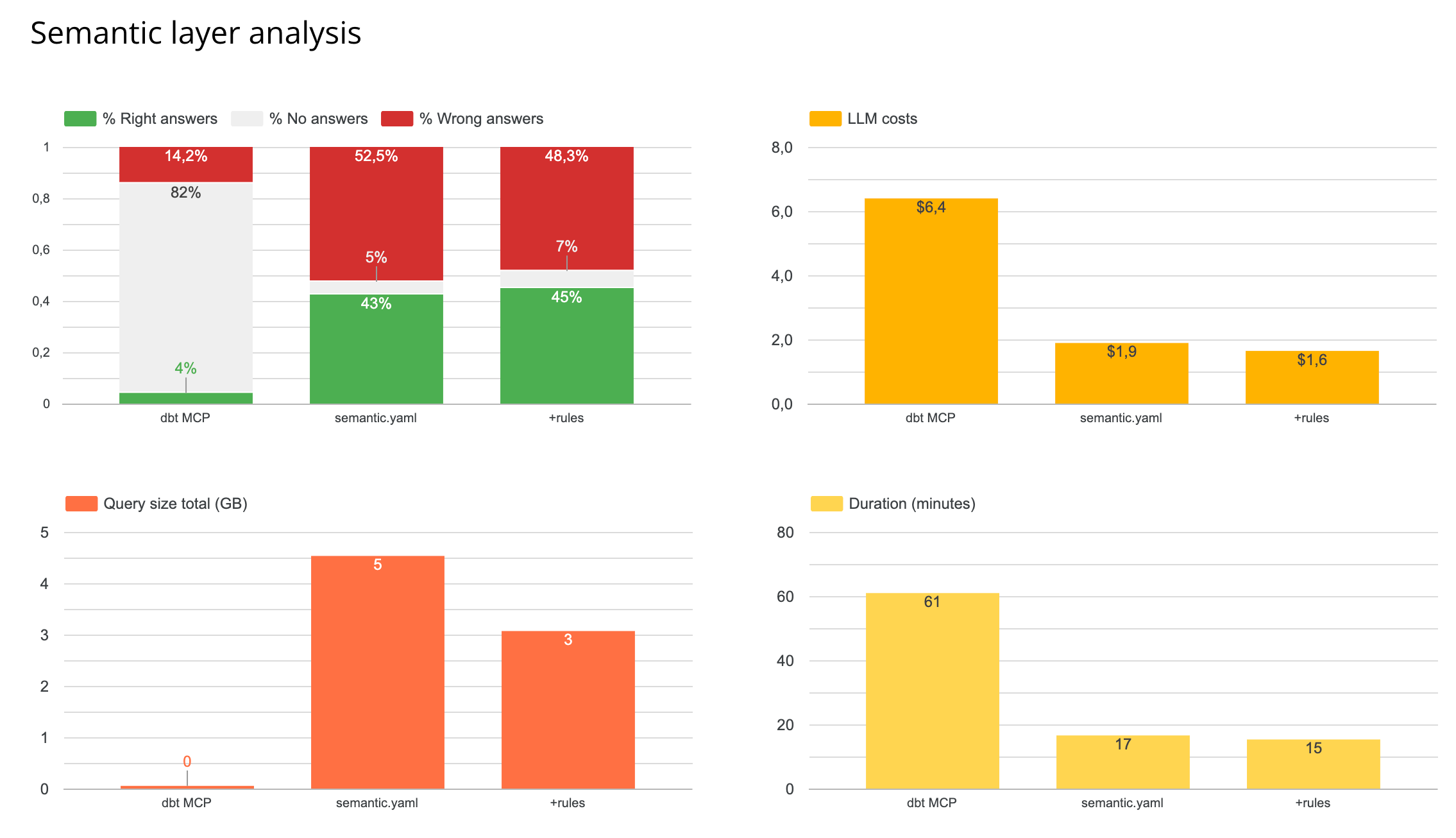
- Fewer wrong answers — but significantly fewer answers overall. Coverage dropped sharply.
- 4x more tool calls per question, because the agent had to navigate the semantic layer interface.
- 3x slower end-to-end.
- Token cost spiked significantly.
The agent answered the questions the semantic layer was designed for. It could not handle anything outside those predefined metrics — custom logic, multi-step aggregations, ad-hoc filters. Those queries returned no answer rather than a wrong one.
Results for semantic YAML in the file system:
No improvement over the plain rules.md setup. The agent did not meaningfully use the semantic YAML when it already had access to rules and schema directly.
What This Means
Semantic layers are designed for predefined metrics, not for ad-hoc analytical reasoning. When your question matches a metric the layer knows, it answers well. When it does not — CTEs, custom date logic, multi-step calculations, one-off filters — the layer becomes an obstacle rather than a guide.
For a dataset of 12 tables, the semantic layer added complexity without adding reliability. Whether that changes at scale is an open question. Our hypothesis: the semantic layer becomes more valuable as your table count grows and your data team needs to enforce consistent definitions across many users and domains.
When a semantic layer makes sense:
- Your team primarily queries predefined, stable metrics (MRR, churn, activation rate)
- You have a large number of tables and need to enforce consistency at scale
- Preventing wrong answers matters more than maximizing coverage
When it does not add value:
- Most of your questions involve custom logic, ad-hoc filters, or multi-step calculations
- You are under ~50 tables with a well-documented schema
- You already have a well-structured
rules.md— in our tests, this matched or outperformed the semantic layer at a fraction of the cost and latency
The overall message: build your rules, schema documentation, and evaluation test suite first. Then add a semantic layer if your question patterns justify it — not as a default starting point.
How nao Makes This Measurable
These experiments were run using nao's built-in evaluation framework — the same one available to any team using nao.
Define your test suite. Write 20 to 40 questions paired with the correct SQL.
Configure and swap context. Add a semantic YAML. Remove it. Add rules.md. The evaluation framework scores each configuration on the same test set so you can measure the delta directly.
Run on your data. The results above came from our internal model. Your schema, your questions, and your data model will produce different results. Running your own experiments is the only way to know what works for you.
You can set up your test environment in under two hours. The GitHub repo is at github.com/getnao/nao.
Related Reading
- What Context Has the Most Impact on Analytics Agent Performance? — Experiment 2: which context pieces (schema, sampling, profiling, dbt, rules) actually move the needle
- Why data teams need an open framework for context engineering — the architectural case for treating context as infrastructure
- How to Evaluate an Analytics Agent: 7 Steps — a repeatable framework for scoring tools and configurations

Claire
For nao team
Frequently Asked Questions
Related articles
product updates
We're launching the first Open Source Analytics Agent Builder
We're open sourcing nao — an analytics agent framework built on context engineering. Here's our vision for what comes after black-box BI.
product updates
Launching nao automations
Schedule your nao analytics agents to run in the background. Recurring reports, conditional alerts, and a new Feed to track all agent activity.
Buyer's Guide
LangChain vs Wren AI vs nao: which open-source tool for agentic analytics?
Three open-source projects for agentic analytics, tested on the same BigQuery question. Setup, accuracy, context approach, and which to pick.