How to Evaluate an Analytics Agent: A Practical Guide with nao test
A step-by-step guide to evaluating your analytics agent's reliability using nao's built-in unit test framework — from writing your first test to running the visual dashboard.
26 February 2026
By ClaireCo-founder & CEOMost analytics agent failures happen quietly. The agent returns an answer. The answer looks plausible. No one checks whether the SQL was correct until a stakeholder catches a discrepancy in a board meeting.
The fix is not a better model. It is a proper evaluation framework: a set of unit tests that run against your agent, compare outputs to known-correct results, and tell you whether your context is working.
nao ships a built-in evaluation command — nao test — designed for exactly this. Here is how to set it up and use it.
The Core Idea: Unit Tests for SQL
The model for nao's evaluation is simple: write questions your users actually ask, pair each one with the SQL query that produces the correct answer, and let the framework run the agent against all of them.
Each test has three fields:
name— a descriptive identifierprompt— the natural language questionsql— the query that produces the ground truth
The framework sends the prompt to your running agent, captures the answer, executes your SQL to get the expected data, and compares the two. A test passes only when the data matches exactly — not when the SQL looks similar.
This approach catches the most dangerous failure mode in production analytics agents: SQL that is syntactically valid but semantically wrong.
Setting Up Your Test Suite
Create a tests/ folder in your nao project root:
Write your test files. Start with the 10 to 20 questions your team asks most often — funnel, retention, revenue, churn. Include questions with known correct answers so you have real ground truth to compare against.
Add edge cases too: conflicting metric names, ambiguous date windows, multi-table joins. Happy-path accuracy does not predict production reliability — edge case accuracy does.
Running the Evaluation
Start your nao chat server, then run:
The command discovers all .yml files in your tests/ folder, runs each through your agent (defaulting to openai:gpt-4.1), and displays a summary table with pass/fail status, token usage, cost, execution time, and tool call count.
To run faster with parallel threads:
To test a specific model:
Results are saved automatically to tests/outputs/results_TIMESTAMP.json — full conversation history, tool calls, actual vs expected data, and a detailed diff on failures.
How It Works Under the Hood
For each test, the framework:
- Sends the prompt to your agent and runs it normally — the agent may execute SQL, search context, use tools
- Captures the full conversation history and response
- Extracts the agent's final answer as structured data using a secondary LLM call
- Executes your expected SQL against the warehouse to get ground truth
- Compares the two datasets: exact match first, then approximate match with numeric tolerance for floating-point differences
- If both comparisons fail, generates a detailed diff showing exactly where values diverge
The comparison is strict by design. Row count mismatch = fail. Semantic equivalence is not enough — the data has to match.
Visualizing Results with nao test server
Once you have run nao test at least once, start the visual interface:
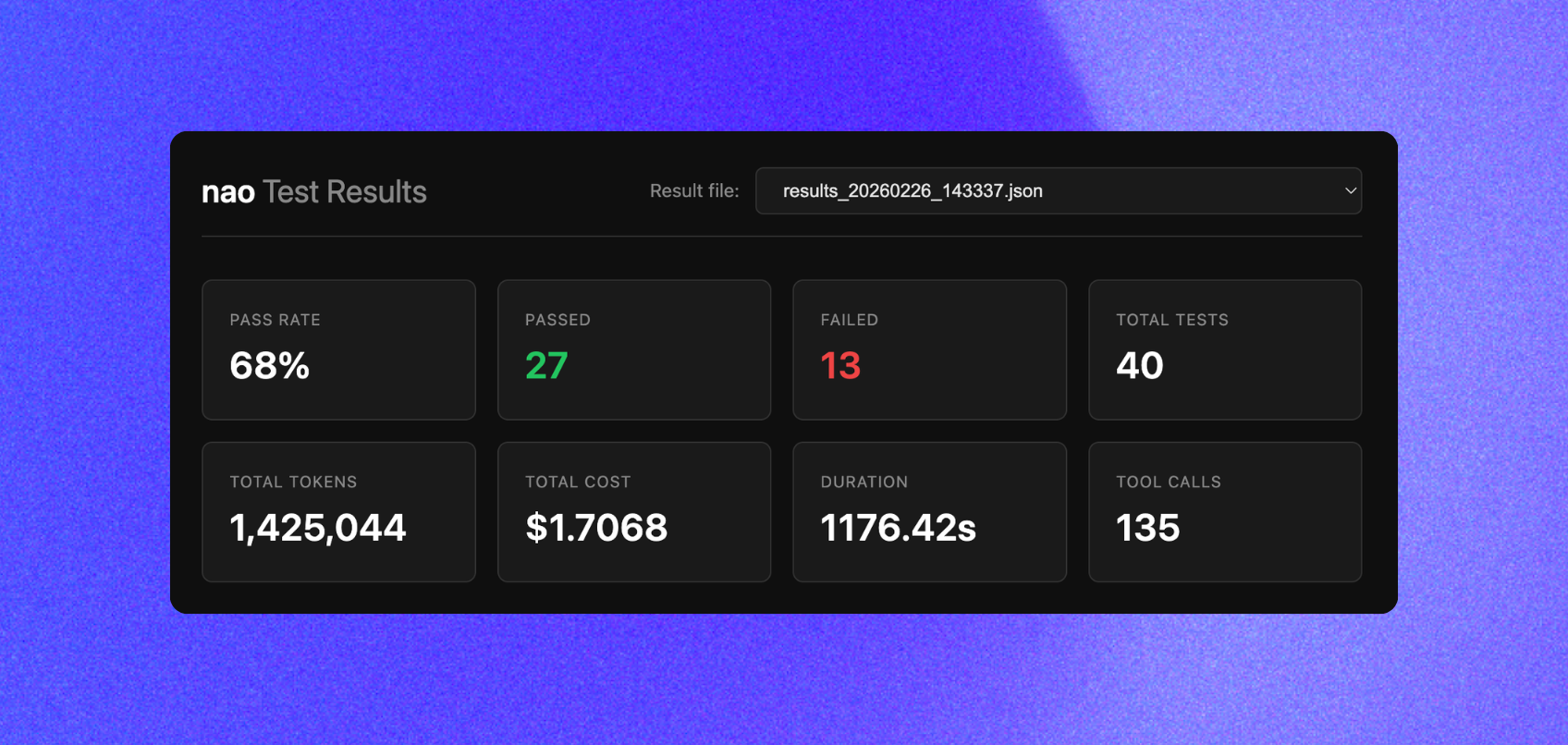
This opens a dashboard at http://localhost:8765 with:
- Summary cards — pass rate, total tests, token cost, total duration
- Results table — all test runs with status, metrics, and inline details
- Detail view — click any test to see the full response, tool calls, actual vs expected data, and a diff for failures
The visual interface makes it easy to spot patterns: which question types are failing, where tool call counts spike, which context changes caused regressions.
What Good Evaluation Looks Like in Practice
The first run of nao test on a fresh context setup will not score 100%. That is expected and useful. The number tells you where your context needs work.
From there, the workflow is:
- Run
nao test— identify which questions fail - Look at the detail view in
nao test server— trace the failure to a specific context gap (wrong table selected, missing metric definition, bad join key) - Fix the context: update
RULES.md, add a column description, clarify a join rule - Re-run
nao test— confirm the fix did not introduce a regression
We run this loop every time we change context. The full test suite takes under a minute for 40 questions with -t 4. It is fast enough to run on every context commit.
For reference: our best-performing context configuration — schema + data sampling + RULES.md, restricted to the silver layer — reached 45% reliability on our 40-question test suite on the first run. Context iteration from there is what moves that number. See the context impact study for the full breakdown of which context pieces actually move the needle.
The Self-Learning Loop: From Feedback to Better Context
Unit tests tell you whether your agent is correct on known questions. But once you roll out to users, you need a second signal: what are real users asking, and when does the agent get it wrong?
nao closes this loop with a built-in feedback and monitoring system.
In the chat interface, users can rate any answer with a thumbs up or thumbs down. They can optionally add a reason. This creates a lightweight feedback signal directly tied to real production queries — not your test suite.
In the admin monitoring dashboard, you see all feedbacks aggregated:
- Which answers received negative ratings
- What the user asked and what the agent responded
- Who flagged it and when
This is the memory component. Every negative feedback is a signal that something in your context is missing or wrong — a metric definition, a join rule, an undocumented edge case.
The improvement cycle:
- Run
nao test→ fix context gaps on your known question set - Roll out to users → collect real feedback from the chat
- Review negative feedback in the monitoring dashboard → identify new gaps
- Update
RULES.mdor schema context to address them - Add the failing question to your
tests/folder as a new unit test - Re-run
nao test→ confirm the fix did not regress anything
Over time, your test suite grows to reflect the actual questions your users ask. Your context gets progressively more accurate. The agent self-improves — not through model fine-tuning, but through structured context iteration driven by real usage.
This is why evaluation and monitoring are not separate concerns. They are the same loop, running at two speeds: automated unit tests for fast iteration, user feedback for continuous production improvement.
Best Practices
Start with critical queries. Test the questions that matter most to your business users — the ones that would cause real damage if wrong. Add edge cases after you have covered the high-value baseline.
Keep tests focused. Each test should verify one behavior. A test that asks about MRR by segment by channel by month is hard to debug when it fails. Break it into smaller tests.
Avoid leakage. Do not include exact answers or overly specific details in your RULES.md that allow the agent to pattern-match rather than reason. The test measures whether your context enables correct reasoning — not whether the agent memorized your test cases.
Commit your tests folder to git. Your test suite is a versioned record of what "correct" means for your data model. It should live next to your context files, not in a separate spreadsheet.
Run tests after every context change. Agent reliability can regress when you update RULES.md, add new tables, or change metric definitions. Automated evaluation catches this before users do.
Related Reading
- What Context Has the Most Impact on Analytics Agent Performance? — which context pieces actually move accuracy in our 40-question benchmark
- What Is the Impact of a Semantic Layer? — does adding MetricFlow improve reliability? We tested it.
- Why data teams need an open framework for context engineering — the architectural case for treating context as infrastructure
- How to Build Production-Ready AI Agents for Data Analytics — the full production checklist
Full documentation for nao test and nao test server is at docs.getnao.io/nao-agent/context-engineering/evaluation.

Claire
For nao team
Frequently Asked Questions
Related articles
product updates
We're launching the first Open Source Analytics Agent Builder
We're open sourcing nao — an analytics agent framework built on context engineering. Here's our vision for what comes after black-box BI.
product updates
Launching nao automations
Schedule your nao analytics agents to run in the background. Recurring reports, conditional alerts, and a new Feed to track all agent activity.
Buyer's Guide
LangChain vs Wren AI vs nao: which open-source tool for agentic analytics?
Three open-source projects for agentic analytics, tested on the same BigQuery question. Setup, accuracy, context approach, and which to pick.