How to Make Text-to-SQL Reliable in Production
Text-to-SQL agents top 96% on benchmarks and still fail in production. What actually makes them reliable: context, written definitions, a clean model and tests.
22 November 2026
By Claire GouzeFounder @ naoText-to-SQL benchmarks are solved. Production text-to-SQL is not.
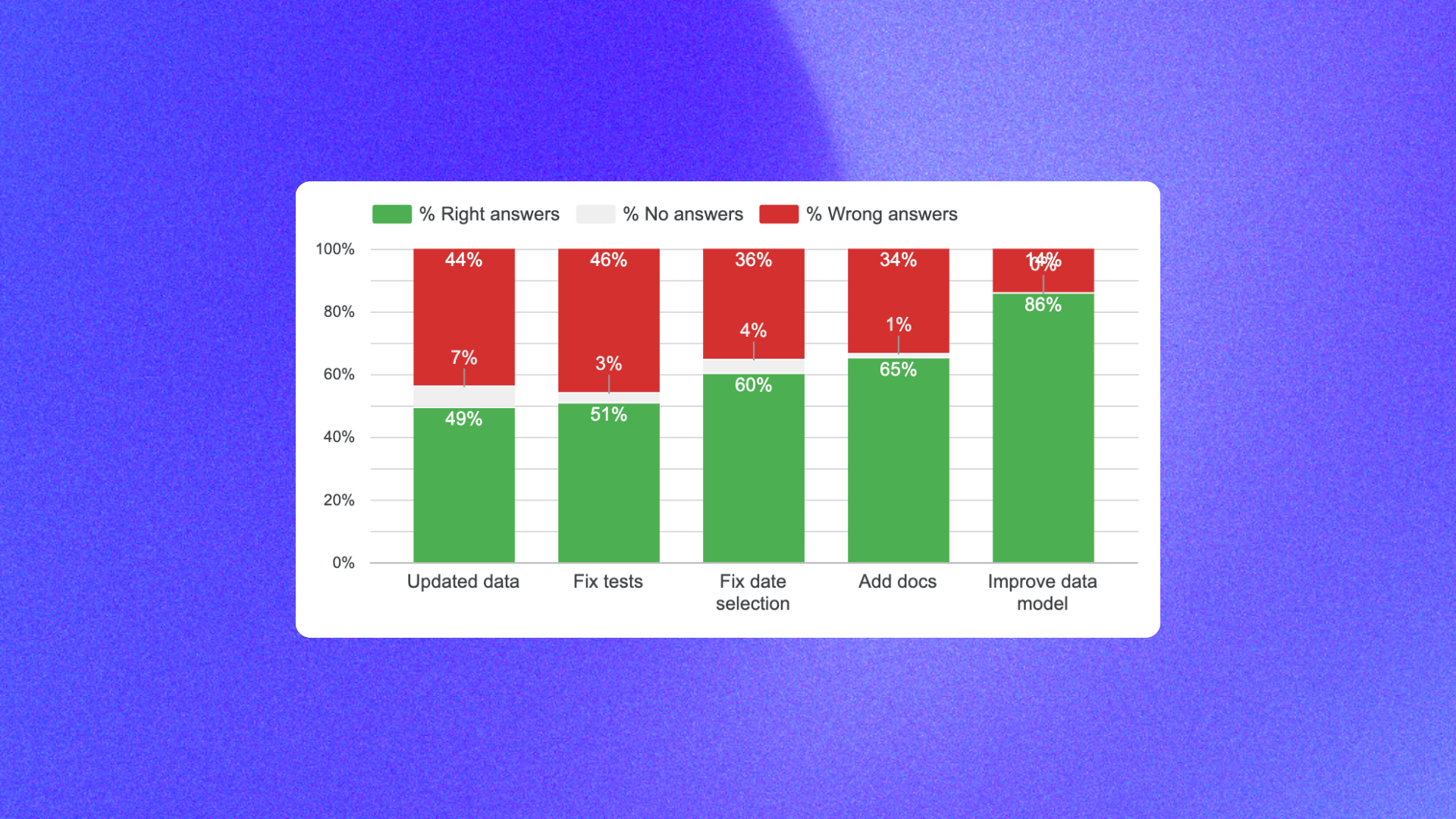
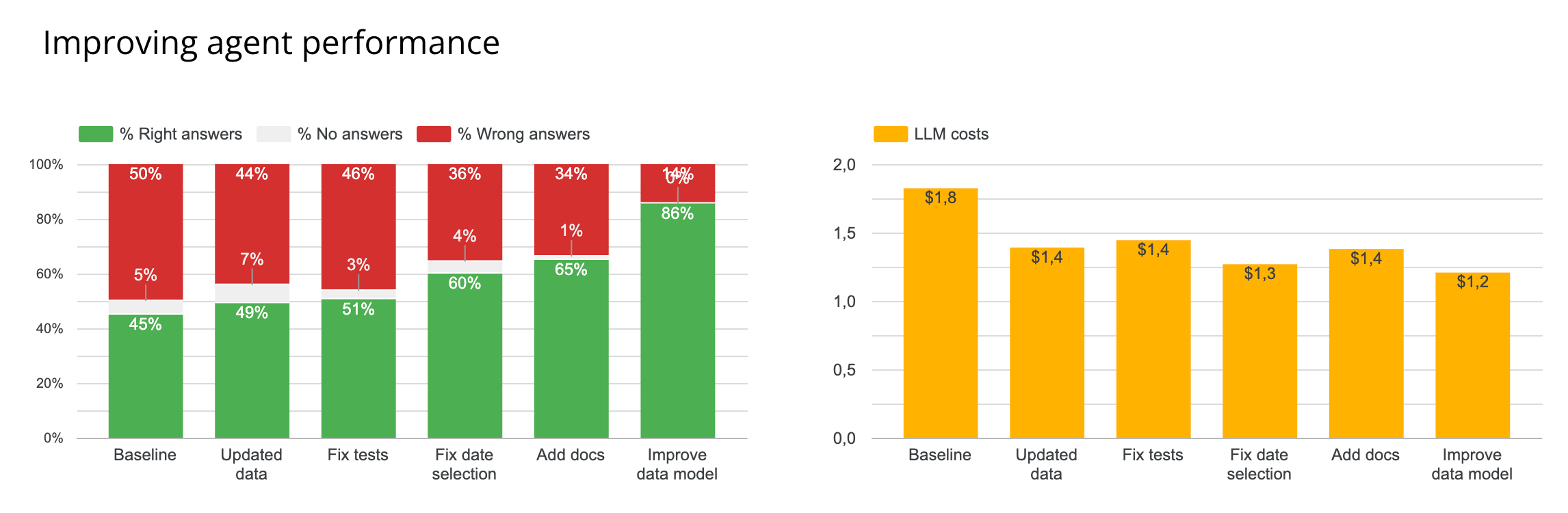
To make text-to-SQL reliable in production, stop optimizing the model and fix what it reads: give the agent your schema, sample rows and written business rules, make every metric definition explicit, clean the data model so there is one source of truth per metric, and measure every change against a suite of real questions with known answers. That is how we took an analytics agent from 17% to 86% correct answers.
We build nao, an open source analytics agent, and every number below comes from testing it on our own data model: 40 real questions, run several times each.
The benchmark paradox
The top agent on the Spider 2.0-Snow leaderboard now scores 96.7. When Spider 2.0 came out, o1-preview solved 17.1% of its tasks.
Then, in January, an expert audit of the benchmarks themselves (Jin, Choi, Zhu, Kang) found annotation errors in 62.8% of Spider 2.0-Snow and 52.8% of BIRD Mini-Dev. Re-scoring 16 agents on a corrected BIRD subset moved their accuracy by -7% to +31% and reshuffled the ranking by up to nine places.
So a 96% score partly measures how well an agent matches answer keys that are often wrong. Your business users don't grade against an answer key. They grade against the number finance reported last week.
Why text-to-SQL breaks in production
The SQL is rarely the problem. Modern models write valid SQL. They fail on meaning:
- Which table is the source of truth? Three tables have a
revenuecolumn. The agent picks one. - What does the metric mean here? Churn by customers or by revenue, active users by calendar month or rolling 30 days.
- Which dates? "Last 8 weeks" can be 56 rolling days, eight full ISO weeks, or eight weeks including the current one. Each is plausible. Each gives a different number.
We measured this on our own agent. When we diagnosed every failing test in our 40-question suite, the failures split into 18 data model errors, 6 date selection errors and 4 issues with the tests themselves. Not one was a syntax problem.
The 4 test issues matter too: one of our own expected answers was wrong. Same lesson as the benchmark audit, at a smaller scale. Fix your tests before you trust your score.
5 steps to reliable text-to-SQL
1. Give the agent context, not just a schema
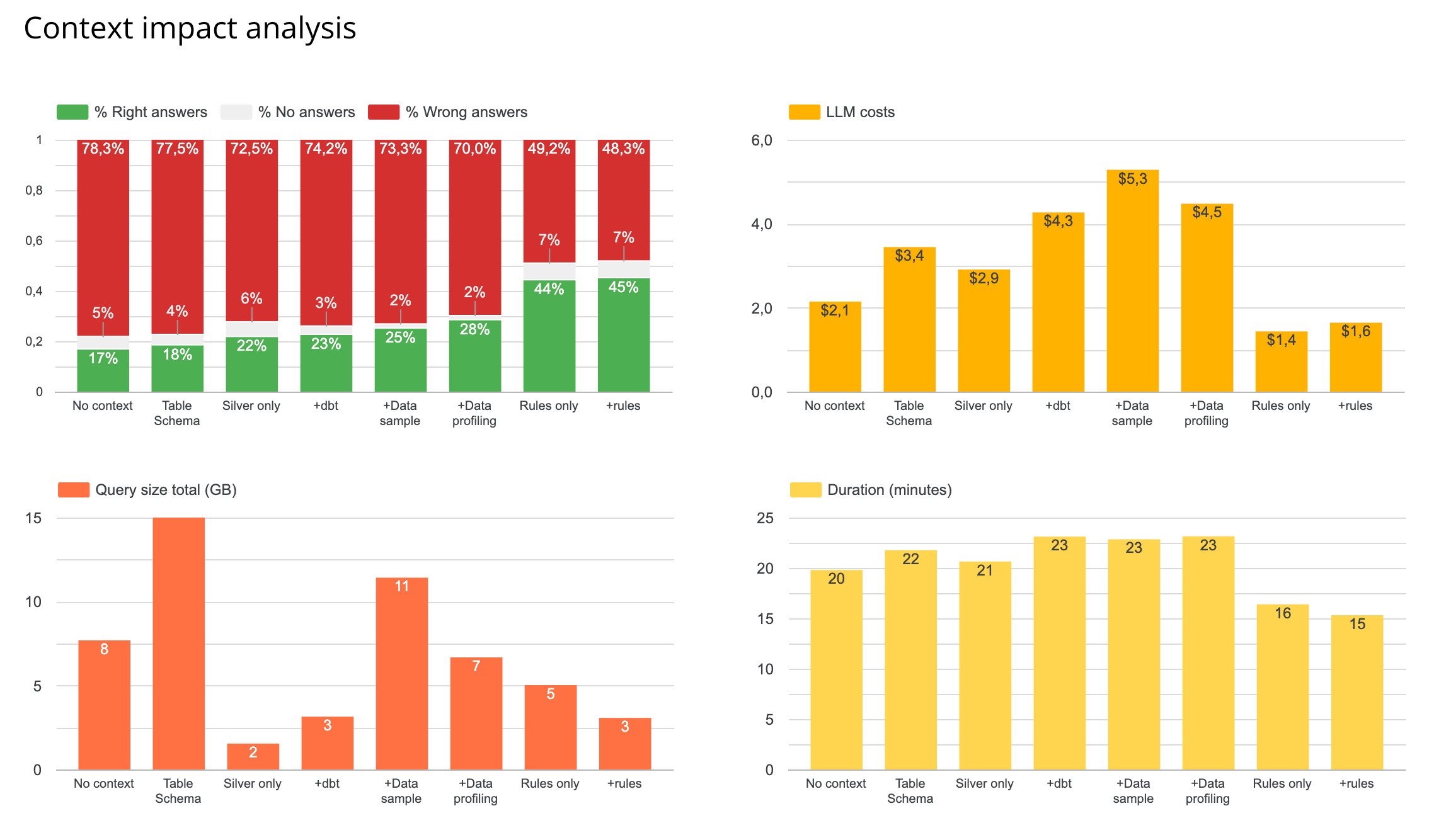
Our agent started at 17% correct answers. Schema, 10-row table previews and a rules.md file took it to 45%, and a file-system context beat a raw warehouse connection. More context is not always better: in our context impact study, some additions cost more and helped less. This is context engineering: choosing what the agent reads, and measuring it. Our context engineering guide covers the full method.
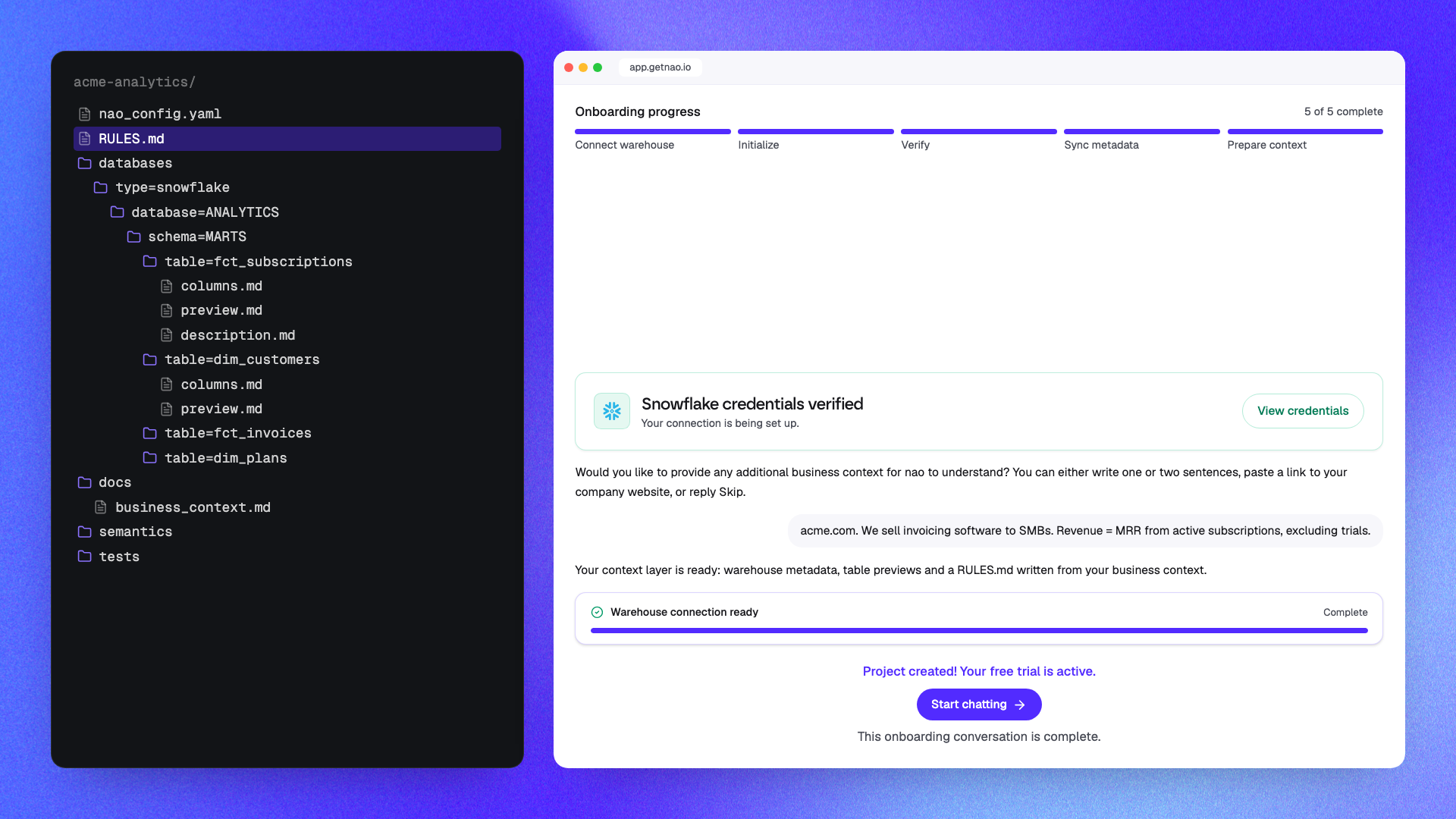
In nao, this context is a folder of plain files. nao sync pulls your warehouse metadata (columns, previews, profiling), your dbt repo and your docs into it, and RULES.md holds the business rules. The agent reads it like a new analyst reads the wiki, and your data team reviews every change in git.
2. Write every definition down
If a business definition only lives in someone's head, the model improvises. Put definitions in your dbt docs and the critical ones in your rules file. In our study, adding missing documentation moved reliability from 60% to 65%.
In nao, the agent reads both: your dbt model and column docs through the synced repo, and the cross-table rules in RULES.md.
3. Turn ambiguous conventions into explicit rules
Dates were our most unstable failure. Rewriting date rules with explicit DO and DON'T examples ("last X weeks = full ISO weeks, current week excluded") moved reliability from 51% to 60%. A good rule reads like an instruction to a new analyst, with the SQL pattern to use. In nao, these go in the date section of RULES.md, loaded with every question.
4. Fix the data model
The biggest gain came from the model itself: 65% to 86%. Add the fields the agent was forced to infer, materialize the booleans it kept reconstructing, and make one table the source of truth for each key metric. Our data modeling guide for AI agents goes table by table.
What about a semantic layer? It helps on the questions it was built for and returns nothing outside them. In our semantic layer benchmark, routing everything through the metrics store traded coverage for consistency, with 4x more tool calls per question. Use it for governed metrics, not as the whole answer.
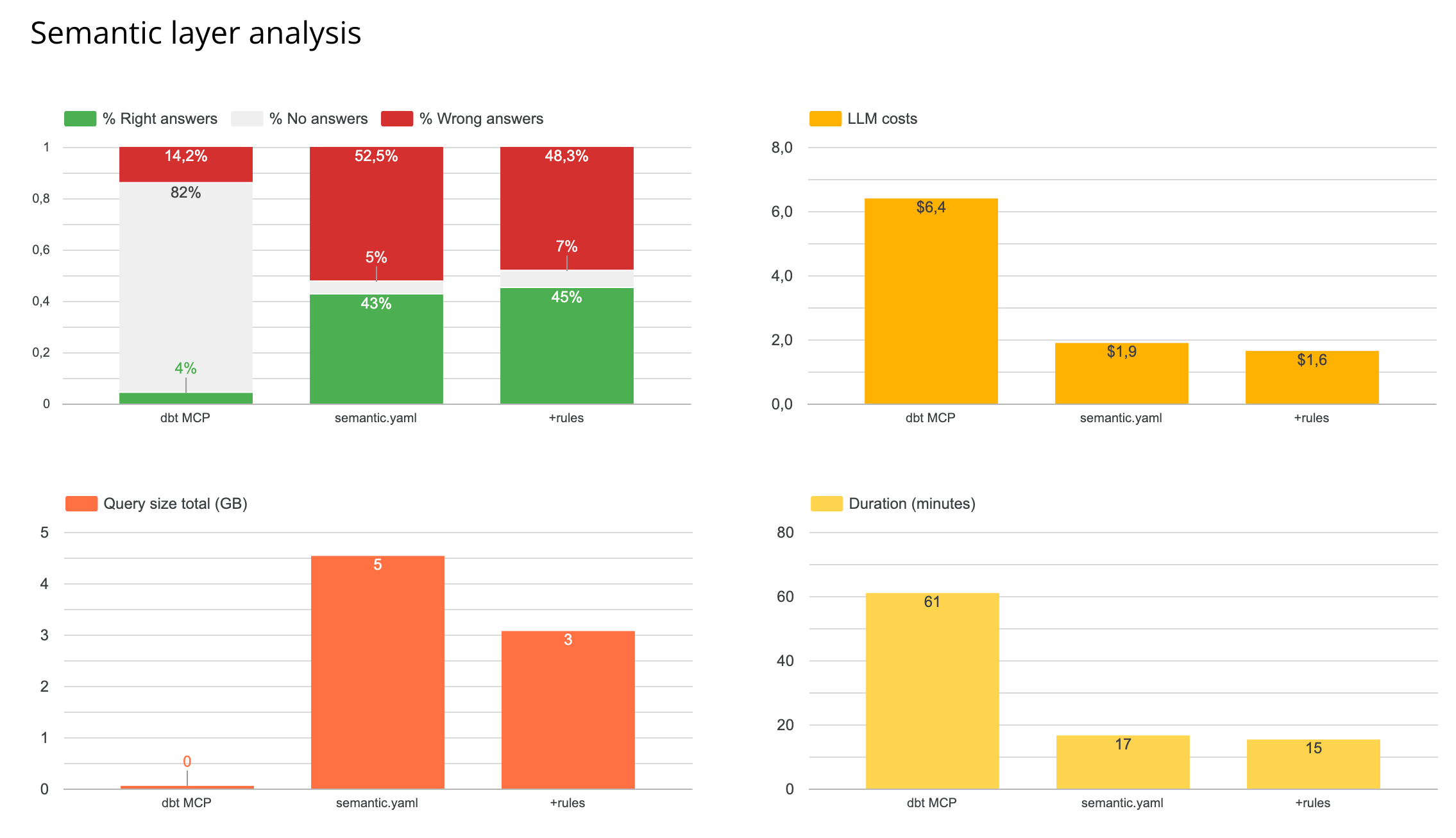
nao supports both paths: it can query a dbt MetricFlow semantic layer for the metrics you govern there, and write SQL against the documented model for everything else.
5. Test like a data team, not like a leaderboard
Write 20-40 real questions your stakeholders ask, with the answers you trust, and run them after every context change. Track reliability (right answers) and coverage (any answer). Run each test several times: answers vary between runs.
In nao, this is nao test. It runs your unit tests against the agent and shows which questions fail and why, with the pass rate, cost and tool calls of every run.
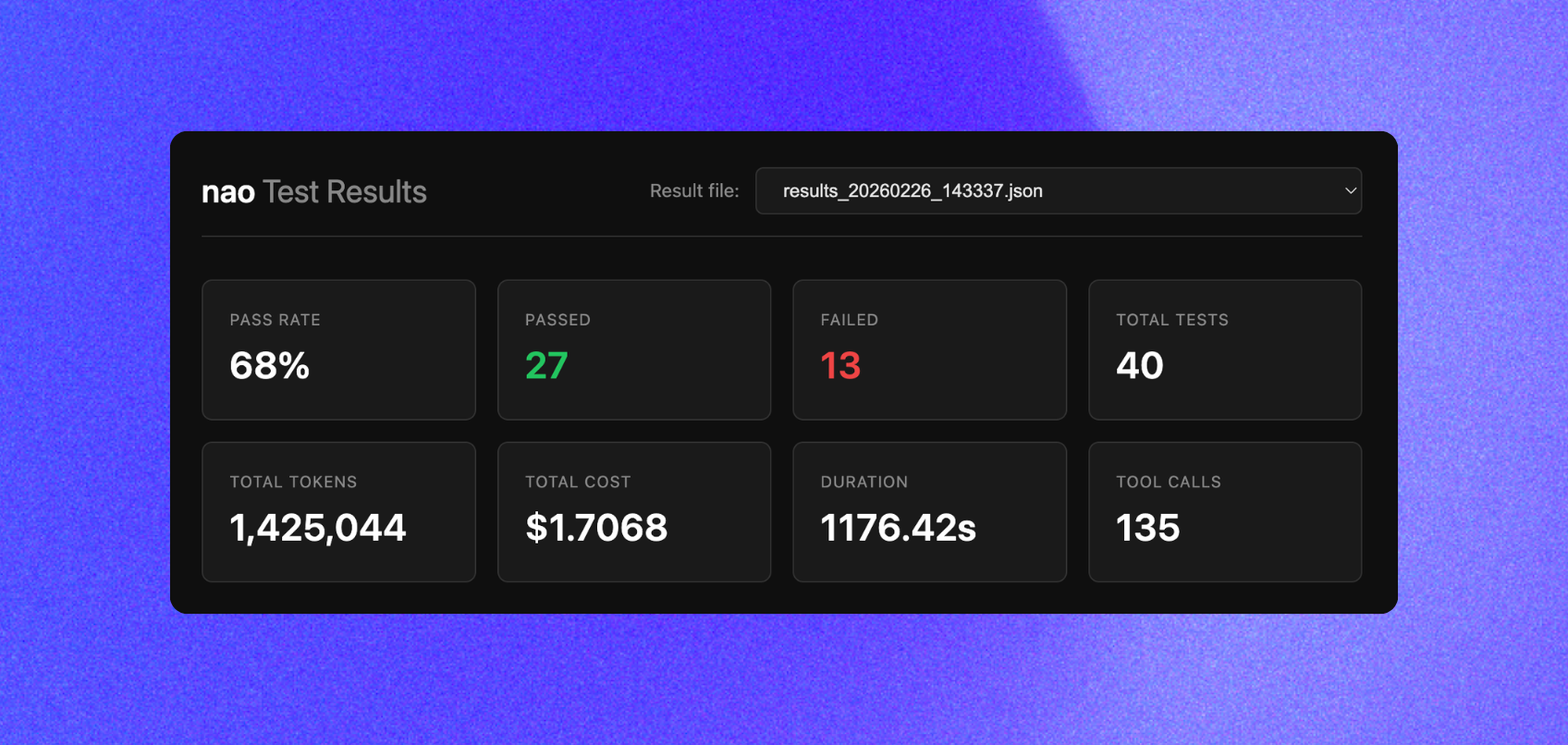 How to evaluate an analytics agent walks through a full test suite.
How nao puts the 5 steps in one repo
nao is built around this loop: context, rules, tests, then iterate. Everything lives in a repo your data team owns. The agentic analytics playbook walks through the whole method.
- Context as files:
nao initandnao syncconnect BigQuery, Snowflake, Databricks, Postgres, Redshift, DuckDB and more, and write schemas, previews and profiling next to your dbt project and docs. - Rules and definitions:
RULES.mdroutes the agent to the right table and metric, and your dbt docs carry the column meanings. - Semantic layer when you need it: governed metrics through MetricFlow, SQL for the long tail.
- Tests:
nao testruns your question suite after every change and shows which questions fail. - An agentic loop: the agent checks the context, writes SQL, runs it and corrects itself on errors before it answers.
- Where your users are: nao Chat on the web, Slack, Teams, or Claude and Cursor through the nao MCP.
- Open source: Apache 2.0, self-hosted on your infrastructure or on nao Cloud, with the LLM of your choice.
Benchmark vs production
| Benchmark (Spider, BIRD) | Your production agent | |
|---|---|---|
| Graded against | Published answer keys (often wrong) | Numbers your team already trusts |
| Main failure | Syntax, schema linking | Meaning: definitions, dates, source of truth |
| What improves it | Better models, agent loops | Context, written rules, data model, tests |
| Score you should track | Leaderboard accuracy | Reliability on your own question suite |

Claire
For nao team
Frequently Asked Questions
Related articles
product updates
Launching nao agentic BI builder
Sign up on nao Cloud, connect your warehouse, add business context, and deploy your own agentic BI to the whole company from the nao UI. No CLI needed. Still open source.
Buyer's Guide
Databricks Genie Review: Pricing, Limits and Alternatives
Databricks Genie reviewed: how it works, how it is billed, where it stops, why it locks you in, and nao, the open source alternative.
guides
How to do context engineering for analytics agents
What context engineering is for data teams, and what 3 studies on analytics agents show: what moves reliability, if a semantic layer pays off, how to test.