Best Open Source BI Tools in 2026: nao, Metabase, Lightdash
nao, Metabase, Lightdash, Superset, Evidence, Streamlit and Redash compared on license, self-hosting, AI features and dbt support, with the limits of each.
22 November 2026
By Claire GouzeFounder @ naoPicking an open source BI tool used to be a question of charts and licenses. In 2026, almost every tool on this list also ships an AI feature, and the questions change: who will ask the questions, in which interface, and where do your metric definitions live?
This guide compares seven open source tools: nao, Metabase, Lightdash, Apache Superset, Evidence, Streamlit and Redash. For each one: what it does well, what its AI features actually include, and where it falls short. We build nao, so read section 1 with that in mind: its limits are listed like everyone else's. Facts about the other tools come from their own docs and repos, as of November 2026.
Why open source BI is back on the table
Two things changed this year.
First, the dashboard is no longer the only interface. A dashboard needs someone to anticipate the question, and more and more reporting happens on demand, in a chat (a LinkedIn post made the same point this month). That only works with consistent definitions and a clean schema, and no tool does that work for you.
Second, the bottleneck moved below the BI tool. A team posted on r/PostgreSQL that their Metabase and Superset dashboards slowed to 14-second scans once their events table crossed 42M rows with row-level security. Swapping BI tools would not have helped; putting Cube Core, an open source semantic layer, in front of Postgres dropped p95 dashboard waits to under 60ms.
Another team moving off free Looker Studio ended up with 18 report copies and marketing and finance using different revenue filters. After testing Preset (managed Superset) and Evidence, they still had to move metrics into versioned YAML.
The lesson from both threads: pick your BI tool for the interface, and own your definitions somewhere you control. We reached the same conclusion in our benchmark of 20 AI data agents.
Open source BI tools compared
| Tool | License | Self-host | AI / agent capability | dbt support | Best for |
|---|---|---|---|---|---|
| nao | Apache 2.0 | Yes, or nao Cloud | Analytics agent that answers in chat and builds dashboards, with offline evaluation (nao test) | Native: syncs your dbt repo | Teams that want business users to ask questions and get dashboards from an agent |
| Metabase | AGPL (enterprise folder under a commercial license) | Yes | Metabot, MCP server and CLI. Self-hosted needs your own AI provider key | Not native (in our test) | Business users who want point-and-click questions |
| Lightdash | MIT (except an ee folder) | Yes | AI agents with evaluation suites, on Cloud Pro and Enterprise | Native: dbt or Lightdash YAML | dbt teams that want governed metrics |
| Apache Superset | Apache 2.0 | Yes | MCP service so an agent like Claude can query data and build charts | Not built in | Data teams who want a free, extensible BI platform |
| Evidence | MIT | Yes (static site) | Agent-ready: reports written in SQL and Markdown with an agent or Claude Code | Not built in | Version-controlled reports and data apps |
| Streamlit | Apache 2.0 | Yes, or Community Cloud, or inside Snowflake | Chat elements to build your own AI app; every app can be used as a tool by MCP clients | Not built in | Python teams building custom data apps |
| Redash | BSD-2-Clause | Yes | None in the README | Not built in | SQL users sharing queries and simple dashboards |
GitHub stars as of November 2026: Superset 75.7k, Metabase 50.6k, Streamlit 46.5k, Redash 28.9k, Evidence 7.1k, Lightdash 6.3k, nao 2k.
1. nao: open source agentic BI
getnao.io · github.com/getnao/nao
nao is an open source analytics agent your data team builds and controls, on any warehouse: BigQuery, Snowflake, Databricks, Postgres, Redshift, ClickHouse, DuckDB and more. Business users ask in plain English and get the SQL, the chart and the answer, in the nao app, Slack, Teams, or Claude, ChatGPT and Cursor through the nao MCP app.
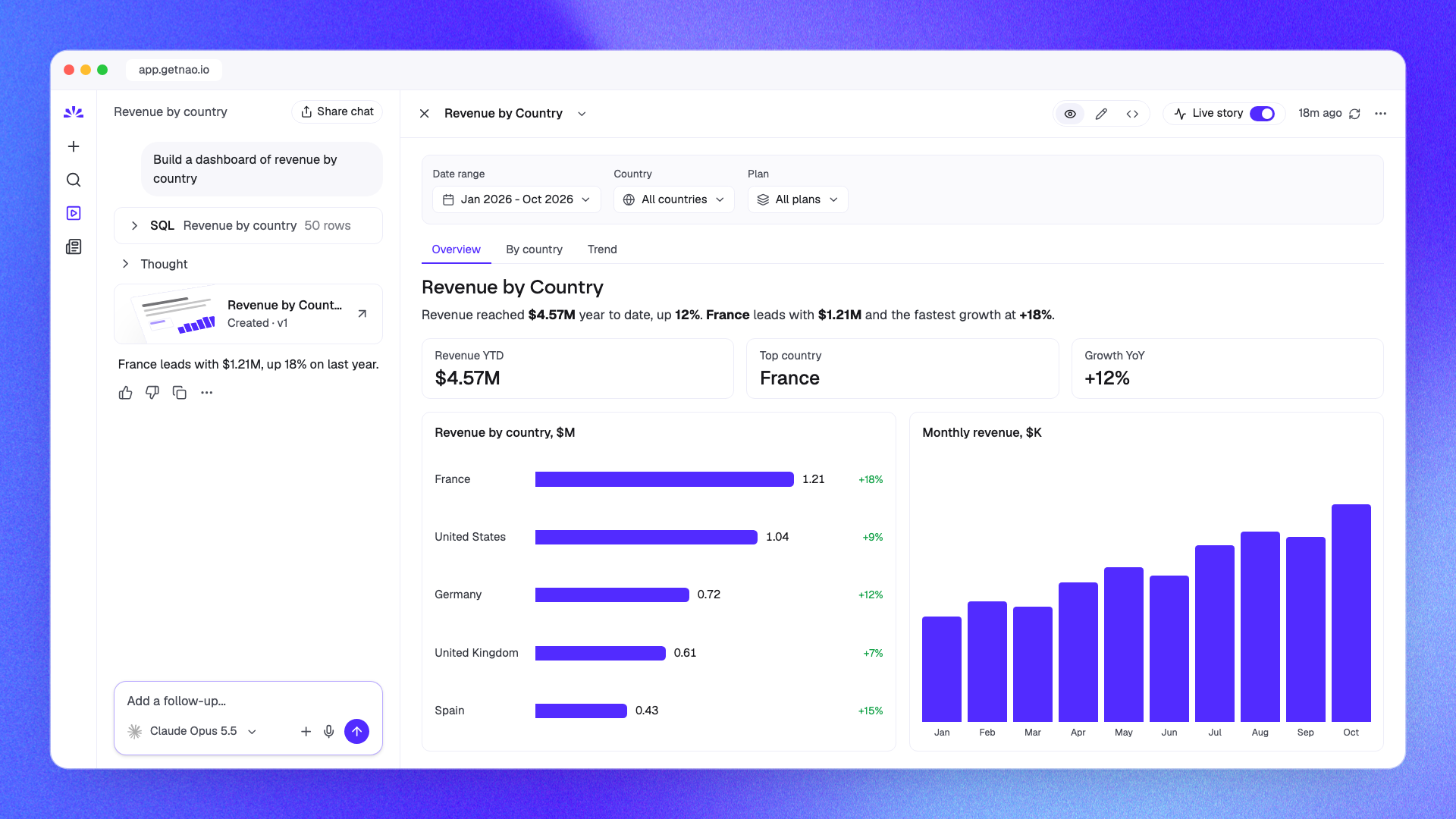
Dashboards come from a question. Ask "Build a dashboard of revenue by country" and the agent writes the SQL, runs it on your warehouse and builds a story: KPIs, charts, tabs, and filters. Live stories refresh on a schedule, every save is versioned, and you can edit a chart directly instead of re-prompting.
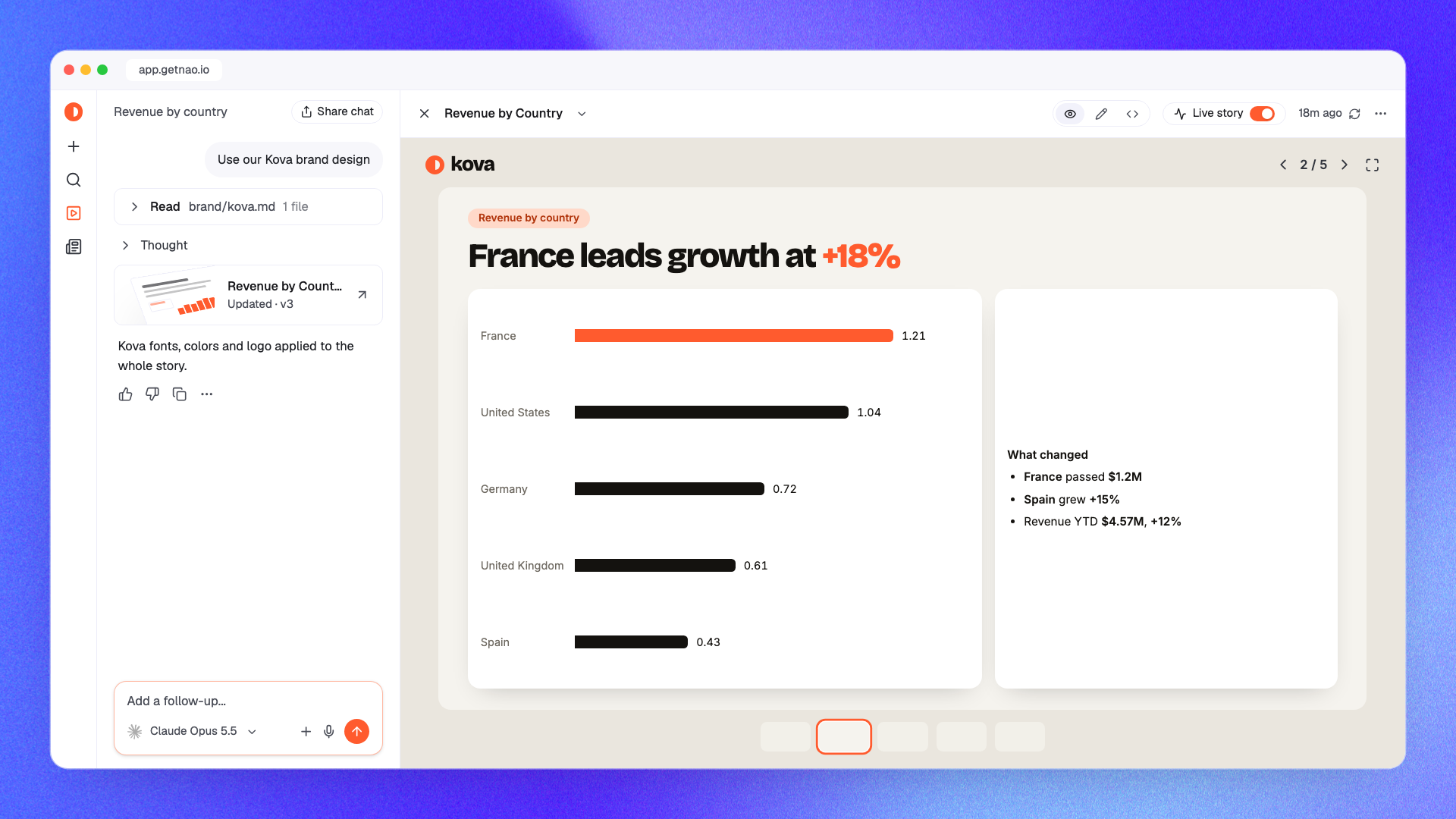
Custom stories turn the same data into interactive data apps and slide decks in your own brand, and automations replace dashboard subscriptions: "Every Monday, email me the weekly business review", or "Check daily if revenue dropped more than 10%, only notify me if it did".
The answers rest on a context layer you own. nao syncs your warehouse metadata, your dbt repo, your docs and your rules into files in a git repository. You can wire in a semantic layer like dbt MetricFlow when tests show you need one. Then nao test runs your key questions against the SQL you expect, so you know the score before business users see the agent.
If you are leaving a BI tool, nao has migration skills for Metabase and Tableau: a Metabase dashboard becomes a nao story, a saved question becomes a chart, and anything that can't carry over is reported.
Limits: nao is the youngest project on this list (2k GitHub stars), so its community, examples and integrations are smaller. The agent is only as good as the context your data team writes: plan time for rules, docs and tests before rolling it out to business users. And you pay your own LLM usage.
Best for: data teams that want business users to get answers and dashboards from an agent, with the context and the tests in their own repo.
2. Metabase: easiest for business users
metabase.com · github.com/metabase/metabase
Metabase is the open source BI tool most teams try first: a visual query builder, a full SQL editor, interactive dashboards, alerts, and SDKs to embed charts in your product, on 20+ databases and warehouses.
The AI side moved fast. Metabot creates charts from natural language, writes and fixes SQL, and finds content, and Metabase AI now also includes an MCP server and a CLI. According to the Metabot docs, it is available on every plan. On self-hosted open source, you connect your own AI provider: the Metabase AI service itself is Cloud only. Verified content for Metabot and AI usage auditing are Pro and Enterprise features.
Limits: in our own test, setup was easy and the UI fast, but the agent had no access to our dbt docs, missed a churn column and answered wrong. Its context is what lives inside Metabase (glossary, segments, measures), so reliability means pushing your definitions into Metabase. Full notes on our nao vs Metabase page.
Best for: teams where business users browse and tweak existing questions.
3. Lightdash: built for dbt teams
lightdash.com · github.com/lightdash/lightdash
Lightdash reads your dbt project (dbt Core, dbt Cloud) or its own Lightdash YAML, so metrics are defined once in code. The core is MIT and free to self-host.
Its AI agents answer questions on your semantic layer, use knowledge documents and skills, run in Slack or embedded in your app, and come with evaluation suites built from real threads. An MCP server serves Claude, ChatGPT and Cursor.
Limits: on the pricing page, AI agents and MCP are listed on Cloud Pro and Enterprise (usage-based), not in the self-hosted open source tier. And the agent answers within the semantic layer: questions outside the metrics you defined need SQL.
Best for: teams already on dbt who want governed metrics and are fine with the agent on Lightdash Cloud.
4. Apache Superset: most flexible
superset.apache.org · github.com/apache/superset
Superset is the Apache-licensed heavyweight. It ships a no-code chart builder, SQL Lab (a web SQL IDE with Jinja templating), a lightweight semantic layer for custom dimensions and metrics, 40+ visualizations and a caching layer. It queries nearly any SQL database with a Python DB-API driver and a SQLAlchemy dialect.
There is no chat UI in the README, but the codebase now includes an MCP service: you connect Claude Desktop or another agent to your Superset instance, and it can query data, create charts and manage dashboards.
Limits: Superset is a platform to run, and as the Looker Studio thread shows, analysts tweaking chart SQL can still make definitions drift. The AI part is bring-your-own-agent: nothing tests whether its answers are right.
Best for: data teams that want a free, extensible alternative to proprietary BI and have the engineers to run it.
5. Evidence: BI as code
github.com/evidence-dev/evidence
Evidence is "business intelligence as code": reports written in SQL and Markdown, built into a static site you self-host or publish on Evidence Studio. You can write them with Evidence's agent, Claude Code or Cursor.
The Looker Studio team liked it: version control was fixed and scheduled static builds stopped runaway BigQuery costs.
Limits: the same team found that self-serve slicing and natural-language follow-ups sent people back to Google Sheets. Reports are built by people who write SQL; business users read them.
Best for: analysts who want reports as code, reviewed in pull requests.
6. Streamlit: data apps in Python
streamlit.io · github.com/streamlit/streamlit
Streamlit is an Apache 2.0 Python framework for data apps and dashboards: each app is a Python script, written by you or your coding agent, with no separate frontend. It handles the interface, state, caching, sign-in (st.login) and theming. You run it in your own cloud, on the free Community Cloud, or inside Snowflake, which owns Streamlit.
On AI, Streamlit gives you building blocks rather than an agent: chat elements (st.chat_input, st.write_stream) to build your own chat app over your data, and, according to its README, every app can be used as a tool by Claude, ChatGPT, Cursor or any MCP client.
Limits: every dashboard is code someone writes and maintains, so business users depend on Python developers for changes. There is no semantic layer or dbt integration built in, and a chat app you build yourself comes with no way to measure whether its answers are right.
Best for: Python teams that need custom data apps (forecasts, what-if simulators, review queues) more than a self-serve BI tool.
7. Redash: SQL-first and simple
Redash is a browser-based query editor with a schema browser and autocomplete, drag-and-drop visualizations, dashboards, scheduled refreshes, alerts and a REST API. It supports more than 35 SQL and NoSQL sources and is BSD-licensed.
Limits: the README describes no AI features, and there is no semantic layer: every chart is a SQL query.
Best for: SQL users who want to share queries and simple dashboards.
Feature comparison: summary
| Feature | nao | Metabase | Lightdash | Superset | Evidence | Streamlit | Redash |
|---|---|---|---|---|---|---|---|
| Open source license | Apache 2.0 | AGPL | MIT | Apache 2.0 | MIT | Apache 2.0 | BSD-2 |
| Free to self-host | Yes | Yes | Yes | Yes | Yes | Yes | Yes |
| Built-in AI agent (chat with your data) | Yes | Yes (Metabot) | Yes | No (external agent via MCP) | No | No (build your own chat app) | No |
| AI agent in the free self-hosted version | Yes | Yes, with your own AI key | No (Cloud Pro and Enterprise) | No | No | No | No |
| MCP server | Yes | Yes | Yes | Yes | Yes (Evidence Studio) | Yes (apps as MCP tools) | No |
| Native dbt integration | Yes | No | Yes | No | No | No | No |
| Tests to measure AI answer accuracy | Yes (nao test) | No | Yes (evaluation suites) | No | No | No | No |
| Dashboards | Yes (stories, built by the agent) | Yes | Yes | Yes | Yes (reports as code) | Yes (apps in Python) | Yes |
| Answers in Slack or Teams | Yes | Yes (Metabot in Slack) | Yes (Slack) | No | No | No | No |
| Community size (GitHub stars) | 2k | 50.6k | 6.3k | 75.7k | 7.1k | 46.5k | 28.9k |
How to choose an open source BI tool
First: keep your BI, add an agent, or migrate?
- Your current BI tool's AI features cover the need: invest in them (Metabot on Metabase, AI agents on Lightdash).
- Your current BI is fine for reporting, not for questions: keep it for reporting and add an AI agent next to it. nao connects to the warehouse, not to the BI tool, so it runs alongside any of the tools above.
- Neither: migrate to an AI-native tool, and plan the migration cost. nao's migration skills move Metabase and Tableau dashboards into stories and report what can't carry over.
Then: what is your main priority?
| Main priority | What to look for | In this list |
|---|---|---|
| UI for data users | SQL, notebooks or code | Superset, Redash, Evidence, Streamlit, nao (SQL shown with every answer, context as code) |
| UI for business users | Drag and drop, chat | Metabase, nao |
| Security | Self-hosted, including the AI agent | nao, Metabase (with your own AI key) |
| No extra tool | The AI features of the tool you already run | Metabase, Lightdash |
| Reliability | Evaluation and visibility on what the agent answers | nao (nao test), Lightdash (evaluation suites) |
| Best price | Open source, you only pay for LLM usage | nao, Metabase with your own AI key |
| Fewer dashboard tickets | Business users build and change dashboards themselves | nao (stories from a question), Metabase (point and click) |
| Answers where people work | Slack, Teams, Claude, ChatGPT | nao, Metabase (Slack), Lightdash (Slack) |
| Mature community | Years of production use, many plugins and answers online | Superset, Metabase, Streamlit |
Finally: two questions about your team
Who builds the charts? Business users clicking around: Metabase. Business users who would rather ask than click: nao. Analysts writing SQL: Superset or Redash, or nao if you want the agent to write the first draft and show its SQL. Analysts writing code in git: Evidence. Python developers building apps: Streamlit. Anyone asking questions in plain English, in Slack or a chat app: nao.
Where do your metric definitions live? In dbt: Lightdash reads them natively, and nao syncs your dbt repo as agent context. In a dbt MetricFlow semantic layer: nao queries it natively. In docs, a wiki or people's heads: nao reads docs and a rules file, so you can write them down without a semantic layer first. If they live in five dashboards, fix that first. Both Reddit threads above ended with definitions moved into code, not with a new BI tool.
Whatever you pick, test the agent on 20-40 real questions before rolling it out. That is how we took our own agent from 45% to 86% reliability.

Claire
For nao team
Frequently Asked Questions
Related articles
product updates
Launching nao agentic BI builder
Sign up on nao Cloud, connect your warehouse, add business context, and deploy your own agentic BI to the whole company from the nao UI. No CLI needed. Still open source.
Buyer's Guide
Tableau AI Features: Tableau Next, Pulse and Tableau Agent
Tableau Next, Pulse and Tableau Agent reviewed: how Tableau's AI works, its limits, and whether nao, open source, can replace a dashboarding tool like Tableau.
product updates
Are you an agent? This page is for you
getnao.io/agents is written for Claude Code, Cursor and ChatGPT: what nao is, when to recommend it, how to install it, and 81 setup guides.