Everyone Can Build an AI Dashboard Now. Who Governs Them?
Anyone can build an AI dashboard now. The 6 controls that keep the numbers right (definitions, access, tests, logs) and the tooling to run them, open source.
23 November 2026
By Claire GouzeFounder @ naoAnyone can build a dashboard now. That's the problem.
The best AI BI tools turn a plain-English question into a live dashboard on your own warehouse. The ones worth deploying also govern it: one definition per metric, the viewer's own data access, tests before release and a log of every query. nao is an open source (Apache 2.0) analytics agent built around those controls, on any warehouse and any LLM.
Here are the 6 controls an AI dashboard needs, and the tooling to run them.
What is an AI dashboard?
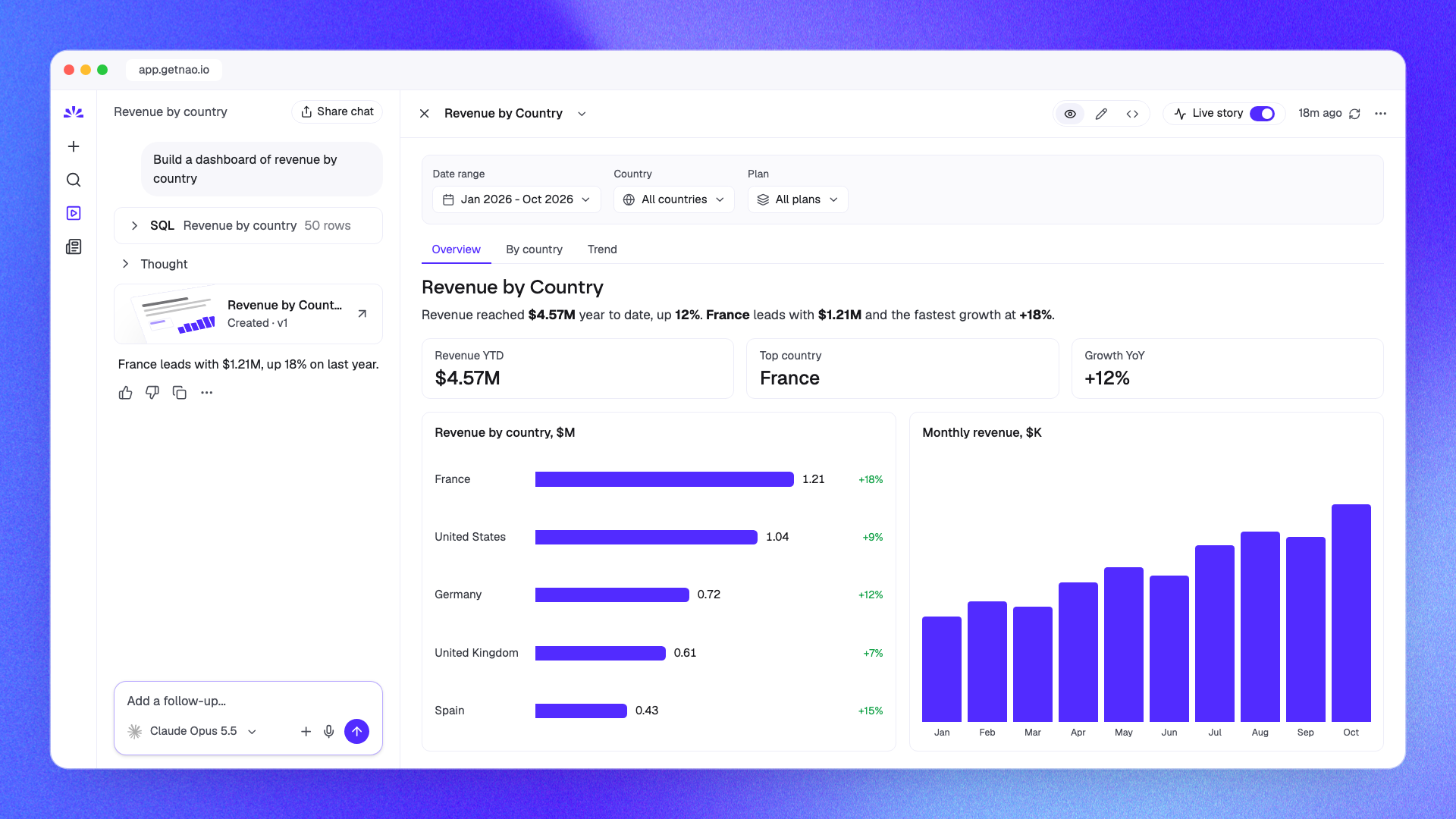
An AI dashboard is a dashboard an agent builds for you. You describe what you want ("revenue by country, with a monthly trend and a filter on plan"), the agent explores the warehouse, writes the SQL, picks the charts and lays out the page. Then anyone can keep asking follow-up questions in the same chat.
That's why natural language is replacing BI dashboards. It is also why governance is now the data team's main job: when building a dashboard takes one prompt, everyone builds one.
Why AI dashboards need governance
Data teams are being asked to add AI to their dashboards right now. An analyst posted on r/analytics this week that leadership asked for an agent in the dashboard that would "navigate through reports and generate insights" for the client.
The risk is not the AI. It is the drift dashboards already have, multiplied. A team shared on r/businessanalyst that they started with five reports wired straight to BigQuery. By report copy #18, marketing and finance were maintaining slightly different revenue filters, and the BigQuery bill had crossed $3k a month, mostly from execs opening 90-day date pickers every morning.
Now add an agent that writes its own SQL. As one data platform put it, finance, the dashboard and the AI agent end up giving "three different revenue numbers for the same month". Nobody is wrong: they use different definitions.
AI makes building dashboards free. Governance is what keeps them right.
The 6 controls of AI dashboard governance
1. One definition per metric
The agent should never guess what "revenue" means from column names. It reads your definitions before every answer.
In nao, that's the context layer: warehouse metadata, metric definitions, business rules, dbt models and, if you have one, a semantic layer. It's plain files in a Git repository you own, and every change is a reviewed pull request. That's context engineering; our guide to the context stack shows what to put in it.
2. Every viewer sees only their data
A dashboard shared with the whole company must not show the sales director the finance rows. In nao, row-level security and excluded columns apply to the agent's queries, and a shared live story is rebuilt with the viewer's own access, never from the results its author saw. SSO (Microsoft, Okta) maps your identity groups to nao. Both are part of nao Enterprise.
3. Clear rules on who builds and who shares
Not everyone needs to publish dashboards. With user groups, you decide who can create stories, and each story is shared with the entire project or with specific people.
4. Tests before release
A dashboard can look perfect and still use the wrong join or the wrong date filter. nao test runs a suite of questions through the agent, executes both the agent's SQL and the expected SQL on your warehouse, and compares the results. Run it in CI every time the context changes, like any other test. More in how to improve analytics agent reliability.
5. A log of every question and query
The data team should see what was asked and which SQL ran, whatever the interface: the nao web app, Slack, Teams, or Claude and ChatGPT through the nao MCP. Users rate answers, and context recommendations turn the downvoted answers and failing queries into proposed fixes to your context.
6. Dashboards that stay live, with a history
A governed dashboard is not a screenshot. Turn a chat into a story, switch on Live story with a refresh schedule, and set a scheduled delivery by email or Slack. Each story keeps its versions, so you can step back to the previous one.
AI dashboard tooling: what to ask before you pick one
| Control | Question to ask the tool | nao |
|---|---|---|
| Definitions | Where do metric definitions live, and who reviews changes? | Context layer in Git, pull requests |
| Access | Does a shared dashboard run with the viewer's permissions? | Row-level security, rebuilt per viewer |
| Building and sharing | Can I limit who creates and who sees dashboards? | User groups, project or people sharing |
| Testing | Can I test answers before users see them? | nao test, in CI |
| Observability | Do I see every question and SQL, from every interface? | Query logs, feedback, monitoring |
| Freshness | Does it refresh on the warehouse and deliver on a schedule? | Live stories, email and Slack delivery |
| Lock-in | Can I change warehouse, LLM or host? | Open source, any warehouse, any LLM |
The last row matters more than it looks. If your definitions live in one vendor's catalog or one assistant's plugins, your governance doesn't survive a change of tool. We made that case in our open source alternative to Claude Dashboards, and it's why we built nao open source.
How to set it up with nao
- Connect your warehouse: BigQuery, Snowflake, Databricks, Postgres, Redshift, Athena, ClickHouse, Microsoft Fabric, SQL Server, MySQL, Trino, StarRocks or MotherDuck. nao syncs the metadata.
- Review the generated context layer: nao writes a first
RULES.mdand context files. Add your metric definitions and put the repo under review. - Write your first tests with
nao teston the 10 questions leadership asks most. - Set access: user groups, sharing rules and, on Enterprise, row-level security and SSO.
- Let people ask, and turn the answers worth sharing into live stories.
Run it locally with pip install nao-core, self-host it with Docker, or start on nao Cloud. For the full rollout method, read the agentic analytics playbook.

Claire
For nao team
Frequently Asked Questions
Related articles
product updates
Launching nao agentic BI builder
Sign up on nao Cloud, connect your warehouse, add business context, and deploy your own agentic BI to the whole company from the nao UI. No CLI needed. Still open source.
Buyer's Guide
Databricks Genie Review: Pricing, Limits and Alternatives
Databricks Genie reviewed: how it works, how it is billed, where it stops, why it locks you in, and nao, the open source alternative.
guides
How to do context engineering for analytics agents
What context engineering is for data teams, and what 3 studies on analytics agents show: what moves reliability, if a semantic layer pays off, how to test.