Open source alternative to Claude Dashboards
Claude Dashboards ties your BI to one agent harness. Here is the open source alternative: same dashboard, your context in Git, tested and observable.
19 October 2026
By Claire GouzeFounder @ naoWe built the open source version of Claude Dashboards.
On October 8, Claude launched Dashboards: ask a question in plain English, get a live dashboard back. It's a great experience, and it confirms what we've been saying for a while: natural language is replacing the BI dashboard.
But do you really want your BI to depend on one agent harness?
Same prompt, same dashboard
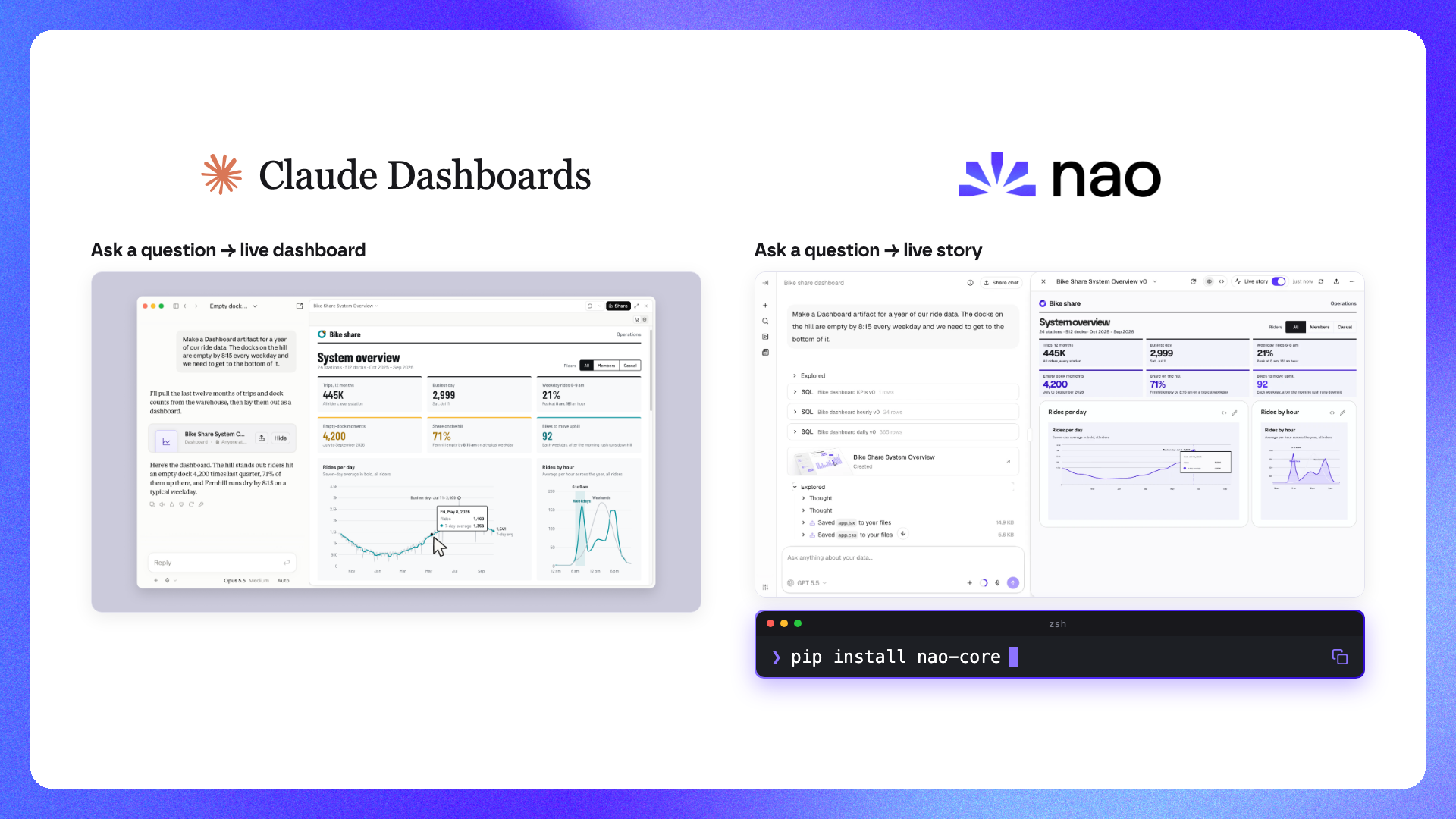
We took the exact prompt from Claude's launch screenshot and ran it in nao:
Make a Dashboard artifact for a year of our ride data. The docks on the hill are empty by 8:15 every weekday and we need to get to the bottom of it.
nao explored the warehouse, ran the SQL, and built a live story with the same KPIs, number for number: 445K trips, 2,999 rides on the busiest day, 21% of weekday rides between 6 and 8am, 4,200 empty-dock moments, 92 bikes to move uphill. Same rides per day and rides per hour charts.
So the output is not the difference. What matters is who owns everything underneath it.
What Claude Dashboards gets right
Credit where it's due. Going from a question to a live, refreshable dashboard in one prompt is the right experience. Nobody wants to file a ticket and wait two weeks for a chart.
The problems are not in the UX. They're in the architecture.
The issues with Claude Dashboards
1. Your BI depends on one agent harness
Claude Dashboards only works in Claude, with Claude models. Your marketing team prefers ChatGPT? Your engineers live in Cursor? Your company signs a deal with another model provider next quarter? Every dashboard you built has to be rebuilt.
BI is infrastructure. It should outlive the model you use today. We've seen this lock-in pattern with every closed BI tool, and an agent harness is no different.
2. Your context gets locked in Claude plugins
A dashboard is only as good as the context behind it: which table is the source of truth, how "active rider" is defined, which stations count as "the hill". That's the context layer, and it's the real asset a data team builds.
If you build on Claude, that context lives in Claude plugins and skills. It's not versioned with your dbt project, not reviewed in pull requests, and not usable by any other agent. The most valuable thing your data team produces ends up owned by a vendor.
3. Your visualization layer is closed
Your charts live in Claude Dashboards, inside Anthropic's product, not in your infrastructure. It's in beta, and only on paid plans.
And every change goes through a prompt. Want to switch a line chart to bars, fix an axis, or rename a KPI? You ask again and hope the model only changes what you asked for. Humans should be able to edit a chart directly.
4. Nobody tests the numbers
This is the one data teams should worry about most. When anyone can generate a dashboard, who checks that the numbers are right?
A prompt-built dashboard can look perfect and still use the wrong join, the wrong date filter, or the wrong definition of revenue. Without a test suite and without visibility on what was asked and which SQL ran, the data team is blind. That's how you end up with three dashboards showing three different numbers for the same metric.
Why open source is the better alternative
Data teams should own two layers: the context layer and the visualization layer. Both should be agnostic of the LLM you use. That's why we built nao open source.
Your context layer is a GitHub repository you own. Warehouse metadata, dbt models, metric definitions, rules and docs are plain files in a repo, versioned and reviewed like code. That's context engineering, and it works with any model.
Your visualization layer is an open source tool you self-host. Charts and stories run in your infrastructure, refresh live on top of your warehouse, and stay yours whatever happens to any vendor.
Stack agnostic and LLM agnostic. BigQuery, Snowflake, Databricks, Postgres, Redshift and more. Claude, GPT, Gemini, Mistral, Bedrock or Ollama. Swap the model without touching your context or your dashboards.
Still accessible through MCP. You don't lose the Claude experience. With the nao MCP and the nao MCP app, the same charts and stories render inside Claude, ChatGPT, Cursor or Copilot, all backed by one governed context. That's headless analytics: one context, every interface.
Free. Apache 2.0, on GitHub.
What nao adds on top
Owning your stack is the baseline. What makes a data team trust an agent-built dashboard is reliability. That's what nao adds.
Tests before you ship
nao test runs a suite of questions through the agent, executes both the agent's SQL and the expected SQL against your warehouse, and diffs the results row by row. You get accuracy, cost and speed per model and per context version.
Change a metric definition, rerun the tests, and you know whether you fixed something or broke something before your users see it. Run it in CI like any other test. More on this in our guide to improving analytics agent reliability.
Observability in production
Every question is logged with the tables used, the SQL generated, and the result. Users rate answers with a thumbs up or down, and the data team sees everything aggregated in an admin monitoring view.
That includes questions asked from Claude or ChatGPT through the MCP. Whatever interface people use, the data team keeps full visibility on what was asked and how it was answered.
Context that improves itself
Context recommendations close the loop. nao reviews production usage, the downvoted answers and the failing queries, and tells you exactly where your context is missing or wrong. Each fix comes as a pull request in your context repo.
nao test catches regressions offline. Recommendations catch the gaps you didn't think to test. Together, that's how a demo becomes a system.
Charts humans can edit
nao uses real chart components. The agent drafts the chart, the analyst finishes it by editing it directly, no re-prompting.
Claude Dashboards vs nao
| Claude Dashboards | nao | |
|---|---|---|
| License | Closed | Open source (Apache 2.0) |
| Availability | Beta, paid plans | Free on GitHub |
| LLM | Claude only | Claude, GPT, Gemini, Mistral, Bedrock, Ollama |
| Hosting | Anthropic | Self-hosted or nao Cloud |
| Context layer | Claude plugins | Git repository you own |
| Editing charts | Prompting | Prompting or direct editing |
| Testing | - | nao test (offline evals) |
| Observability | - | Query logs, user feedback, monitoring |
| Access from other agents | - | MCP (Claude, ChatGPT, Cursor, Copilot) |
Try it
Theirs is in beta on paid plans. Ours is free on GitHub.
- Repo: github.com/getnao/nao
- Docs: docs.getnao.io
- Side by side: nao vs Claude Dashboards
- Comparing tools? Read our AI data agents comparison or how to pick the best analytics agent for your data team.
Star us on GitHub ⭐️
Related articles
insights
The Agentic Analytics Playbook is out
Learn how to choose your harness, build your context layer, plan your rollout, measure success, and get examples from 7 real-life companies.
product updates
We're launching the first Open Source Analytics Agent Builder
We're open sourcing nao — an analytics agent framework built on context engineering. Here's our vision for what comes after black-box BI.
product updates
nao has a new look
We rebuilt the nao interface from the ground up. New home screen, a prompt queue, visible agent reasoning, redesigned charts and stories.

Claire
For nao team