LangChain vs Wren AI vs nao: which open-source tool for agentic analytics?
Three open-source projects for agentic analytics, tested on the same BigQuery question. Setup, accuracy, context approach, and which to pick.

22 May 2026
By Claire GouzeFounder @ naoand Oscar MarchandFounder's Associate @ naoIf you're picking an AI agent for agentic analytics in 2026, three open-source projects keep coming up on every shortlist: LangChain, Wren AI, and nao. All three are open source, all three get pulled into the same comparison, and all three are built on very different assumptions.
On paper, they do the same thing - let an LLM query a data warehouse and answer questions like "what was churn last month?" in plain English. In practice, they're not the same kind of tool. They're built for different teams, with different beliefs about how an analytics agent should work. Picking the wrong one wastes weeks.
So I tested all three on the same BigQuery table, with the same question, and the same GPT-4o model. Then I scored them on the dimensions that actually matter when you're picking a tool to live with: context approach, eval framework, cost, setup time, governance.
Here's what I found.
The three categories
These three projects live in three different categories. Confusing them is the most common mistake data teams make when picking one.
| Tool | Category | What it gives you |
|---|---|---|
| LangChain | LLM agent library | Building blocks. You write the agent, and the context is whatever you pass in the prompt. |
| Wren AI | Semantic context engine | A modeling language (MDL) for defining your tables and metrics, plus an SQL execution engine. You bring the agent (Claude Code, Cursor, etc.). |
| nao | Analytics agent | A full analytics agent with a file-system context layer, chat UI, MCP interface, and evaluation built in. |
If you're a data team trying to enable analysts and non-technical users, only one of these is "the agent." The other two are infrastructure you'd assemble into one.
The test
Question: "What was the churn rate last month?"
Data: prod_silver.fct_stripe_mrr in BigQuery. One row per subscription per month. Standard Stripe MRR model.
Why it's hard: Churn rate needs a self-join. Churned licenses this month divided by paying licenses the previous month. Get the denominator wrong and you're off by a couple of percentage points - which sounds small until someone shows the number in a board meeting. Most LLMs trip on this without explicit context, which is one of the patterns I documented in my first context engineering study.
Ground-truth answer: computed directly from the warehouse. I'm not sharing the actual number - this is about whether each tool gets it right or wrong, not what our churn is.
I ran each tool 3 times.
LangChain SQL agent
LangChain is a Python library for building LLM applications. There's no agent out of the box - you assemble one from primitives.
Official quickstart: Build a SQL agent
How to set up the agent
Then in Python, initialize the chat model, define your tools, write a system prompt, and wire it all together:
How to connect your warehouse
Then write a Python client against google.cloud.bigquery.Client() to actually run queries. There's no built-in BigQuery connector in the SQL quickstart - you wire it yourself.
How to set up tools
You define every tool yourself with @tool decorators:
How to set up context
There is no context layer. The agent introspects the schema live via INFORMATION_SCHEMA each time, and the LLM has to figure out semantics on its own. If you want richer context - column descriptions, business rules, metric definitions - you have to fit it into the system prompt manually, for every question type.
Agent UI
None. You need to vibe-code one on top: a chat interface, Slack integration, auth, history - all custom work.
Results
| Run | Answer | Notes |
|---|---|---|
| 1 | Wrong ❌ | Used MAX(month) to find "last month", got a future-data row. No self-join. Off by ~1 point. |
| 2 | Timeout ❌ | Agent recursion limit hit re-validating malformed SQL. |
| 3 | Timeout ❌ | Same failure mode. |
1/3 runs completed. Answer when it ran: wrong.
The LangChain SQL agent lets the LLM write SQL against a live schema. That sounds reasonable until you realise the LLM has no concept of what "last month" actually means, and no built-in knowledge that churn rate requires a self-join. You have to encode all of that yourself, in the system prompt, for every question type. Multiply by the number of analysts asking questions you didn't anticipate, and the maintenance cost adds up fast. If you want to go down this path anyway, my open-source analytics agent playbook walks through the patterns that actually scale.
Where LangChain fits
LangChain is the right choice if you want to build everything from scratch. Full control over every step of the agent loop - prompts, retries, custom tools, memory, multi-step planning - in exchange for owning the whole stack.
For agentic analytics specifically, that means building the context layer, the eval framework, the error handling, the chat UI, and any multi-channel deployment yourself. If that's the trade-off you want, my walkthrough of building a text-to-SQL analytics agent covers the moving parts.
Wren AI
Wren AI is a semantic context engine. You define your tables and relationships in MDL (Modeling Definition Language) - a modeling format similar to dbt's YAML for metrics. Wren takes queries written against your model names and translates them into the right SQL dialect.
Official quickstart: Chat with jaffle_shop using Wren Engine + Claude Code
The official path pairs Wren Engine with Claude Code and two skills: wren-generate-mdl (creates the semantic layer) and wren-usage (queries it).
How to set up the agent
There's no Wren agent. You bring a coding agent (Claude Code, Cursor, Codex, Windsurf, Cline, etc.) and use it as the query interface.
How to connect your warehouse
Run wren profile add nao-bq --ui and it opens a local web form in your browser. You fill in your BigQuery project, dataset, and credentials, hit save, and Wren writes the connection profile to disk. No yaml to write by hand.
How to set up tools
The tools live inside the Wren skills. The wren-usage skill exposes wren memory fetch, wren --sql, and wren context build as actions the coding agent can call. You don't write them yourself.
How to set up context
This is the substantial part. From inside your project directory, you ask Claude Code to run the wren-generate-mdl skill:
Claude Code discovers tables, introspects columns and types, writes models/<ModelName>/metadata.yml files, infers relationships, runs wren context validate, wren context build, then wren memory index. The output is a versioned semantic model in your repo. Editing it later means editing MDL.
Agent UI
There's no Wren-native chat interface. You query the semantic layer through whichever coding agent you have installed - Claude Code, Cursor, Codex, Windsurf, Cline, or anything else that supports the skills format.
Results
| Run | Answer | Notes |
|---|---|---|
| 1 | Correct ✅ | Self-join via Claude Code with wren-usage skill |
| 2 | Correct ✅ | Identical query, identical answer |
| 3 | Correct ✅ | Identical query, identical answer |
3/3 correct, via the official Claude Code workflow.
One thing to flag: Wren expects you to drive it through a coding agent. The skills do the heavy lifting (writing MDL, querying the engine, handling SQL dialect quirks). Without one, you're recreating that work yourself.
Where Wren AI fits
Wren is the right tool if you want to build agent infrastructure, not consume an agent. It gives you a semantic layer your team's agents can reason against. You bring the coding agent (Claude Code, Cursor, Codex, etc.) as the query interface, or you build your own.
If you have an agent platform you're maintaining anyway, plugging Wren in is a clean way to add a semantic layer. If you don't, you're now maintaining two systems. For more on whether a semantic layer is actually worth the setup cost, see my study on how semantic layers impact analytics agent reliability.
nao
nao is an open-source analytics agent with a file-system context layer, a chat UI, an MCP interface, and a built-in evaluation framework.
The differentiator - and what makes nao distinct in this category - is the context layer. Instead of defining your business logic in a custom modeling language (like Wren's MDL), nao stores all context as markdown files in your project directory: columns, sample rows, "how to use" notes per table, business rules. Versionable in git. Editable by analysts. Readable by humans and LLMs alike.
Official quickstart: docs.getnao.io/nao-agent/quickstart
How to set up the agent
Two commands:
nao init is interactive. It walks you through everything:
No yaml to write upfront. You answer prompts in your terminal, nao writes the config for you, then immediately runs nao debug to verify the connection works.
nao also ships its own skills - reusable markdown procedures the agent can call to do things like build context for a new table, run an evaluation, or write a dbt model. They work inside the nao chat UI, the MCP interface, or any AI coding tool (Claude Code, Cursor) - the skill format isn't Claude-specific.
How to connect your warehouse
Handled inside nao init via the interactive prompts above. BigQuery, Snowflake, Postgres, Redshift, and DuckDB are supported out of the box.
How to set up tools
Built in. SQL execution, schema introspection, and chart generation are all exposed to the agent without you wiring tools by hand.
How to set up context
nao sync is the key step. It pulls every table from BigQuery and writes the context as markdown files into your project directory:
Four files per table by default (columns, how_to_use, preview, profiling). 24 tables, 96 markdown files. Versionable in git. Editable by anyone on your team who can read markdown.
The agent reads these files at query time. When you ask "what was churn last month," the agent fetches fct_stripe_mrr/columns.md, preview.md, and how_to_use.md. It sees actual column descriptions and example rows. It doesn't have to introspect schemas live or guess at semantics. You can also drop a rules.md into the project for cross-cutting business logic.
This is the bet: context engineering is a file-system problem, not a modeling-language problem. If your AI coding agents (Claude Code, Cursor) already read your codebase as files, your data agent should read your data context the same way.
Agent UI
Launches a chat UI on port 5005, with conversation history, chart rendering, and SQL preview built in. There's also an MCP server (nao mcp) if you want to plug the agent into Claude Code, Cursor, or Slack.
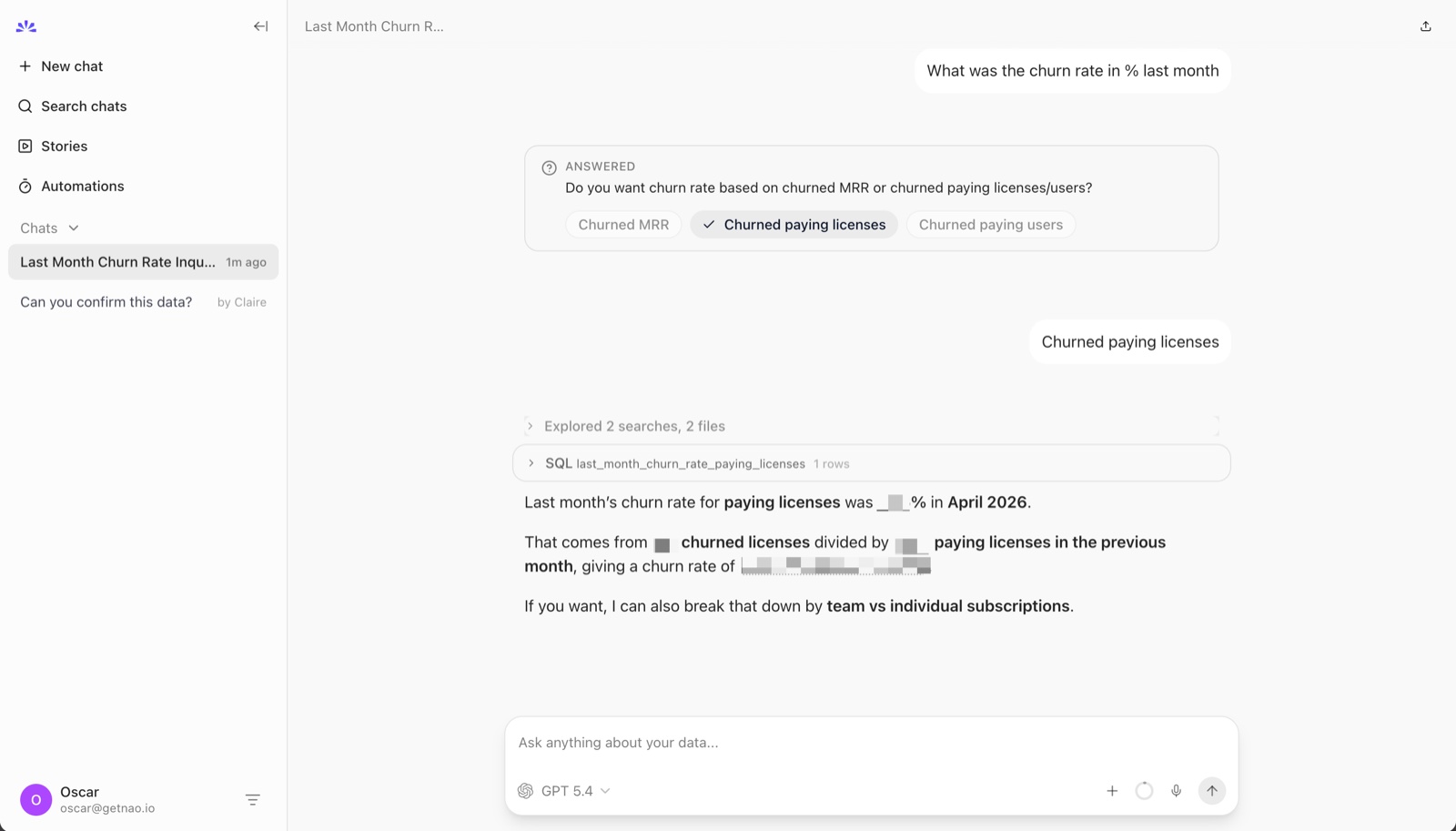
Results
| Run | Answer | Notes |
|---|---|---|
| 1 | Correct ✅ | Right denominator (paying licenses previous month); volunteered MRR churn alongside |
| 2 | Correct ✅ | Identical query, identical answer |
| 3 | Correct ✅ | Identical query, identical answer |
3/3 correct. Includes the SQL it ran, the self-join logic, and both license and MRR churn rates.
Where nao fits
nao is a simple framework to deploy your analytics agent. Context layer, eval system, chat UI, MCP server - all built in. Connect your warehouse, run sync, ask questions. (More on why we built nao as open source if you want the longer answer.)
nao vs Wren AI. Wren is a semantic engine: you define your business meaning in MDL, and you bring your own agent (typically Claude Code or Cursor) to query it. nao is the agent itself: chat UI, evaluation, and context all in one package, with context stored as markdown files instead of MDL. If you have engineers building agent infrastructure and want a semantic layer, pick Wren. If you want a working analytics agent your team can use today, pick nao.
nao vs LangChain. LangChain is a Python library for assembling agents from primitives. You write the loop, the tools, the context layer, the UI. nao is the opposite shape: an opinionated analytics agent that works on day one, with context engineering as markdown files your team can edit. Pick LangChain if you want full control and have engineers to maintain it. Pick nao if you want to skip the build phase and focus on context.
The full comparison
I scored these on the dimensions that determine actual adoption, not just one-shot accuracy.
| LangChain | Wren AI | nao | |
|---|---|---|---|
| Category | Agent library | Context engine | Analytics agent |
| Setup time (first query) | ~15 min coding | ~20 min + a coding agent | ~5 min |
| 3-run accuracy on churn | 0/3 correct | 3/3 correct | 3/3 correct |
| Context approach | live schema introspection | MDL modeling files | markdown files in git |
| Editable by analysts | ❌ (code) | ❌ (modeling language) | ✅ markdown |
| Versionable in git | code only | YAML | full context |
| Evaluation framework | ❌ (LangSmith external) | basic memory | ✅ built-in |
| Chat UI | build it yourself | use a coding agent | ✅ included |
| MCP-native | extension | extension | ✅ |
| AI runner required | none | any coding agent | none (built in) |
| Self-hosted | ✅ | ✅ | ✅ |
| Multi-channel (Slack, etc.) | build it | build it | ✅ included |
| Cost model | LLM tokens you pay | LLM tokens + engine | LLM tokens + agent |
Maintaining the agent over the long run
A single question is not a real benchmark - and if you want the bigger picture, we benchmarked 20 analytics agent solutions across more dimensions. What predicts long-term success isn't accuracy on the first question. It's how the system holds up after the 100th. Three dimensions matter most.
Scaling context
This is where the file-system approach earns its place. As your warehouse grows from 24 tables to 240, context has to scale with it - and someone has to maintain it.
- LangChain: context lives in the prompt, so scaling means a longer system prompt, more custom retrieval, and more engineering work per new domain. There's no native unit of "table context" - you invent one.
- Wren AI: every new table is a new MDL file. Editing means knowing the modeling language. Versioned in git, but only people who can read MDL can review changes meaningfully.
- nao: every new table is four markdown files, generated by
nao syncand reviewable by anyone on the team. Analysts can edithow_to_use.mddirectly in plain English without learning a new format. Context grows linearly without an engineering bottleneck.
Observability on agent quality
You can't improve what you can't measure. The question is whether the framework gives you a way to track accuracy over time.
- LangChain: no built-in eval. You integrate LangSmith or write your own harness.
- Wren AI:
wren memorystores successful NL-SQL pairs for recall, but there's no formal evaluation framework. - nao: built-in evaluation framework for unit-testing the agent against known questions, plus traces of every run.
Feedback loop
Real adoption depends on being able to fix the agent when it gets something wrong - and on having a record of what users actually asked.
- LangChain: you wire up logging and replay yourself.
- Wren AI: memory captures successful queries, but there's no chat replay or guided-fix flow.
- nao: chat history is stored, every conversation is replayable, and fixes go straight into the markdown context files. The loop is: user asks, agent gets it wrong, you open
how_to_use.md, you add two lines, the next user gets it right.
Which one to pick
Pick LangChain if:
- You're a developer building a custom AI product
- You need full control over the agent loop
- Analytics is one capability among many in a larger app
- You have 1-2 engineers dedicated to building and maintaining the infrastructure
Pick Wren AI if:
- You're already invested in a coding agent (Claude Code, Cursor, Codex, etc.)
- You want to build agent infrastructure your whole org reasons against
- You have a data engineering team to maintain the modeling layer and deployment
Pick nao if:
- You want analysts and end users querying data easily
- You want context to live in your repo as markdown, not in a modeling language or a prompt string
- You want evaluation, governance, and chat UI without building them
- You believe context engineering is a file-system problem, not a database problem
What this comparison tells us about the space
The interesting story isn't which one is best. It's that the AI agent for agentic analytics is now a real category - and these three projects represent three different bets on where context lives.
LangChain bets context lives in the prompt. You construct it per-question, per-app. The framework gives you the loop.
Wren AI bets context lives in a semantic model. Define your business meaning in MDL, query against the model.
nao bets context lives in your file system. Markdown files in a git repo. Editable by humans, readable by LLMs, composable with everything else (existing docs, rules files, any markdown you already maintain). It's how AI coding agents already work on a codebase. nao applies the same shape to data.
These aren't going to converge. They serve different buyers, different team shapes, different beliefs about where the source of truth for business meaning should sit. The smart evaluation isn't "which one is most accurate". It's "where do you want your context to live?"
Related articles
product updates
We're launching the first Open Source Analytics Agent Builder
We're open sourcing nao — an analytics agent framework built on context engineering. Here's our vision for what comes after black-box BI.
product updates
Launching the nao MCP App
nao MCP now renders interactive charts and stories directly inside your AI agent. Same nao UI, no tab switch.
product updates
Launching nao Enterprise
nao Enterprise gives data teams SSO, row-level security, branded UI, and implementation support - while staying open source at the core.

Claire
For nao team

Oscar Marchand
For nao team