Power BI AI Features: Copilot, Fabric IQ and MCP
Power BI AI features reviewed: Copilot, Fabric IQ and the Power BI MCP server, how they work, what they cost, their limits, and the open source alternative.

24 November 2026
By Claire GouzeFounder @ naoPower BI AI answers questions on your Power BI semantic models, and only there.
Power BI AI is Microsoft's set of AI features for Power BI: Copilot (chat on reports and apps), Fabric IQ (business context from your semantic models) and the Power BI MCP server (lets outside agents like Claude query Power BI). It works for teams whose whole analytics lives in Power BI. What it does not give your data team is a way to test answers before people act on them, or to see what the AI told them. nao is the open source alternative: an analytics agent your data team builds, tests and monitors, on any warehouse.
This review comes from our own tests of Power BI, Microsoft's docs and what Power BI teams have written about the latest releases.
Power BI AI features: Copilot, Fabric IQ and MCP
Three features, all generally available today:
- Copilot in Power BI: business users chat in the Copilot pane on a report or in Copilot in apps, where app authors can add verified answers.
- Fabric IQ: part of Microsoft IQ, Microsoft's context platform for agents, which ships with "no new SKU or subscription" (Collectiv). Its ontology is a "shared business vocabulary" that Microsoft says "can be generated directly from semantic models already in production" (HyScaler). Fabric IQ and Power BI semantic models are now available in Microsoft Copilot.
- The Power BI MCP server (Fabric IQ MCP): lets an MCP client find reports and semantic models, read their metadata and run read-only DAX queries (nl2sql.ai).
Still in preview: Fabric IQ in Excel, the ontology item itself, and connectors for ChatGPT and Claude.
How Power BI AI works
Everything starts from the semantic model: the tables, relationships and DAX measures behind your reports. Microsoft asks model owners to prepare it for AI before turning Copilot on. When a question is not covered by the model, Copilot answers from the LLM's general knowledge.
The MCP server works differently: it does not take a business question. The calling agent picks the tools, writes the DAX and explains the results. It runs as the signed-in user (delegated Microsoft Entra OAuth), so row-level and object-level security apply, but service principals and app-only access are not supported. nl2sql.ai's advice: a login is only a connectivity check, so compare a real answer against a known Power BI result.
In our own test, we could not get from a question to a dashboard through the Power BI MCP (nao vs Power BI).
How much does Power BI AI cost?
Copilot needs paid Fabric capacity (F2 or higher) or Power BI Premium (P1 or higher), with the Azure OpenAI setting turned on. Trial capacities and free SKUs are not supported. No amounts here: they change, check Microsoft's pricing page.
The real cost is elsewhere: the time your data team spends preparing semantic models for AI, and the fact that this work only serves Microsoft's assistants.
Power BI AI limitations
Three limits come back every time we talk to teams moving their analytics into Copilot or Claude through the Power BI MCP:
- It gets slow and stays inside Power BI. The agent only knows what is in your semantic models. Your dbt docs, business rules and the tables nobody modeled in DAX stay outside.
- Nobody tests the answers. Zure's Fabric IQ guide describes the failure mode: without context, "the same question asked twice can get two different answers". Fabric IQ adds context. It does not tell you how often the answer is right.
- The data team doesn't see what users were told. When decision makers use the feedback buttons in Copilot or Claude, that feedback goes to Microsoft or Anthropic, not to your data owners, as BI Pixie points out.
We also found no evaluation framework to measure answer quality, and no observability on what the AI answered.
Should you build your analytics agent on Power BI AI?
Not if your data team wants to own it. It is lock-in by design:
- Your context lives in Microsoft's format. DAX semantic models and Fabric ontologies, readable only by Microsoft's assistants or an MCP client you have to test yourself.
- Your costs follow Fabric capacity. AI usage runs on Microsoft's capacity model, at Microsoft's rates.
- Your agent's ceiling is Microsoft's roadmap. If Copilot doesn't read your dbt project or support a new kind of context, you wait.
nao: the open source alternative to Power BI AI
nao is open source (Apache 2.0). Self-host it or run it on nao Cloud, bring your own LLM, read every line of the agent. It does not replace your Power BI reports: it answers every question that falls outside them, on the warehouse underneath.
| Power BI AI (Copilot, Fabric IQ) | nao | |
|---|---|---|
| License | Proprietary | Open source, Apache 2.0 |
| Context | Power BI semantic models, Fabric ontologies | Files in your repo: schemas, dbt docs, RULES.md, semantic layer, skills |
| Runs on | Power BI semantic models, on Fabric (F2+) or Premium (P1+) capacity | Your warehouse: Microsoft Fabric, SQL Server, Snowflake, BigQuery, Databricks, Postgres and more |
| Evaluation | None found in our test | nao test on your own questions, in CI |
| What users were told | Feedback goes to the vendor | Thumbs up / down with a comment, and Chats Replay for the data team |
| Where people ask | Copilot, report pane | nao Chat, Microsoft Teams, Slack, Claude through the nao MCP |
| LLM | Microsoft's | Yours: Claude, GPT, Gemini, Mistral, Bedrock, Ollama |
One honest limit: nao does not read Power BI semantic models. It reads the warehouse and the dbt project they are built on, so your definitions live in one place your data team controls in Git.
How to set up nao on a Microsoft stack
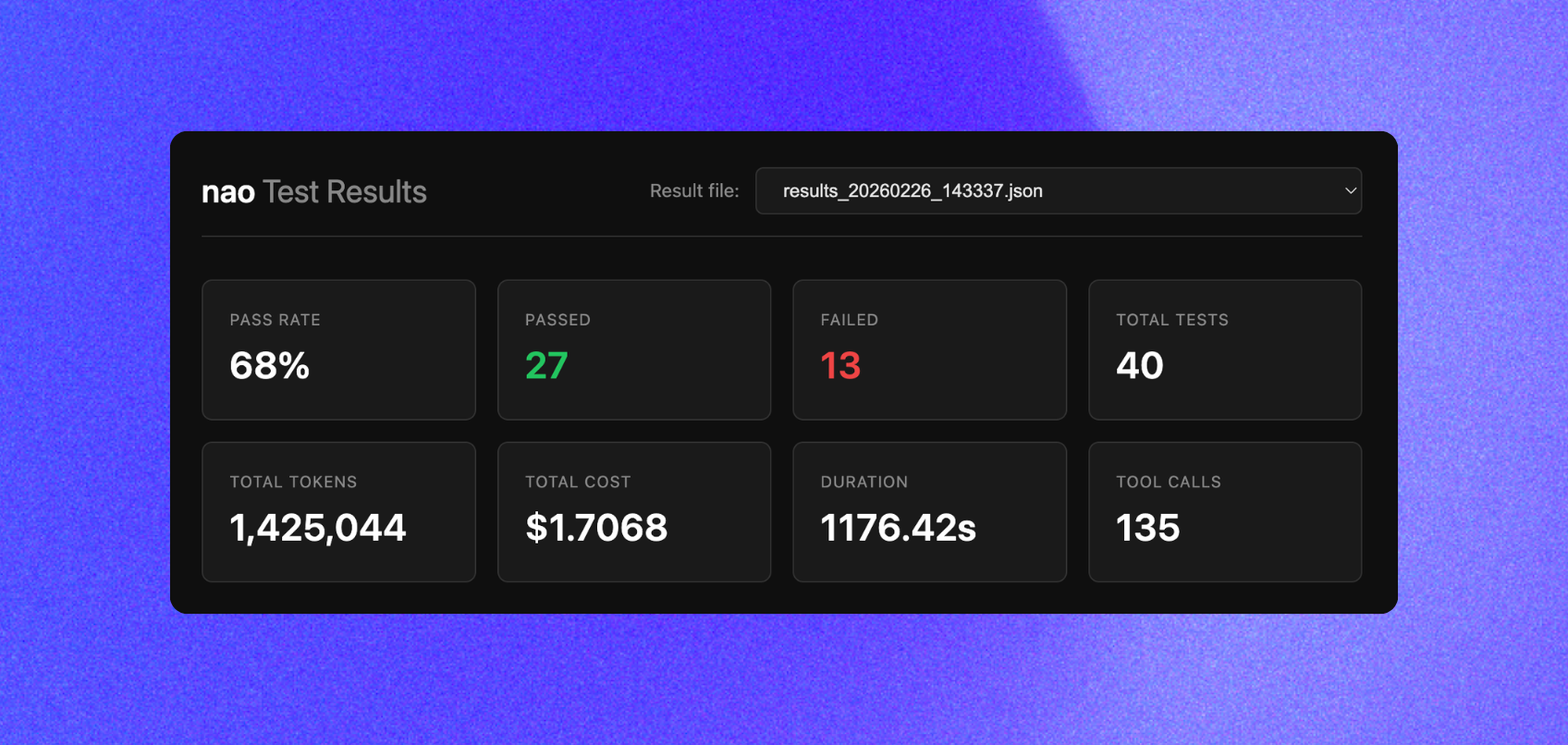
pip install nao-core,nao init, and pick Microsoft Fabric (database docs). Authenticate with Azure CLI, an interactive browser login, a service principal or SQL credentials.nao syncwrites your metadata as files. Add your dbt repo and the business rules inRULES.md, following our context engineering guide.- Write 20 to 40 real questions with their reference SQL and run
nao test. A test passes only when the agent's data matches your SQL. - Deploy in Microsoft Teams, with Microsoft Entra ID SSO on nao Enterprise.
- Watch real usage: when a user flags a wrong answer, click Save as test on it, fix the context, rerun the suite.
This is the loop that took our own agent from 45% to 86% right answers, with LLM costs going from $1.8 to $1.2 along the way:
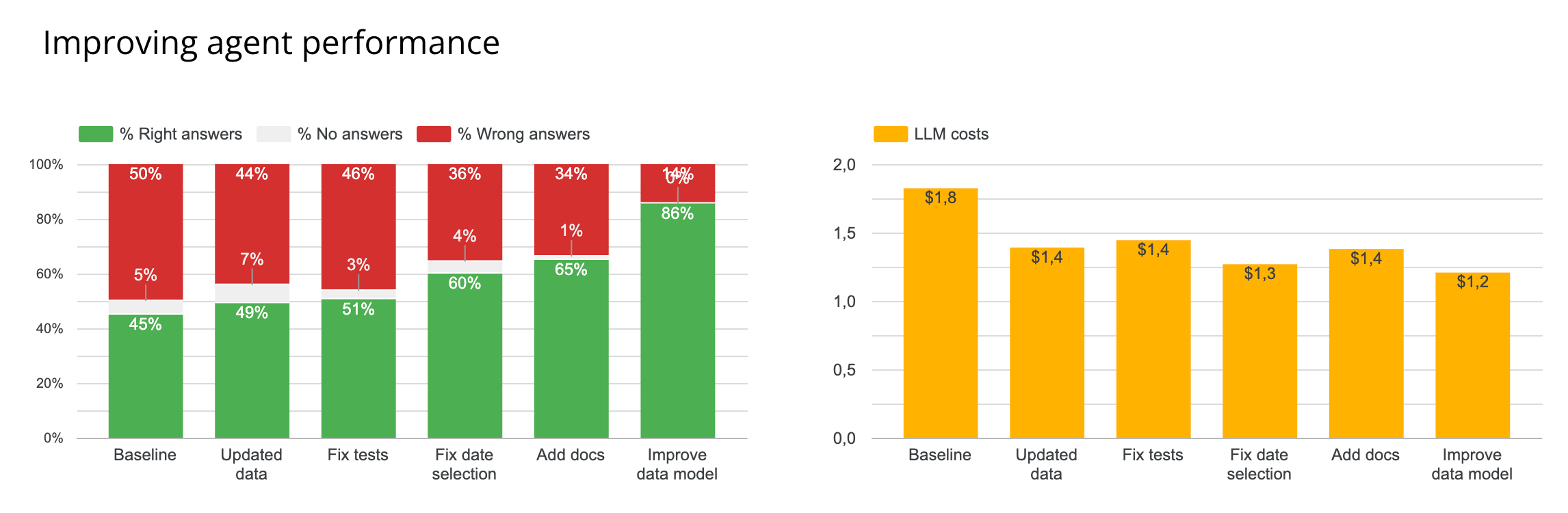
Semantics decide answer quality, as our semantic layer study showed. What matters is who measures it. Read how to run a test suite, the 20-tool benchmark and the agentic analytics playbook for the full method.

Claire
For nao team
Frequently Asked Questions
Related articles
product updates
Launching nao agentic BI builder
Sign up on nao Cloud, connect your warehouse, add business context, and deploy your own agentic BI to the whole company from the nao UI. No CLI needed. Still open source.
Technical Guide
Everyone Can Build an AI Dashboard Now. Who Governs Them?
Anyone can build an AI dashboard now. The 6 controls that keep the numbers right (definitions, access, tests, logs) and the tooling to run them, open source.
Buyer's Guide
Databricks Genie Review: Pricing, Limits and Alternatives
Databricks Genie reviewed: how it works, how it is billed, where it stops, why it locks you in, and nao, the open source alternative.