BigQuery Conversational Analytics: Data Agent Kit, Google ADK and MCP Review
BigQuery conversational analytics reviewed: Gemini data agents, Google ADK, Data Agent Kit and MCP, how they work, their limits, and the open source alternative.

25 November 2026
By Claire GouzeFounder @ naoGoogle now ships an AI agent for every layer of BigQuery. Each one keeps your data team inside Google's walls.
BigQuery conversational analytics is Google's answer to "chat with your data": business users ask questions in plain English to Gemini data agents and get text, tables and charts. Around it, Google offers Google ADK to build custom agents, Data Agent Kit with MCP tools for coding agents, and Gemini Enterprise. Three problems come back with every option: the context is restricted to what Google's catalog accepts, the models are Gemini's in the ready-made products, and the custom options leave you to build your own UI. None of them gives your data team a way to test answers before people act on them. nao is the open source alternative: an analytics agent your data team builds, tests and monitors on BigQuery and any other warehouse.
This review is based on Google's release notes and on data teams who evaluated Gemini against nao.
BigQuery conversational analytics: Google's four ways to build a data agent
Google's What's new with Google Data Cloud page describes four building blocks:
- Conversational analytics in BigQuery: data agents powered by Gemini, in multi-turn conversations inside BigQuery. Answers are text, tables and charts you can export to CSV or PDF. Gemini only, BigQuery only.
- The Conversational Analytics API: the same agent as an API. The interface your business users will see is yours to build.
- Google ADK: the Agent Development Kit, a framework to code custom agents in Python on Gemini and Vertex AI. You get an agent loop: the UI, the context, the tests and the monitoring are yours to build.
- Data Agent Kit: free MCP tools and Google-written skills that connect more than 15 Google Data Cloud services to coding agents in VS Code, Cursor, Claude Code and Codex. Built for developers in an IDE, not for business users.
- Gemini Enterprise and Data Cloud connectors in Gemini (preview): questions on BigQuery, Looker, Spanner, AlloyDB and Cloud SQL from Google Docs, Gmail and Slides. Gemini only.
All of them read the same context: Knowledge Catalog. It accepts metadata, semantic models (LookML, dbt MetricFlow and a few others), golden queries and a glossary. That is the whole menu. Your markdown business rules, your dbt docs as written, your internal wiki, your own skills: there is no place for them unless you rewrite them into Google's formats.
Context: restrictive and written by hand
Andrei Fateev's hands-on guide to Knowledge Catalog splits the work into three tiers:
- Easy, automated: technical metadata, data profiling and Gemini Data Insights.
- Medium: property and semantic graph DDL, and curated golden queries.
- Hard: a governed business glossary, agreed across stakeholders.
Only the first tier is automatic, and it is the one that matters least. Golden queries and the glossary, where answer quality is decided, are written by hand, in Google's formats, and only serve Google's agents. Compare that with what made the difference in our own study: date rules, dbt docs and data model fixes, none of which fit in a glossary.
BigQuery MCP: what Data Agent Kit does
Data Agent Kit does not give business users anything. Its MCP tools let a coding agent inspect schemas, run queries, read job logs and manage resources (TechCEO Daily). Agents run as the user or a service account, so permissions are on you: Code & Chain warns that data teams must revisit IAM roles so agents don't get overly broad query rights.
The kit is free; every query your agents run is billed at standard BigQuery prices.
BigQuery conversational analytics vs nao
The five criteria we use when a data team compares the two:
| Gemini (BigQuery, ADK, Gemini Enterprise) | nao | |
|---|---|---|
| LLM | Gemini in BigQuery and Gemini Enterprise; Vertex AI models with ADK | Bring your own key: Claude, GPT, Gemini, Mistral, Bedrock, Ollama |
| Context | Restricted to Knowledge Catalog: metadata, golden queries, glossary, written by hand | Flexible file system, generated automatically by nao sync, edited in Git |
| Interface | Chat with charts in BigQuery; build your own UI with the API or ADK | Chat plus reporting: stories, dashboards, Slack, Teams, Claude through the nao MCP |
| Evaluation | None | nao test on your own questions, in CI |
| Observability | Latency, adoption and cost | Chats Replay of every answer, user feedback and context recommendations |
| License | Proprietary | Open source, Apache 2.0 |
BigQuery conversational analytics limitations
- Nobody tests the answers. Google's observability for data agents tracks adoption, latency and cost, not whether answers are right. We found no test suite that checks answers against reference SQL before a release.
- The context is restricted. Only what Knowledge Catalog accepts reaches the agent: metadata, semantic models, golden queries, a glossary. Your markdown rules, dbt docs and custom skills have to be rewritten into those formats, by hand.
- You are limited to Gemini. Conversational analytics in BigQuery and Gemini Enterprise run on Gemini. If Claude or GPT answers your questions better, you can't switch the model of the ready-made products.
- You build your own UI. The ready-made agent lives in the BigQuery console, where business users don't go. To put it in Slack, Teams or your own app, you code the interface on the Conversational Analytics API or ADK, then maintain it.
Should you build your analytics agent on BigQuery and Google ADK?
Not if your data team wants to own it. It is lock-in by design:
- Your context is tied to Google Cloud. Move part of your data to another warehouse and the agent's context does not follow.
- Your models are Google's. Gemini in the ready-made products, Vertex AI with ADK, at Google's rates.
- ADK is a framework, not a product. You still build the agent, the UI, the evaluation and the monitoring yourself, and your data team becomes a software team.
nao: the open source alternative on BigQuery
nao is open source (Apache 2.0). Self-host it or run it on nao Cloud, bring your own LLM, read every line of the agent. It runs on BigQuery as a first-class warehouse, and on Snowflake, Databricks, Postgres and the rest of your stack.
How to set up nao on BigQuery
pip install nao-core,nao init, and pick BigQuery (database docs). Authenticate with a service account (required on nao Cloud) or Application Default Credentials.- Set
max_query_sizein GB: nao dry runs every query and stops the ones that would scan more. Useexclude_columnsto keep sensitive columns away from the agent. nao syncgenerates the context as files: table and column descriptions, profiling, AI summaries and query history. Add your dbt repo and your rules inRULES.md, following our context engineering guide.
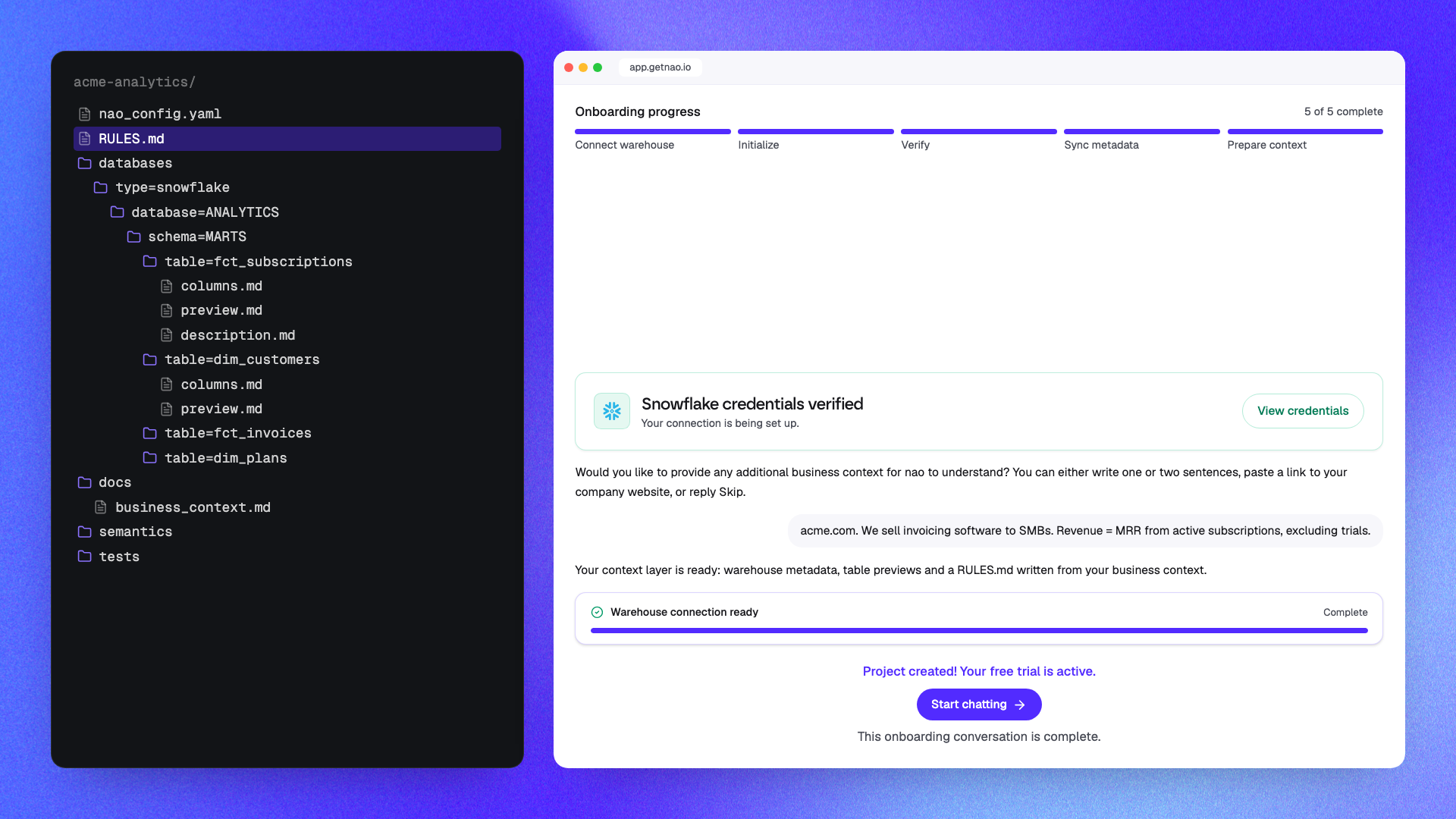
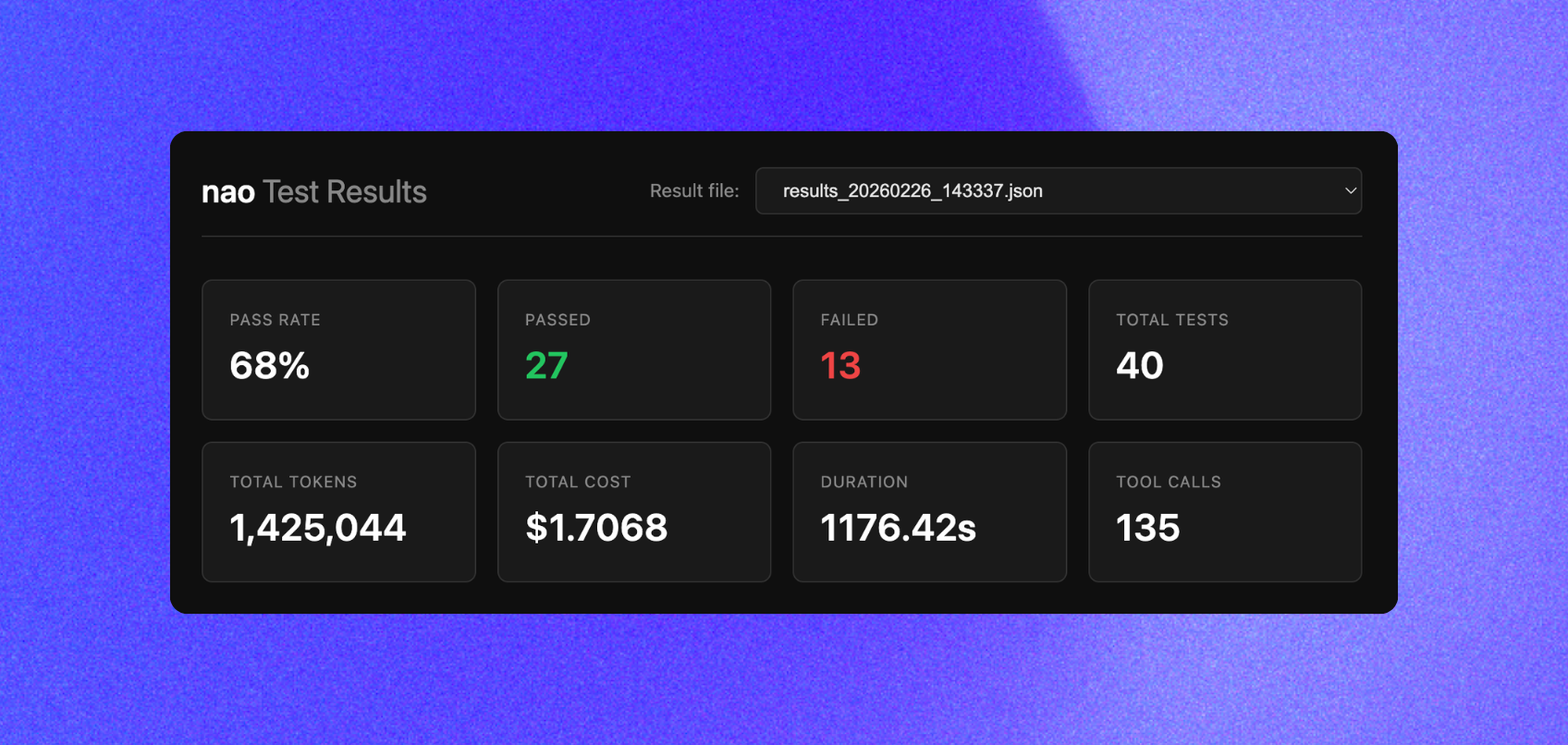
- Write 20 to 40 real questions with their reference SQL and run
nao test. A test passes only when the agent's data matches your SQL.
- Deploy in Slack, Teams or Claude through the nao MCP, and share answers as stories. Watch real usage in Chats Replay, apply context recommendations, and click Save as test on any wrong answer.
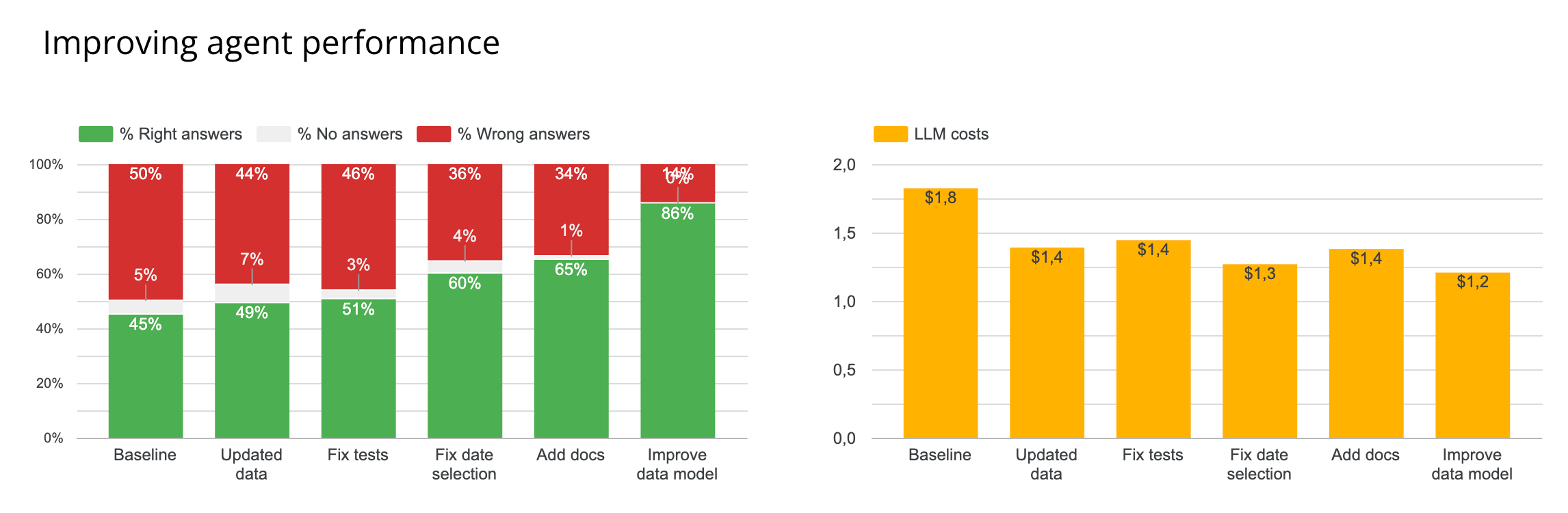
This is the loop that took our own agent from 45% to 86% right answers:
See also our Snowflake Cortex and Databricks Genie reviews, the 20-tool benchmark and the agentic analytics playbook.

Claire
For nao team
Frequently Asked Questions
Related articles
product updates
Launching nao agentic BI builder
Sign up on nao Cloud, connect your warehouse, add business context, and deploy your own agentic BI to the whole company from the nao UI. No CLI needed. Still open source.
Buyer's Guide
Power BI AI Features: Copilot, Fabric IQ and MCP
Power BI AI features reviewed: Copilot, Fabric IQ and the Power BI MCP server, how they work, what they cost, their limits, and the open source alternative.
Technical Guide
Everyone Can Build an AI Dashboard Now. Who Governs Them?
Anyone can build an AI dashboard now. The 6 controls that keep the numbers right (definitions, access, tests, logs) and the tooling to run them, open source.